SOLVED: Image swatches & Image Gallery

Browser: Chrome 110
OS: macOS / Windows / Linux / etc.
URL: Link to a page that illustrates this issue
Video: Short screen recording that illustrates this issue (free tool: jam.dev)

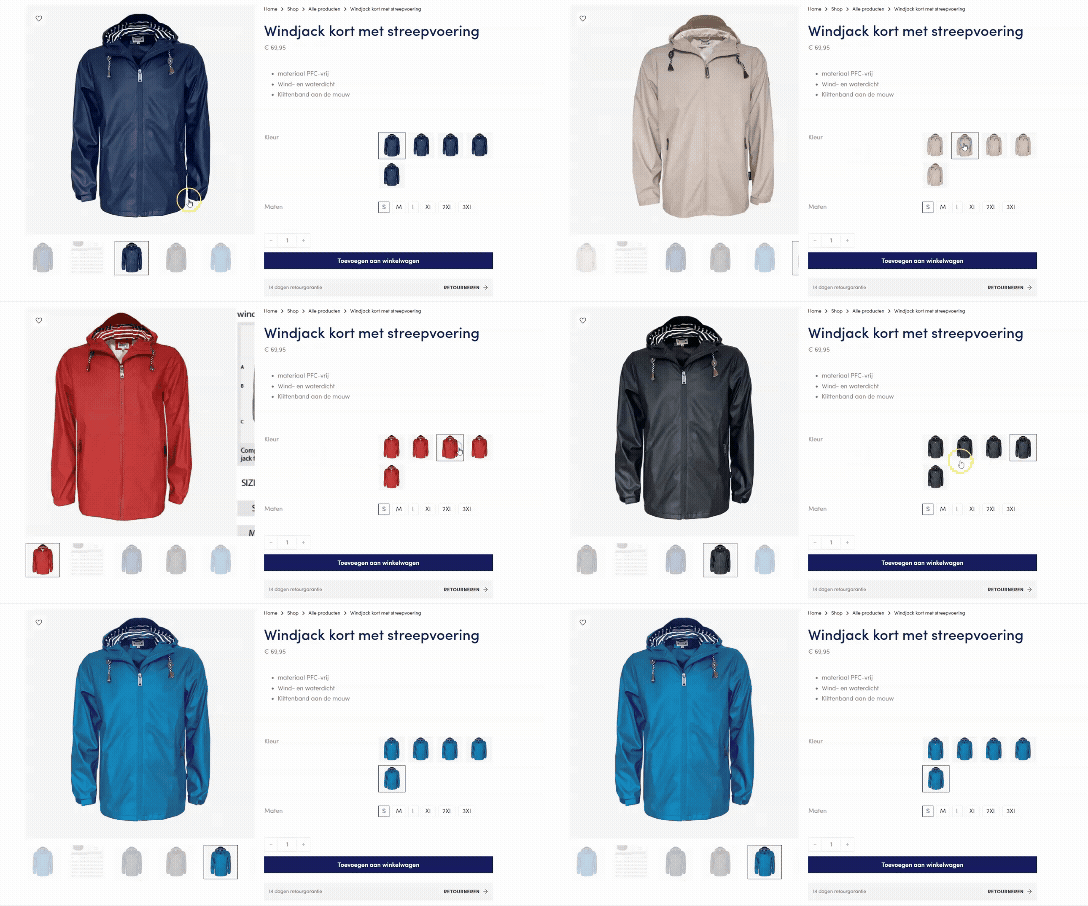
On WooCommerce product page i have 2 attributes as Product Swatches. First one as images, second one as dropdown. There is a product gallery element in the left column.

Issue after page reload:

  1. The main image is not changing to the product swatch, the gallery is working
    Issue afer click on swatch

Issue after selecting the 2nd swatch (dropdown)
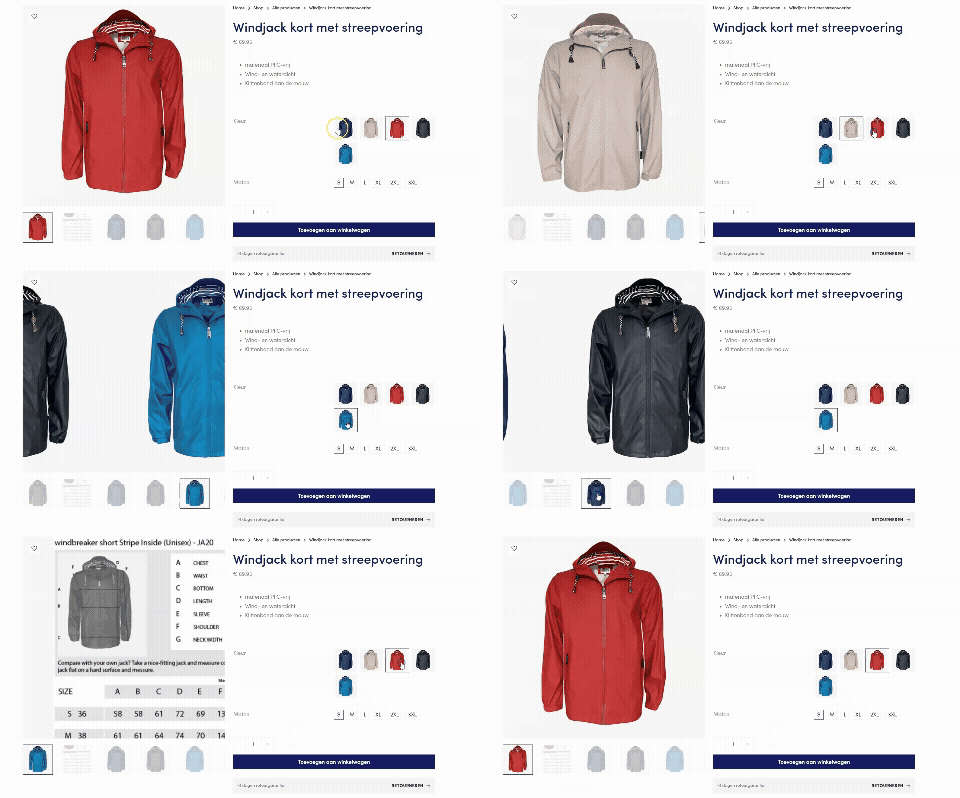
2) The swatch images all go into 1 variation (same image) although the slider works now showing the clicked variation.

Setup (passw: breton)

Variation Swatches (passw: breton)

  • not changing main image on click on initial load
  • changing main image after selecting second swatch
  • first swatch is going into 1 color after selecting 2nd swatch

Hi there,

Thank you so much. I can replicate the 2nd issue and have recorded it in the bug tracker.

For the 1st issue, that is the correct behaviour. If your variation has 2 or more options, they are required to select all options (Color and size in your case), then WooCommerce can detect the final variations and change the main Image.

Regards,
Jenn

Hi,

I fugured out the 1st issue as “expected behaviour” the client didn’t set all default values for variations:

a

Because of this people need to click on both first. When a default value is set all works as expected.

Jasper

I get the same issue #2. For issue #1…

Settings default values is a great idea, but in practice I notice Bricks locks the variations.

The only way to switch between variations (when some variation don’t exist) is to use the “clear” button to reset the flow.

This is a big problem in itself for UX!

This is a solution for the first look. but if you select a option all the images change tho the selected variation.


@itchycode wrote in his response that it’s added in the bug tracker , hopefully in the next minor release

Hi,

Unfortunately WooCommerce product pages with variations are not production ready yet after installing v2.0.2 as the selected image swatch is changing to all the same. I was hoping this would be fixed as well :frowning: as it holds back a large WooCommerce project i am working on now.

The issue was written here (2nd issue) and added to the bug tracker:

Here i have a V2.0.2 example of the image swatches:
Adobe Express - Recording__50

  • click on an image variation
  • select another image variation
    Result: now all images are going into the same.

What to do? Should i submit a new issue into the forum with v2.0.2 labeled? Or could you write it down with an extra ‘!’ :wink:
Thanks!

Joep

For a temporary solution i have created a dirty ChatGPT script:

In your (child) template create a file named ‘fix-bricks-swatch-thumbs.js’ and place this in: /assets/js/fix-bricks-swatch-thumbs.js
Copy-paste the below code:

(function($){
  'use strict';

  function cacheOriginal($img){
    if (!$img.attr('data-o_src'))     $img.attr('data-o_src', $img.attr('src') || '');
    if (!$img.attr('data-o_srcset'))  $img.attr('data-o_srcset', $img.attr('srcset') || '');
    if (!$img.attr('data-o_data_src'))    $img.attr('data-o_data_src', $img.attr('data-src') || '');
    if (!$img.attr('data-o_data_srcset')) $img.attr('data-o_data_srcset', $img.attr('data-srcset') || '');
  }

  function restoreOriginal($img){
    var oSrc     = $img.attr('data-o_src');
    var oSrcset  = $img.attr('data-o_srcset');
    var oDataSrc = $img.attr('data-o_data_src');
    var oDataSet = $img.attr('data-o_data_srcset');

    if (oSrc && $img.attr('src') !== oSrc) $img.attr('src', oSrc);
    if (typeof oSrcset !== 'undefined' && $img.attr('srcset') !== oSrcset) $img.attr('srcset', oSrcset);
    if (oDataSrc && $img.attr('data-src') !== oDataSrc) $img.attr('data-src', oDataSrc);
    if (typeof oDataSet !== 'undefined' && $img.attr('data-srcset') !== oDataSet) $img.attr('data-srcset', oDataSet);
  }

  function lockSwatchImages($scope){
    // Scope: the variations table only
    var $tbl = $scope && $scope.length ? $scope : $('table.variations');

    // Any images used as swatches inside the table
    var $swatchImgs = $tbl.find('td.value img, .variable-items-wrapper img');

    // Cache originals once
    $swatchImgs.each(function(){
      var $img = $(this);
      cacheOriginal($img);

      // Guard against any script that tries to change src/srcset later
      if (!$img.data('bs_observed')){
        var obs = new MutationObserver(function(mutations){
          mutations.forEach(function(m){
            if (m.type === 'attributes' && (m.attributeName === 'src' || m.attributeName === 'srcset')) {
              restoreOriginal($img);
            }
          });
        });
        obs.observe(this, { attributes: true, attributeFilter: ['src','srcset'] });
        $img.data('bs_observed', true);
      }
    });

    // Also restore on common events that plugins use
    var $form = $tbl.closest('form.variations_form');
    if ($form.length){
      $form.on('found_variation reset_image woocommerce_update_variation_values', function(){
        $tbl.find('td.value img, .variable-items-wrapper img').each(function(){
          restoreOriginal($(this));
        });
      });
    }

    // Optional: visual active state without swapping images
    $tbl.on('click', '.variable-item, [data-value], img', function(){
      var $cell = $(this).closest('td.value');
      $cell.find('.is-selected').removeClass('is-selected');
      $(this).closest('li, a, button, img').addClass('is-selected');
    });
  }

  $(function(){
    lockSwatchImages($('table.variations'));

    // If your theme replaces the table via AJAX, re-lock on DOM changes
    $(document).on('wc_variation_form', function(){
      lockSwatchImages($('table.variations'));
    });
  });

})(jQuery);

In your funtions.php place the following code:

add_action( 'wp_enqueue_scripts', function () {
  if ( is_product() ) {
    wp_enqueue_script(
      'fix-bricks-swatch-thumbs',
      get_stylesheet_directory_uri() . '/assets/js/fix-bricks-swatch-thumbs.js',
      ['jquery'],
      '1.0.0',
      true
    );
  }
}, 20 );

Now it works untill there is a native solution

newisieis

I adapted the fix-thumbnails script to allow varation selection and main image change.
You can set the specific attribute or ALL images to change the Product main image on line 8.

(function($){
  'use strict';
  
  // ===== CONFIGURATION =====
  // Set the attribute slug that should be allowed to change the main product image
  // Examples: 'pa_kleur', 'pa_color', 'pa_colour'
  // Set to null to allow ALL attributes with images to change the main image
  var TARGET_ATTRIBUTE = 'pa_kleur';
  // =========================
  
  function cacheOriginal($img){
    if (!$img.attr('data-o_src'))     $img.attr('data-o_src', $img.attr('src') || '');
    if (!$img.attr('data-o_srcset'))  $img.attr('data-o_srcset', $img.attr('srcset') || '');
    if (!$img.attr('data-o_data_src'))    $img.attr('data-o_data_src', $img.attr('data-src') || '');
    if (!$img.attr('data-o_data_srcset')) $img.attr('data-o_data_srcset', $img.attr('data-srcset') || '');
  }
  
  function restoreOriginal($img){
    var oSrc     = $img.attr('data-o_src');
    var oSrcset  = $img.attr('data-o_srcset');
    var oDataSrc = $img.attr('data-o_data_src');
    var oDataSet = $img.attr('data-o_data_srcset');
    if (oSrc && $img.attr('src') !== oSrc) $img.attr('src', oSrc);
    if (typeof oSrcset !== 'undefined' && $img.attr('srcset') !== oSrcset) $img.attr('srcset', oSrcset);
    if (oDataSrc && $img.attr('data-src') !== oDataSrc) $img.attr('data-src', oDataSrc);
    if (typeof oDataSet !== 'undefined' && $img.attr('data-srcset') !== oDataSet) $img.attr('data-srcset', oDataSet);
  }
  
  function lockSwatchImages($scope){
    // Scope: the variations table only
    var $tbl = $scope && $scope.length ? $scope : $('table.variations');
    
    // Lock ALL swatch images in the variations table (not just target attribute)
    var $swatchImgs = $tbl.find('td.value img, .variable-items-wrapper img');
    
    // Cache originals once
    $swatchImgs.each(function(){
      var $img = $(this);
      cacheOriginal($img);
      // Guard against any script that tries to change src/srcset later
      if (!$img.data('bs_observed')){
        var obs = new MutationObserver(function(mutations){
          mutations.forEach(function(m){
            if (m.type === 'attributes' && (m.attributeName === 'src' || m.attributeName === 'srcset')) {
              restoreOriginal($img);
            }
          });
        });
        obs.observe(this, { attributes: true, attributeFilter: ['src','srcset'] });
        $img.data('bs_observed', true);
      }
    });
    
    // Also restore on common events that plugins use
    var $form = $tbl.closest('form.variations_form');
    if ($form.length){
      $form.on('found_variation reset_image woocommerce_update_variation_values', function(){
        $tbl.find('td.value img, .variable-items-wrapper img').each(function(){
          restoreOriginal($(this));
        });
      });
    }
    
    // Optional: visual active state without swapping images
    $tbl.on('click', '.variable-item, [data-value], img', function(){
      var $cell = $(this).closest('td.value');
      $cell.find('.is-selected').removeClass('is-selected');
      $(this).closest('li, a, button, img').addClass('is-selected');
    });
    
    // If TARGET_ATTRIBUTE is set, only allow that attribute to change the main image
    if (TARGET_ATTRIBUTE && TARGET_ATTRIBUTE !== '' && TARGET_ATTRIBUTE !== null) {
      // Find the target attribute row
      var $targetRow = $tbl.find('tr.attribute_' + TARGET_ATTRIBUTE);
      
      // When clicking on the target attribute, allow the variation change
      $targetRow.on('click', '.variable-item, [data-value], img, li, a, button', function(e){
        var $clicked = $(this);
        var value = $clicked.attr('data-value') || $clicked.closest('[data-value]').attr('data-value');
        
        if (value) {
          // Find the select dropdown for this attribute
          var $select = $form.find('select[name="attribute_' + TARGET_ATTRIBUTE + '"]');
          if ($select.length) {
            // Change the select value (this triggers WooCommerce variation change)
            $select.val(value).trigger('change');
          }
        }
      });
      
      // Block other attributes from changing variations (if they try)
      $tbl.find('tr').not('.attribute_' + TARGET_ATTRIBUTE).on('click', '.variable-item, [data-value], img, li, a, button', function(e){
        // Prevent propagation that might trigger variation image change
        e.stopImmediatePropagation();
        
        // Still allow the value to be selected for cart purposes
        var $clicked = $(this);
        var $row = $clicked.closest('tr');
        var attrName = '';
        
        // Extract attribute name from row class
        var classes = $row.attr('class');
        if (classes) {
          var match = classes.match(/attribute_(pa_[^\s]+)/);
          if (match) {
            attrName = match[1];
            var value = $clicked.attr('data-value') || $clicked.closest('[data-value]').attr('data-value');
            if (value && attrName) {
              var $select = $form.find('select[name="attribute_' + attrName + '"]');
              if ($select.length) {
                // Temporarily unbind variation change events
                $form.off('change', 'select');
                $select.val(value);
                // Rebind after a short delay
                setTimeout(function(){
                  $form.on('change', 'select', function(){
                    $form.trigger('woocommerce_variation_select_change');
                  });
                }, 100);
              }
            }
          }
        }
      });
    }
  }
  
  $(function(){
    lockSwatchImages($('table.variations'));
    // If your theme replaces the table via AJAX, re-lock on DOM changes
    $(document).on('wc_variation_form', function(){
      lockSwatchImages($('table.variations'));
    });
  });
})(jQuery);

Hi @joep ,

We have a potential fix for this issue. If you are willing to test it on a staging site, kindly send an email to help@bricksbuilder.io and include this forum thread URL as a reference.

I will provide you with an updated JS file based on Bricks 2.1.4

Regards,

Jenn

We fixed this issue in Bricks 2.2 beta, which is now available in your account.
Changelog: Bricks 2.2-beta Changelog – Bricks

Please let us know if you are still experiencing issues.

As with any pre-stable release, please do not use it on a production/live website. It is only meant for testing in a local or staging environment. The more feedback we get, the better :v: