Hi Austin,
Please try to use
https://www.youtube.com/watch?v=k7Oq8zO0tLs
instead of
https://youtu.be/k7Oq8zO0tLs
Hi Austin,
Please try to use
https://www.youtube.com/watch?v=k7Oq8zO0tLs
instead of
https://youtu.be/k7Oq8zO0tLs
That worked! However, on mobile, only the thumbnail image shows up. The video doesn’t play.
is there anything else I need to do to get the video to play on mobile? I’ve now taken the site live and the video is in the hero of the homepage at https://yttangsoodo.com/
Videos with audio often won’t play in the background. Try uploading the video without audio and then using that link instead.
Hi Austin,
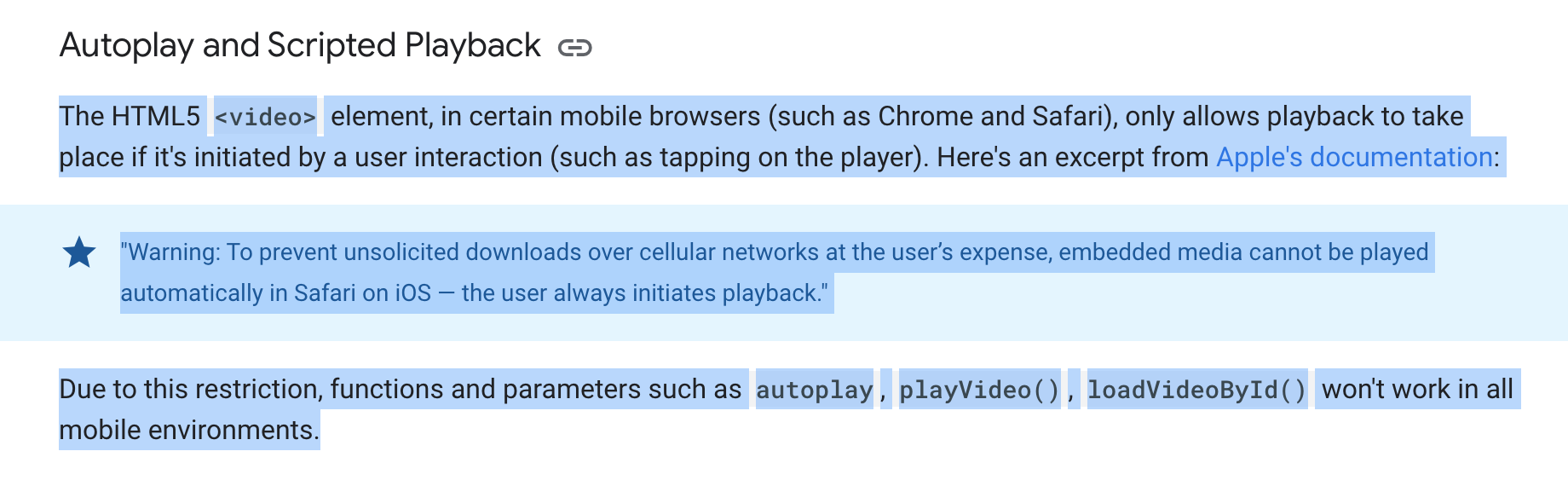
As per Curtis explanation, autoplay youtube will not work on a mobile device.
You could try to upload a video with audio disable. (But I don’t think it works too)
For more info, you could check The mobile considerations section in YouTube Player API Reference for iframe Embeds | YouTube IFrame Player API | Google Developers
Hey Thomas
Did you ever discover what happened here? I’m a novice at this whole thing, trying to get a video to autoplay as I’m using it as background in my header and footer. Seems like it should be a super simple solution, but it’s been all afternoon for me, now. Ha!
As mentioned in the link Jenn shared in his reply above: the video autoplay might not work in certain mobile browsers (such as Chrome and Safari) as it needs to be initiated by a user interaction (such as tapping on the player). This seems to be in place due to user data consumption concerns and to prevent unwanted noise or distractions.
It’s not a Bricks bug, but a browser policy/restriction.
Possible workaround: convert your video into a .gif file, and add it as a background image. This only makes sense, though, if the video is a few seconds long as you don’t wanna end up loading a massively big file either. Just an idea, not an official recommendation.
Im having the same issue but Ive linked a video hosted in my Wordpress files. Should’t it at least be able to display the video on mobile since it displays fine on desktop? Perhaps autoplay may not work but in my case it wont even display the first frame of the video.
Here is my site.
https://figuretheory.com/heros/
Here is another site I work on. This was created in Divi obviously a different builder all together but I can get videos to display on mobile here.
https://wildwoodhealth.org/natural-farm/
Hi @hazenxa ,
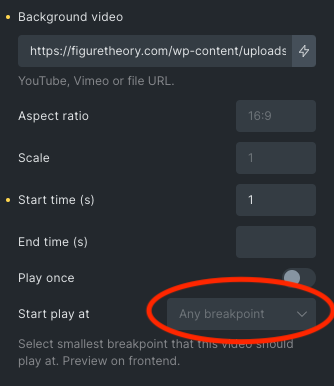
Thanks for the link to your page, you have defined the background video to only show at desktop breakpoint. So it will be empty on viewport width lower than 1201px.
You can add a background image with that setting so visitor can still see an image in smaller breakpoint.
Regards,
Jenn
Hi Jenn!
Thank you so much for taking the time to look at this. I appreciate it. Im really new to Bricks so please bare with me. I made a video showing the settings that I have. If I inspect the site through the browser at smaller breakpoints it does play the video. The only issue seems to be that it wont play on my phone when I test there. I’ve tested with safari, firefox and chrome. Here is the video. Thanks again!
Hi @hazenxa ,
I have tested your page (Heros – Figure Theory) and the background video is playing without issue.
Can you check if you are using iPhone + in low power mode?
Reference: NO BUG: Background Video not playable on iPhone in Low Power Mode
Regards,
Jenn
Hi Jenn,
Thank you for getting back to me. I found a thread on the Bricks facebook page that suggested to set the “Start play at” setting to “Any breakpoint.” While this option is not available in the dropdown, you can set another breakpoint then delete it and it defaults to this “Any breakpoint” setting. Once the site is saved with that setting in place the background video will work on mobile. 
Cheers!
Bug still present -_-
Hi @gslweb,
Welcome to the forum!
Bug report insufficient 
Please explain the problem and how we can reproduce it in detail. Ideally, please provide a live link, too. Then we’ll be happy to take a look!
Thanks so much,
timmse
I am also experiencing issues with the background video not playing on frontend.
ive used mp4 link and vime link (sometimes is will play in the editor) but not launched.
ive tried it on both the container and section elements
the bg video is set only on the desktop default breakpoint.
CWF video section (grey where vid bg should be) https://ogklcw.wpenginepowered.com/
frontend is accopanied with a js error that seems related.
Uncaught NotFoundError: Failed to execute ‘removeChild’ on ‘Node’: The node to be removed is not a child of this node.
at e.eachElement [as _customEachElement] (bricks.min.js?ver=1730146552:1:33868)
at e.value (bricks.min.js?ver=1730146552:1:10453)
at bricks.min.js?ver=1730146552:1:11223
at Array.forEach ()
at e.value (bricks.min.js?ver=1730146552:1:10829)
at bricksBackgroundVideoInit (bricks.min.js?ver=1730146552:1:36486)
at HTMLDocument. (bricks.min.js?ver=1730146552:1:119983)
Thanks for taking a look let me know if you need anything else.
Hi @Mighty , welcome to the forum!
As far as I can see, you’re not using the background video setting but an absolutely placed video element, which is a different thing.
Please create a new report with reproducible steps, and please test on the latest version, which is currently 1.12.1 (you’re currently using 1.11).
Thanks!
hey sorry,
I ended up just remaking the functionality with relative position container & abs pos vid element. but yeah bg video feature not working i moved that to a different page here:
u’ll see the section using bricks vid bg feature failing in grey and below the one I made.