I’ve got a ACF custom taxonomy for a custom post type of Projects. Taxonomy is called Project Market and contains 4 definitions with Projects assigned underneath all four. For my Filter - Radio module I have Target Query set to Posts – the other module on the page besides headings. Url Param=market, Apply On=Input, Action=Filter, Source=Taxonomy, Taxonomy=Project Markets (Project). For some reason on the front end, it doesnt show any assigned Projects to the different Project Markets. Project Markets are UI components throughout the site and when I click on a Project Market (Essential Services), It’ll go to the correct URL param selected filter. Other Project Market params are then filterable. Even the All Project Markets button (no added URL param and the URL that is in my Nav) functions.
Hey there, so I am not 100% sure of what you are trying to achieve here, but I did a little video talking about a few things.
If you could give some more context that would be great.
Ah! Sorry for the confusion. I ended up making a really hacky temporary solution for the client where I mocked the buttons and just made them hyperlink to the filtered version of the posts. Here is the original setup:
And a pre filtered link that still works for sorting:
Backend settings:
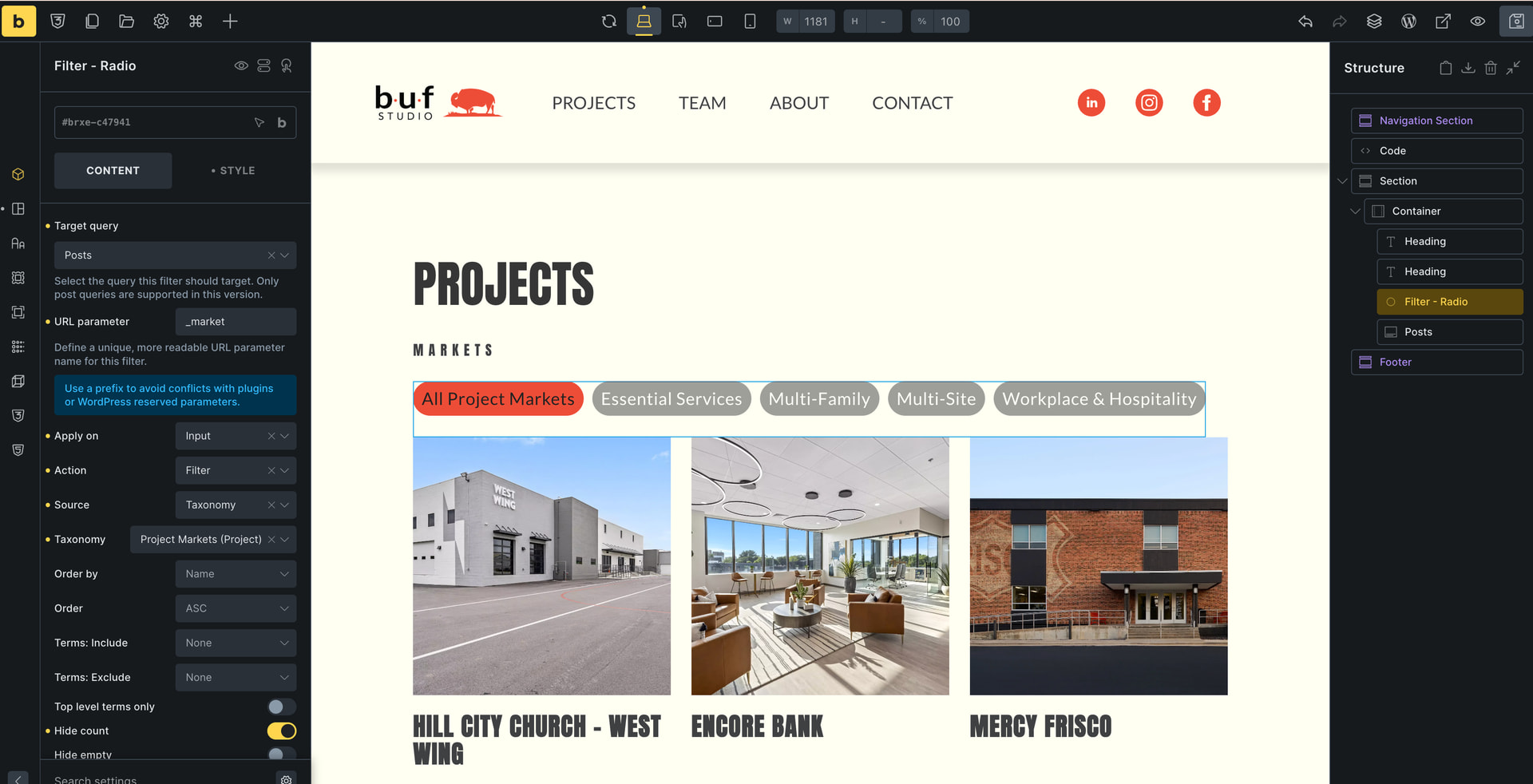
It’s almost as if the Filter-Radio module doesn’t recognize that there are any posts that use the taxonomy selected. But it only occurs on /projects/ page, because if you select a taxonomy from a single project page or from the homepage, the filter is active and workable. If I set Hide Count to off, it shows as zero for each of the taxonomies listed. Under the taxonomy of the Project Markets, I can see a solid amount projects assigned to each taxonomy.
Sorry for the confusion, hopefully this is better.
All good, no worries.
I wondering if it is because you are using the “Posts” element and not a custom built query.
In my example I had a parent Block (grid) then inside that I had another Block which is where I put the query on. Then inside that query block I put the element such as Featured Image and Title.
Have you tried that option yet? if so, did you get any different of a result?
UPDATE: I just tested it with the filter and the Posts Element and it worked just fine and it was on a CPT as well. Question. Do you have any additional plugins that might be conflicting or any custom code?
I dont think so? Pretty minimal and normal plugin setup – ACF, Yoast, and SafeSVG. Nothing that feels suspect of clashing with this particular function. I think the strangest part of the mystery being that the filter is completely workable, as long as it doesn’t start with /projects/ page, but starting at a url param. I will try making a loop and see if that handles any differently.
Give it a go and let us … it does seem a bit odd for sure. But we should be able to sort it out. =]
Hi @loukall ,
If you are using v2.1.4, it’s a known bug and already solved in >= 2.2-beta
Thank you! It seemed suspiciously like a bug, I appreciate pointing me in the right direction.
Thank you for your help! Setting it up as a Query Loop with a block and a Featured Image + Project Title was actually working. I could not make sense why it was working one way and not the other. Glad it was identified as a bug and I wasn’t just missing something obvious lol.
Glad to hear the new query setup is working for you. Most of my local dev setups are running the 2.2 RC, so of course for me all will be working, but glad to know they popped in to let you know about the known bug.
So now you can stick with the query build and once RC goes lives, you can revert back to your original setup.