SOLVED: Query Filters not working on frontend for Posts element

Browser: Chrome 110
OS: macOS / Windows / Linux / etc.
URL: Mašīnas - Transports Tukums
Video: CleanShot 2025-11-13 at 13.05.32 · CleanShot Cloud

The filters are not working anymore in the latest version - 2.1.4
Attached video for reference.

The filters reference ACF Fields. They show up correctly in the editor, but in the front-end they all show as 0. And all filters for multiple acf fields.

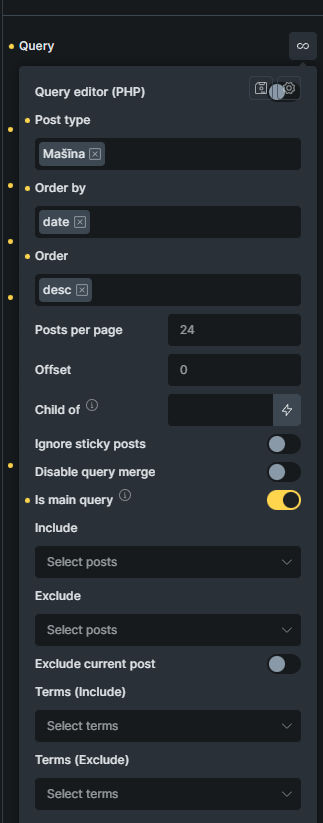
Looks like the “Posts” element with the query lost the query. It shows the css symbol but not the loop symbol.

Check if the loop is still turned on in the “Posts” element.

Since that’s in an Archive Template, I’m using the Posts block.
And the query loop is there, but weirdly enough the “raw php” toggler is overlapped by the query manager buttons.

EDIT: The search filter works. So it’s only taxonomy filters that aren’t being populated. And as seen in the video, they are showing up in the editor.

The editor can load a not connected taxonomy and show its count, while the real page would show 0 as there are none.

Check if the taxonomies are still correct and attached to the posts.

Maybe add them again inside the template to see if they somehow got misplaced in some config.

If it is a custom posttype, maybe check if the taxonomies are still connected to the posttype.

Is there a reason to use “is main query”? i never use this. See if this might change something.

Hi Henry,
Thanks so much for your report!

We already received a report on this via email. It happens only when using the posts element with a filter.

To get this solved, you can either revert back to the previous version or create a custom loop instead of the posts element.

We will update this thread as soon as it is fixed.

Best regards,
timmse

We fixed this issue in Bricks 2.2 beta, which is now available in your account.
Changelog: Bricks 2.2-beta Changelog – Bricks

Please let us know if you are still experiencing issues.

As with any pre-stable release, please do not use it on a production/live website. It is only meant for testing in a local or staging environment. The more feedback we get, the better :v:
2 Likes