Browser: Chrome 110
OS: macOS / Windows / Linux / etc.
When adding a section, container, div, or block element in Bricks Builder, these elements initially have some default space (height/width), which allows us to insert child elements. Once content is added, that default space adjusts as expected—this is fine.
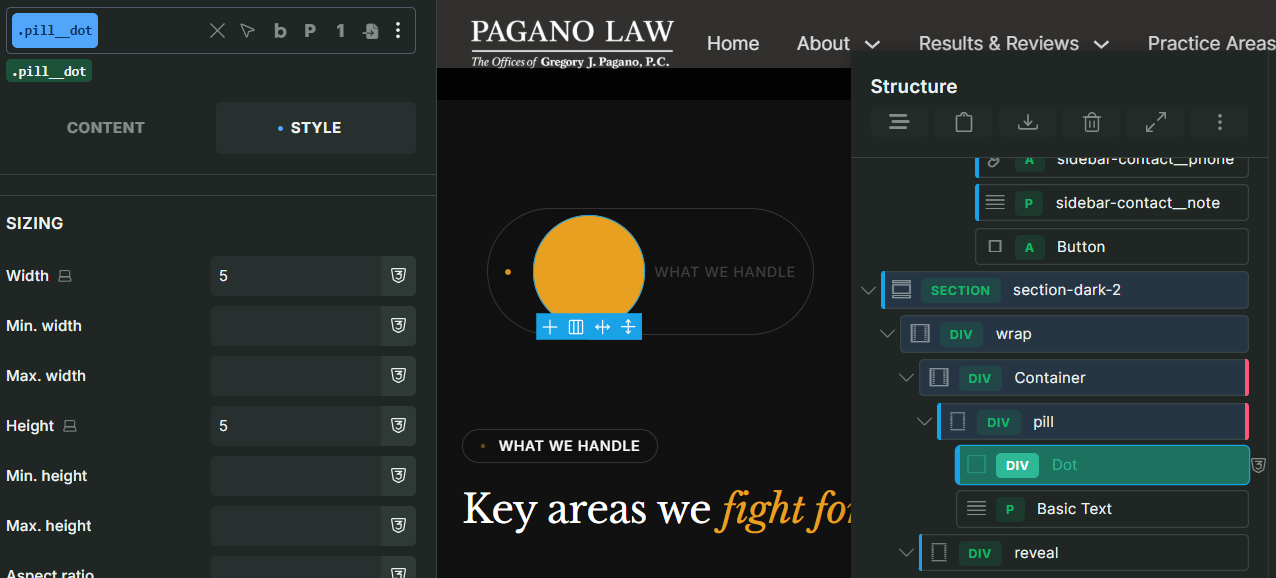
However, if the element is used without any inner content (e.g., for badges, pills, or decorative shapes) and a custom width and height are assigned, the builder does not reflect those dimensions properly.
In the Bricks editor, the element appears much larger than the specified width and height. On the frontend, it renders correctly.
Steps to Reproduce:
-
Add a div or block element.
-
Do not add any inner content.
-
Assign a custom width and height (e.g., for a badge or pill shape).
-
Observe the element size in the editor.
[Please describe this bug in as much detail as possible so we can replicate & debug this bug]