At the moment we use FacetWP for filtering on our WC store. We’d like to start using your new query filtering but we can’t as we have many categories in the catalog and it’d look horrible if we did.
The issue is that we can’t nest the child categories like FacetWP does by default.
See images example below where you only see the parent categories and toggle to see the nested child categories.
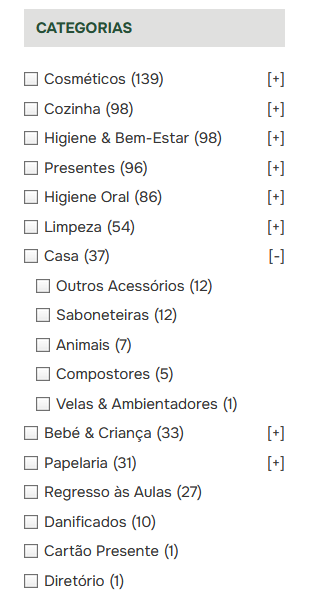
I have a solution here for anyone looking for the same.
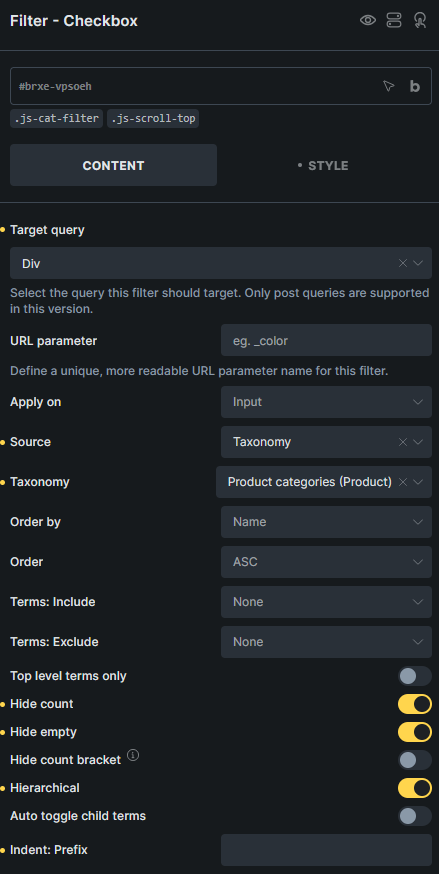
Add .js-cat-filter to the query filter. To include smooth scrolling to the top add .js-scroll-top too.
JS:
(function () {

  const openParents = new Set();

  function getParentKey(item) {
    const input = item.querySelector('input[type="checkbox"]');
    if (!input) return '';
    return input.value || input.getAttribute('data-term-id') || '';
  }

  function initCatFilter(filterEl) {
    const items = Array.from(filterEl.querySelectorAll('li[data-depth]'));
    if (!items.length) return;

    filterEl.querySelectorAll('.cat-toggle').forEach(function (btn) {
      btn.remove();
    });
    items.forEach(function (li) {
      li.classList.remove('has-children', 'is-open', 'is-visible-child');
    });

    items.forEach(function (item, index) {
      const depth = parseInt(item.getAttribute('data-depth') || '0', 10);
      if (depth !== 0) return;

      const key = getParentKey(item);

      const children = [];
      for (let i = index + 1; i < items.length; i++) {
        const d = parseInt(items[i].getAttribute('data-depth') || '0', 10);
        if (d === 0) break;
        children.push(items[i]);
      }
      if (!children.length) return;

      item.classList.add('has-children');

      const label  = item.querySelector('label') || item;
      const toggle = document.createElement('button');
      toggle.type = 'button';
      toggle.className = 'cat-toggle';
      label.appendChild(toggle);

      let isOpen = key && openParents.has(key);

      if (isOpen) {
        item.classList.add('is-open');
        toggle.textContent = '[-]';
        children.forEach(function (c) {
          c.classList.add('is-visible-child');
        });
      } else {
        toggle.textContent = '[+]';
      }

      toggle.addEventListener('click', function (e) {
        e.preventDefault();
        e.stopPropagation();

        isOpen = !isOpen;
        item.classList.toggle('is-open', isOpen);
        toggle.textContent = isOpen ? '[-]' : '[+]';

        if (key) {
          if (isOpen) openParents.add(key);
          else openParents.delete(key);
        }

        children.forEach(function (c) {
          c.classList.toggle('is-visible-child', isOpen);
        });
      });
    });
  }

  function initAllCatFilters() {
    document
      .querySelectorAll('.brxe-filter-checkbox.js-cat-filter')
      .forEach(initCatFilter);
  }

  document.addEventListener('DOMContentLoaded', initAllCatFilters);

  document.addEventListener('bricks/ajax/query_result/displayed', function () {
    initAllCatFilters();
  });

})();

document.addEventListener('DOMContentLoaded', function () {
  document.addEventListener('bricks/ajax/query_result/displayed', function () {
    if (!document.querySelector('.js-scroll-top')) return;

    setTimeout(function () {
      window.scrollTo({
        top: 0,
        left: 0,
        behavior: 'smooth'
      });
    }, 50);
  });
});
CSS:
.js-cat-filter li[data-depth]:not([data-depth=“0”]) {
display: none;
}


.js-cat-filter li[data-depth].is-visible-child {
display: list-item;
}


.js-cat-filter label.depth-0 {
display: flex;
align-items: center;
}


.js-cat-filter .cat-toggle {
margin-left: auto;
cursor: pointer;
border: 0;
background: none;
font-size: 1em;
line-height: 1;
padding: 0;
}

.js-cat-filter li[data-depth=“1”] label,
.js-cat-filter li[data-depth=“2”] label,
.js-cat-filter li[data-depth=“3”] label {
margin-left: 1.5rem;   /* adjust to taste */
}

.js-cat-filter li {
margin-bottom: 0.25rem;
}

.js-cat-filter input[type=“checkbox”] {
width: 1.5rem;
height: 1.5rem;
accent-color: #2f855a;
}
If you are interested in purely PHP solution I made something very similar with new “bricks/filter_element/populated_options” hook.