I have a blog that was created (by my hosting service Bluehost) using Bricks a year ago (transferred from a host that shut down). I tend to use basic blocks for posting new items and editing old ones/standing pages. This week suddenly all the links in WordPress basic (which I understand is Gutenberg; as you can or will be able to tell, I am not tech-y) are not showing up when I go to post and/or edit. They are still there; I just can’t see them in basic editing mode. So I have to bounce from webpage as posted to see the links, then back to editing tool to make any changes. Very annoying and time consuming. Bluehost says it is a conflict with Gutenberg core blocks and Bricks and directed to a forum post here from 2 1/2 years ago(!); a response in 2025 seemed to indicate that issue was solved with a Bricks update. But my invisible links and wonky formatting just happened last week. Any idea why, and how I can get it back to where it was just last week? Thanks for any help, clarifications, booze suggestions if this can’t be fixed.
Hi @SKB-taxblogger,
when you say the links are invisible, does the linked text disappear completely, or does it remain visible but lose its link colour or underline?
Please share a screenshot of the affected editor area, a link to the published post, and your Bricks and WordPress versions. That will help us distinguish a styling issue from missing editing controls.
Can you also share a link to the forum post that BlueHost redirected you to?
Thank you,
Matej
Thanks for your reply. Sorry for my delayed response. I think/hope the info below answers your questions. It’s one example, but what I call “invisible” in the editing tool links has been happening for a while.
In WordPress basic editing tool, screenshot below, the links are not visible as I edit. Although Bluehost built my site in Bricks, I don’t use it to post. I’m finagling my way through with basic WP and what I did on my previous site via TypePad.
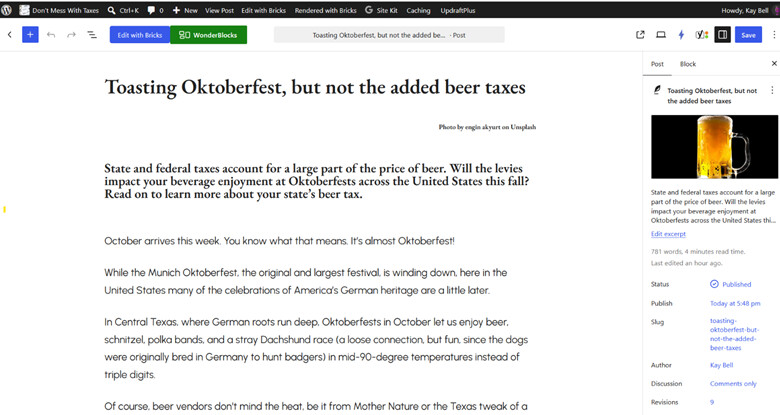
But they are there and show in published version

Theme Information
Theme name: Bricks
Theme version: 2.4.1
Theme author: Bricks
Theme author URI: https:// bricksbuilder. io/
WordPress Environment
Home URL: https: //dontmesswithtaxes. com
REST API Prefix: wp-json
WP version: 7.1.2
WP debug:
WP language: en_US
WP multisite:
WP memory limit: 40 MB - Recommended wp_memory_limit: 64M (or more)
And this is the link Bluehost directed me to
ttps://forum.bricksbuilder.io/t/implemented-gutenberg-core-blocks-features-disabled-when-theme-bricks/22680
Hey,
just today we released 2.4.2 version. Can you try updating to it and check if the issue is still there?
Let me know. 
Thanks,
Matej
thanks for the update. I blogged today and YAY! the links again show in the basic publishing tool. Thank you!
Hey @SKB-taxblogger, I’m happy that it works now
Matej