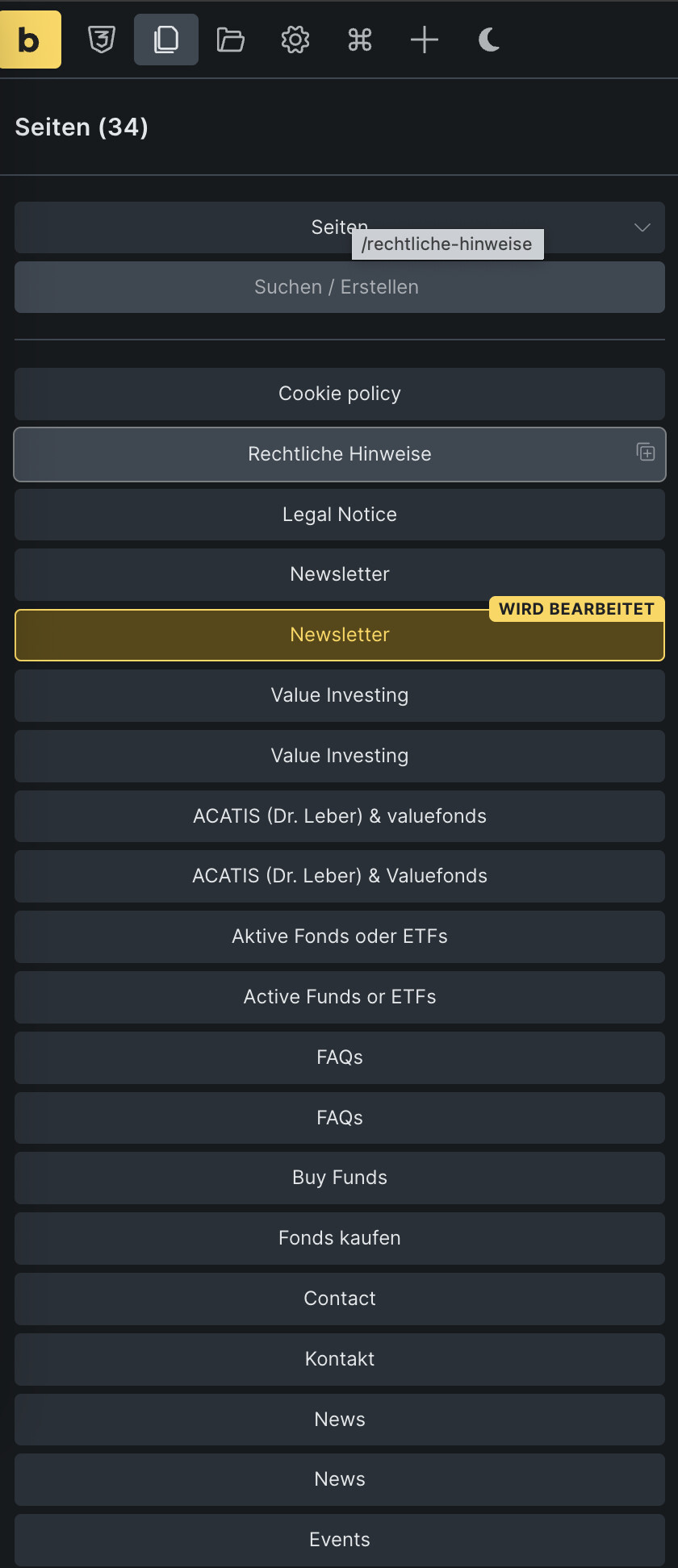
I’m working with WPML and the latest version of Bricks, and I’ve noticed that in the Pages list (see screenshot) it’s not immediately clear which language version a page belongs to.
For example, I have pages with the same title (“News”, “Kontakt”, etc.) in German and English. When I insert a link, I can see that the slug shows /de/ or /en/, so the language info is technically present.
My question: is it possible (or could it be added) to show a small language indicator in the page list view — e.g., “(DE)” or “(EN)” next to the page title — so one can immediately recognize which language version is being edited?
This would be especially helpful when there are multiple pages with identical titles in different languages.
Thanks in advance for any feedback or workarounds!
thanks a lot for the positive feedback on this idea.
I just wanted to check in and ask whether there have been any updates on this topic in the meantime — or if anyone knows whether something like this might be planned for an upcoming Bricks release (e.g. 2.2 or later).
Alternatively, has anyone found a workaround in the meantime?
Even a small tweak or plugin-based solution to make the language visible in the page list would already help a lot.
I had the same problem when I was working with five languages and had about 40 pages for each language…
It was a bit chaotic with nearly 200 pages. So every time they had to go back to the WP panel and select a specific language from there because I didn’t know which page was which just from the title.
So.. This indicator is a great option, although if Bricks says it has integration with WPML or Polylang, it would be useful to have a small switcher at the top that displays a specific flag or language code and shows us the pages available for editing in a given language. Just like in the WordPress panel.