WIP: Specificity issue with custom CSS

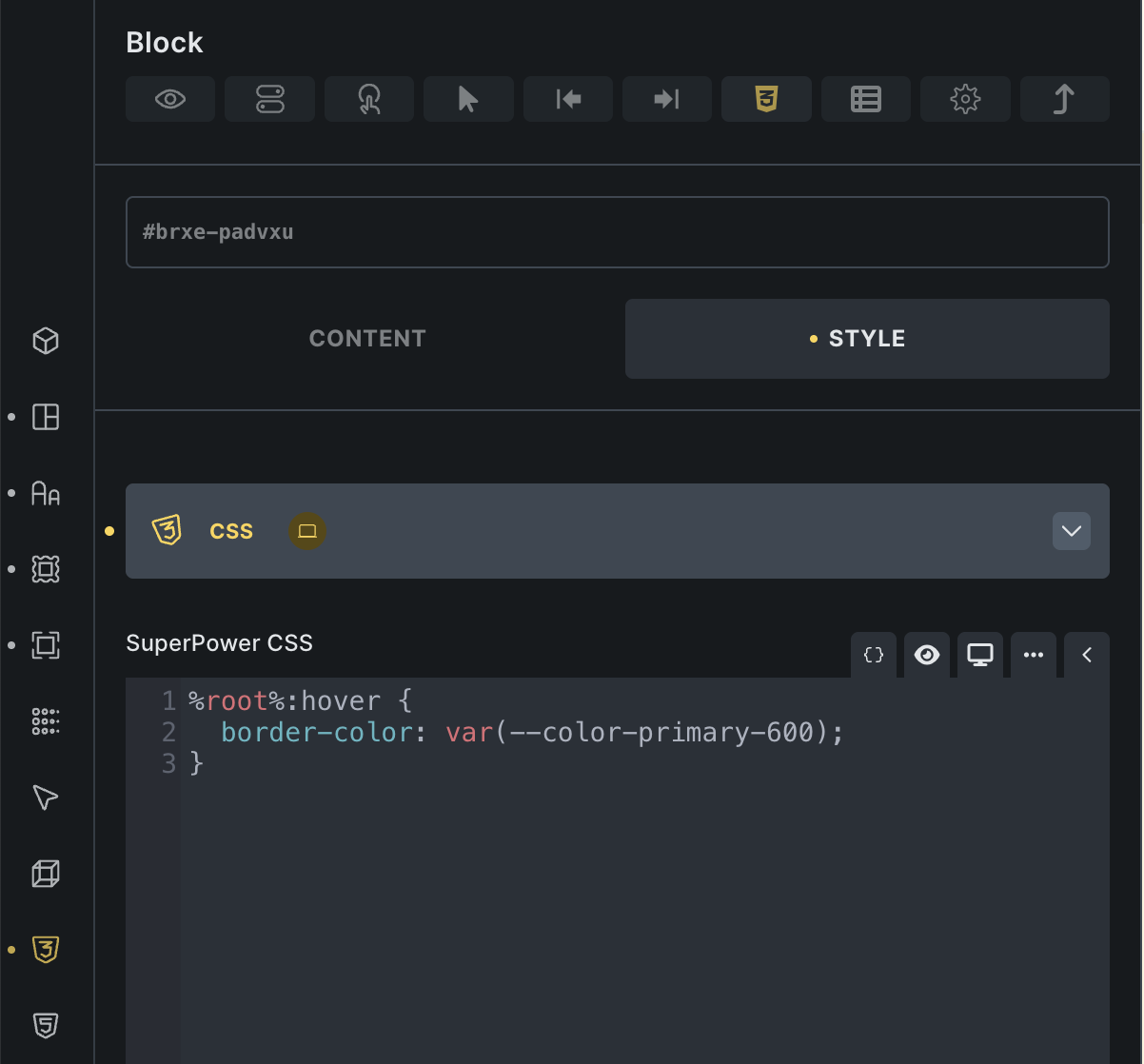
I styled an element via the Bricks Editor and wanted to style the hover effect via Custom CSS.

This is the code generated for styles that come from the editor:

.brxe-mrksim .brxe-padvxu.brxe-block {
    background-color: var(--color-background-alt);
}

And this is the style generated when Using Custom CSS with the %root% variable:

.brxe-padvxu:hover {
    border-color: var(--color-primary-600);
}

So without using !important or manually adding the other Classes the style gets ignored.

Is this by design or a bug?

Hi @jonaswd,

you can try adding %root%.brxe-block as a selector instead.

Or, you can go to Bricks Settings → Performance and you enable the “Disable chaining element & global class”, then the .brxe-block class should not be there anymore. I suggest you do this, but go over your website style just in case :slight_smile:

Best regards,
Matej

Hi @Matej,

I already did enable the option regarding chaining of classes a few days ago. I checkt on other elements and it did work and removed the chaining - it seems it did not in this case.

I regenerated the CSS files but this had no effect.

This element is inside a query. Maybe this has something to do with it?

Bildschirmfoto 2025-10-27 um 18.48.34

Hi @jonaswd,

ok, so it’s not that this time. I’ve actually re-read the question, as it seems I missed something when reading it first time:

In your “generated” style when using custom CSS you are using border-color, but in the styles, that are generated from the editor, you have background-color. Those two are different, and should not affect one another.

If that’s not it, can you share a link to the website + a video showing the setup and the issue?
You can also copy-paste the relevant structure here, so I can test it locally. That would be nice :slight_smile:

Thank you,
Matej

Hi @Matej,

sorry, I cleaned up the css styling and probably confused the background-color with border-color. Here is the structure:

This is the html of my query list:

<ul id="brxe-qqling" class="brxe-block glossar-query-list">
    <!--brx-loop-start-mrksim-->
    <li class="brxe-mrksim brxe-block" start-letter="A">
        <div class="brxe-cvsbkc brxe-shortcode" aria-hidden="true">
            <div class="az-heading">A</div>
        </div>
        <a href="#" class="brxe-padvxu brxe-block">
            <div class="brxe-bozlex brxe-block">
                <span class="brxe-dziqco brxe-text-basic">Acacia Senegal Gum Extract</span>
                <span class="brxe-xkyamt brxe-text-basic">Xanthan Bindemittel</span>
            </div>
            <div class="brxe-uugguu brxe-block glossar-list-icon-wrapper">
                <svg></svg>
            </div>
        </a>
    </li>
</ul>

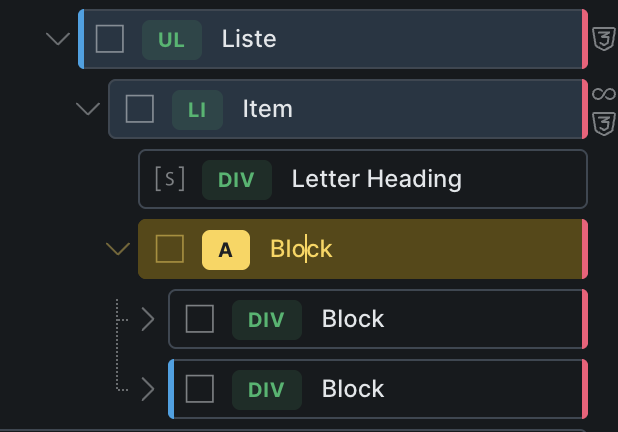
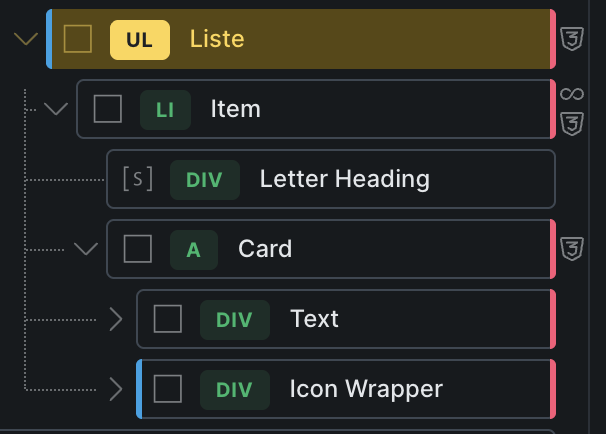
Here is a screenshot of the Bricks navigator:
Bildschirmfoto 2025-10-29 um 09.51.12
Now, the styling I applied via the Brickseditor (including the border) is set on the Card element. This is the generated CSS:

.brxe-mrksim .brxe-padvxu.brxe-block {
    background-color: var(--color-background-alt);
    border: 1px solid var(--color-brand-100);
    border-radius: var(--border-radius-m);
    font-size: var(--text-s);
    line-height: 1.3;
}

For some reason even the parent class (this would be the li element) is included here.
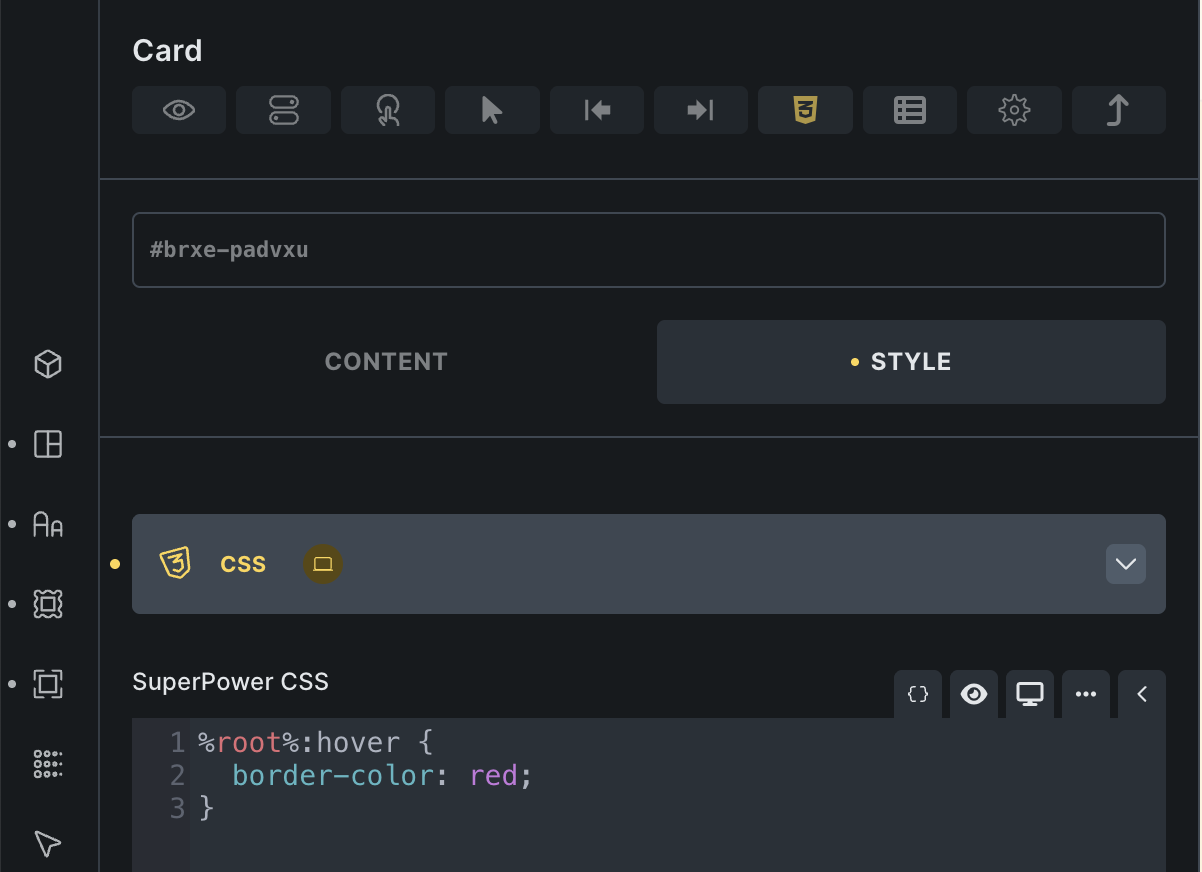
The hover state I wanted to define via custom CSS like this:


but the CSS in the frontend looks like this:

.brxe-padvxu:hover {
    border-color: red;
}

so obviously the specificity is not enough to have any effect.

Hope I didn’t miss anything this time.

Hi @jonaswd,

Thank you for all. It’s a bit clearer now, but I still don’t know which controls you changed that generated that CSS.

I suggest you do one of those two. Second one is ideal :slight_smile:

  1. Right click on the “Liste” element, and paste the content (JSON) directly here in the forum (wrap it with preformatted text). That way, I will be able to paste the same structure into my installe and debug it there.
  2. Send temporary login credentials to your website and a link to this topic to help@bricksbuilder.io using the email address you used during the purchase, so I can take a look.

Thank you,
Matej

Hi @Matej,

sure. I would gladly provide you with access – at this moment there is developing going on so if the JSON doesn’t work, tomorrow I can provide you access to my staging environment.

Here is the JSON:

{"content":[{"id":"qqling","name":"block","parent":"jlvbcc","children":["mrksim"],"settings":{"tag":"ul","_cssCustom":"#brxe-qqling .az-heading {\n\tfont-size: var(--heading-l);\n  font-family: var(--font-fam-serif);\n  color: var(--color-heading);\n  display: block;\n  padding-top: var(--space-xs);\n}\n\n#brxe-qqling {\n\tlist-style: none;\n}","_rowGap":"var(--space-2xs)","_padding":{"left":"0"},"_cssClasses":"glossar-query-list"},"label":"Liste"},{"id":"mrksim","name":"block","parent":"qqling","children":["cvsbkc","padvxu"],"settings":{"hasLoop":true,"query":{"objectType":"post","post_type":["glossar"],"order":["asc"],"posts_per_page":"24","infinite_scroll":true,"ajax_loader_animation":"default","infinite_scroll_margin":"900","orderby":["title"]},"_attributes":[{"id":"ngsfnq","name":"start-letter","value":"{acf_glossar_letter}"}],"tag":"li","_cssCustom":"#brxe-mrksim a.brxe-padvxu,\n#brxe-mrksim a.brxe-padvxu .glossar-list-icon-wrapper {\n  transition: all var(--tran-du-s) var(--tran-type-smooth-m);\n}\n#brxe-mrksim a.brxe-padvxu:hover {\n\tborder-color: var(--color-primary-600);\n  box-shadow: 0 0 0 2px var(--color-primary-200);\n}\n#brxe-mrksim a.brxe-padvxu:hover .glossar-list-icon-wrapper {\n  color: var(--color-primary-600);\n}"},"label":"Item"},{"id":"cvsbkc","name":"shortcode","parent":"mrksim","children":[],"settings":{"shortcode":"[sl_letter_divider]","_attributes":[{"id":"tsfexj","name":"aria-hidden","value":"true"}]},"label":"Letter Heading"},{"id":"padvxu","name":"block","parent":"mrksim","children":["bozlex","uugguu"],"settings":{"tag":"a","link":{"type":"meta","useDynamicData":"{post_url}"},"_background":{"color":{"raw":"var(--color-background-alt)"}},"_border":{"width":{"top":"1px","bottom":"1px","right":"1px","left":"1px"},"style":"solid","color":{"raw":"var(--color-brand-100)"},"radius":{"top":"var(--border-radius-m)","right":"var(--border-radius-m)","bottom":"var(--border-radius-m)","left":"var(--border-radius-m)"}},"_typography":{"font-size":"var(--text-s)","line-height":"1.3"},"_padding":{"top":"var(--gap-xs)","right":"var(--gap-xs)","bottom":"var(--gap-xs)","left":"var(--gap-xs)"},"_display":"flex","_direction":"row","_flexWrap":"nowrap","_alignItems":"center"},"label":"Card"},{"id":"bozlex","name":"block","parent":"padvxu","children":["dziqco","xkyamt"],"settings":{"_direction":"column","_flexGrow":"1"},"label":"Text"},{"id":"dziqco","name":"text-basic","parent":"bozlex","children":[],"settings":{"tag":"span","text":"{post_title}","_typography":{"font-weight":"600"}}},{"id":"xkyamt","name":"text-basic","parent":"bozlex","children":[],"settings":{"tag":"span","text":"{acf_glossar_title_human}","_typography":{"color":{"raw":"var(--color-text-faded)"},"font-style":"italic"}}},{"id":"uugguu","name":"block","parent":"padvxu","children":["jcjjil"],"settings":{"_flexShrink":"0","_width":"auto","_cssClasses":"glossar-list-icon-wrapper","_typography":{"color":{"raw":"var(--color-brand-300)"}}},"label":"Icon Wrapper"},{"id":"jcjjil","name":"icon","parent":"uugguu","children":[],"settings":{"icon":{"library":"custom_set_unywoeijq","svg":{"id":1342,"icon_id":"icon_9lkmjlts5","url":"/wp-content/uploads/arrow-right.svg"},"height":"1.5em","width":"1.5em","strokeWidth":"1.5","stroke":{"raw":"currentColor"}}}}],"source":"bricksCopiedElements","sourceUrl":"/","version":"2.1.3"}
Hi @jonaswd,

thank you so much for the JSON structure. I was able to replicate the issue locally now, and I’ve created an internal bug task.

As a workaround, it will work if you add a custom :hover selector via UI.

Once the issue is fixed, we will update this topic.

Thank you,
Matej

1 Like