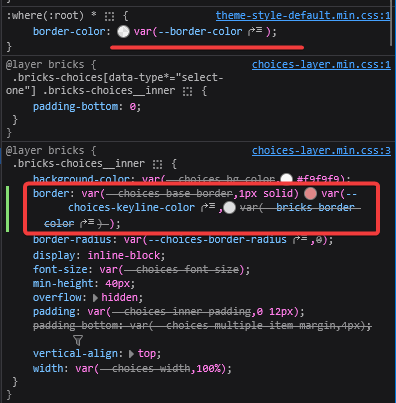
Browser: Firefox
OS: Windows
Root border-color have higher priority and overrides styles from builder inputs
Browser: Firefox
OS: Windows
Root border-color have higher priority and overrides styles from builder inputs
Hey @Illarion,
can you show me how to replicate the issue? What should I set and where? Ideally, if you can record a video or copy-paste relevant elements here.
Thank you,
Matej
Hi @Matej
Same issue here. It affects border color on filter check boxes and radio buttons. Where do I change this? It is overriding element-level CSS.
Hey @Illarion,
I’m sorry for not responding earlier. I was able to replicate the issue at that time, and I’ve created an internal bug report and changed topic to WIP… but then forgot to answer here 
@catamundo, can you record a video which border setting it’s overriding in your case? You will have to wait for fix to be released, but meanwhile, you can use the following CSS for Filter - Select
%root% .bricks-choices__inner{
  border-color:red;
}
Matej