WIP: Not possible to unlink instance from Component

Browser: Firefox Dev Edition 143.0b9 (64-bit)
OS: Linux Mint 22.1
URL: N/A
Video: N/A

Steps to Reproduce:

  1. Place an element
  2. Turn it into a Component
  3. Delete the Component
  4. Check out the now-orphaned element

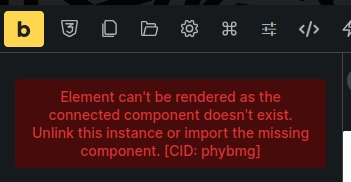
When deleting a component, the orphaned instances of it have this warning message:

image

It’s not possible to “unlink this instance”.

Notes:
I posted about this on Facebook and nobody was able to point me to the unlink feature. I might be overlooking it.

Note that this occurs in Bricks 2.0.2, there’s no such tag available for this post though.

Hi @mr.matt.eastwood,

I don’t think this is a bug, but it’s a possible misunderstanding of how this works. Let me try to explain.

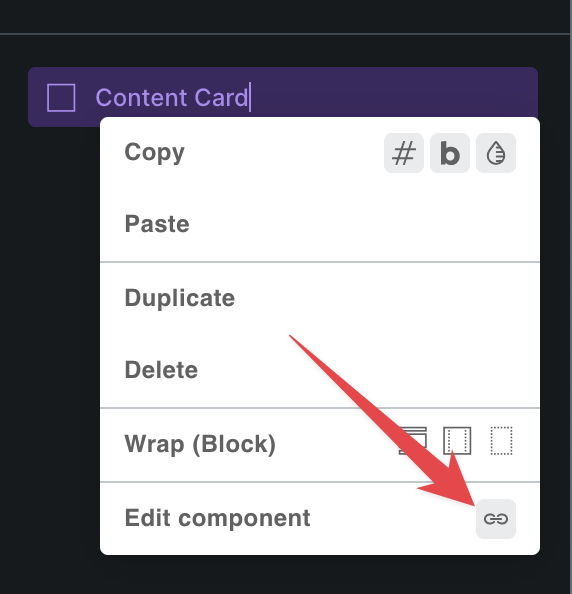
If the component exists, you can unlink the component instance by right clicking on it, and then you have that “unlink” button. Your component will still be there, but the instance is unlinked.

Now, if you remove the component, while you still have some instances on the page, then what will be left is the “orphan instance” as you call it. But that element there is just a “reference” to the component (that now does not exist anymore). If you would to import the same component back, it would work again.

Because it’s only a “reference”, you can unlink it, and you have to delete it. However, I see that the error message is misleading and I’ll create an internal task for this. :slight_smile:

I hope this explains it a little bit, but please let me know.
Matej
1 Like

Thanks! Appreciate the explanation :slight_smile:

1 Like

I’m glad it’s clear now. :v:

We will also update this topic, once we change the notice text. Thanks for pointing that out.

Matej