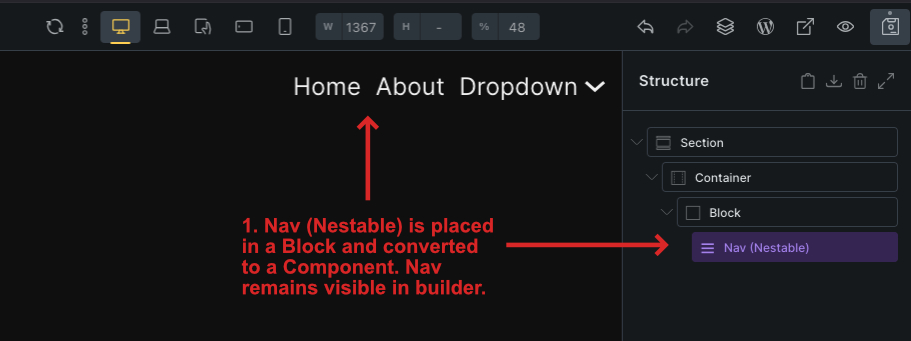
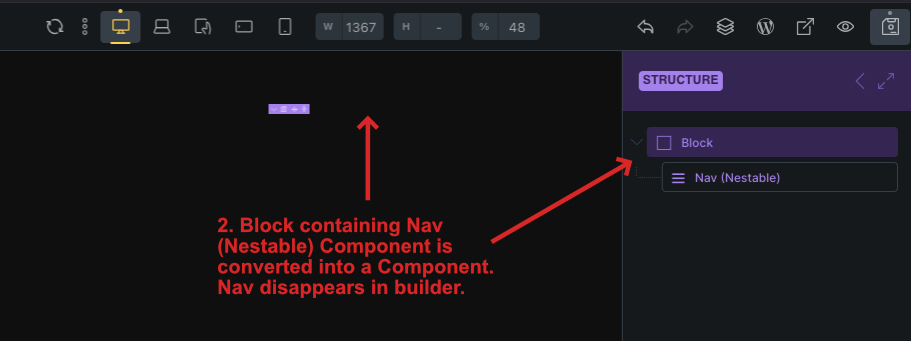
When a Block containing a Nav (Nestable) Component is converted into a Component, the nav disappears in the builder view but is still visible and functions correctly on the frontend. Tested on Bricks 2.1.2.
Steps to Reproduce
Open Bricks Builder on a blank page.
Add a Section > Container > Block.
Inside the Block, add a Nav (Nestable) element.
Convert the Nav (Nestable) into a Component.
Convert the Block that the nav is in into a Component.
Notice that the Nav (Nestable) Component disappears in the builder but is visible and functions correctly on the frontend.
Use Case
I am trying to build a componentized sidebar navigation to insert in pages and templates. It’s either down to this method or using Templates and inserting them as elements in my page, but if the above issue can be solved, I believe that’s the most efficient solution. I am open to any suggestions or solutions.
Hi xylo,
Thanks so much for your report, and welcome to the forum!
We have already received a report about this by email and are working on a solution.
Are you sure that the menu is working correctly in the front end? Please take a look at the mobile menu — this should cause problems (desktop and hamburger toggle are displayed in parallel).
Thank you for getting back to me! You’re right, the mobile menu isn’t working properly on the front end. The navigation items show up twice: once outside the hamburger menu and again inside it when you click on it.
For now, my other option is to create a Template that contains a regular Block with my Nav (Nestable) Component. Then I can add this Template to any page using the Template element in the builder. This way, all my pages stay connected to the main Template.
I have a couple of follow-up questions:
What’s the typical timeline for a solution, and how will I be notified?
Overall, what’s the most efficient way to reuse a sidebar Nav (Nestable) Component in a Block across multiple pages—should I use the original Components method, the Templates method I described above, or is there another recommended way?
It’s hard to say, as it always depends on the complexity of the problem. We will respond to this thread and mark it as “SOLVED” as soon as the fix is included in one of the next versions.
The approach that works for you is the best one. At the moment, I would probably recommend the template element way. Once the bug has been fixed, you can replace the template element with your component.