We are experiencing an issue with imported header and footer templates that contain logos hosted on our CDN.
The SVG image URLs are correctly included in the exported JSON. However, after importing the templates, all .svg images are replaced with the default placeholder-svg.svg. This issue only affects SVG files. .png images are imported correctly and remain unchanged.
Additionally, our footer templates contain PHP code. After importing, the executeCode setting is automatically changed from true to false, causing the PHP code not to be executed.
There may be several reasons why the SVGs are not being imported:
SVG uploads are not enabled in the Bricks settings. This option is not included when exporting the settings because it poses a potential security risk, so it must be enabled manually.
The current user isn’t allowed to upload SVGs. I assume you’re an admin, so this is probably not the reason.
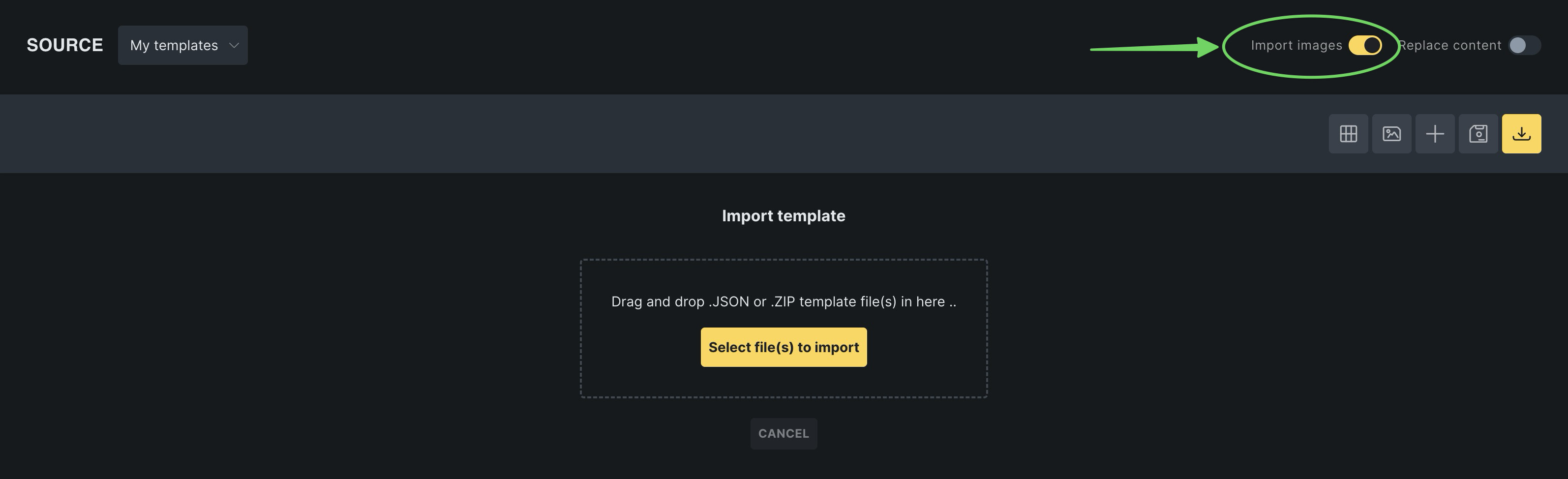
The “import images” toggle was not active during the import (the most common reason, if 1&2 are fulfilled).
The same applies to the code element, as it can pose a potential security risk, too. Accordingly, code execution must be enabled in the settings, the execute code toggle must be enabled, and the code must be signed.
So, overall I don’t see a bug as it’s the expected behavior. If, however, the situation is different in your case, please provide me with reproducible steps and screenshots of your settings, or a screencast showing everything (settings and the import process).
I think this could be improved, especially for admin users.
SVGs
I don’t understand why SVG uploads need to be enabled when the SVG itself is not uploaded but loaded from an external domain. The element has the property external: true, so it’s clearly not an uploaded file.
Executing code
Once again, I think admins should be able to export and import these settings, perhaps with an additional warning. Right now, I have to go through every template and component to re-enable the “Execute code” option.
In its current state, Bricks makes it difficult to move a design from one WordPress site to another. I have to export seven different settings, and after importing I still need to manually reconfigure every template and component that uses SVGs or executes PHP code.
Fonts
Fonts are another issue. It is currently impossible to export or import them. On a new instance, I have to download the fonts again and then manually select the new font family because custom_font_xx points to a font that does not exist on the target site. Ideally, I would prefer to load fonts from our CDN, but unfortunately it’s not possible to provide a URL for the font files. I found an idea request for this feature Idea board – Bricks, although I’m not sure how old that request is or whether it’s currently on the roadmap.
I understand that my use case may be somewhat niche, but it’s still frustrating because I have to repeat this process seven times for the seven languages in my multisite network
Thanks for the detailed follow-up. I agree the migration workflow can be frustrating, especially across multiple sites/languages. However, we’re already working on ways to simplify the import/export process
For now, I’d still classify this as expected behavior rather than a bug, mainly because SVGs and executable PHP both sit behind security boundaries.
For the SVGs: good point about external: true. If the intent is to keep the CDN URL as-is, Bricks ideally should not need to upload the SVG. However, when “Import images” is enabled, Bricks may try to process/import image assets, and SVG handling is still restricted by the target site’s SVG permissions.
Can you provide me with a minimal export file? That would be useful for us to inspect.
For PHP code: imported code execution is intentionally disabled. Even for admins, Bricks should not automatically trust and execute PHP imported from another site/export. The destination site needs to explicitly enable code execution and review/sign the code again.
The PHP/code execution part is still expected behavior: imported executable code is intentionally not trusted automatically and needs to be reviewed/signed again on the destination site.
But the external SVG case is different. Your Image element uses an external SVG URL with external: true, and “Import images” was disabled. In that case I agree Bricks should preserve the external URL instead of replacing it with the SVG placeholder. The current import handling appears to detect the svg URL and treat it like an importable SVG image, without taking the external: true flag into account.
I also see your point about the SVG element. The control description says URL is supported, but a plain SVG URL entered there does not seem to be handled correctly.
I’ll create an internal bug report for the external SVG handling. The code execution/import behavior will stay separate, as that is intentional for security reasons.