Hi team,
Component properties currently stop at the top level of a control. As soon as a control reveals sub-fields based on the selected option, those sub-fields can no longer be connected to a component property — there is no “connect property” option on them at all.
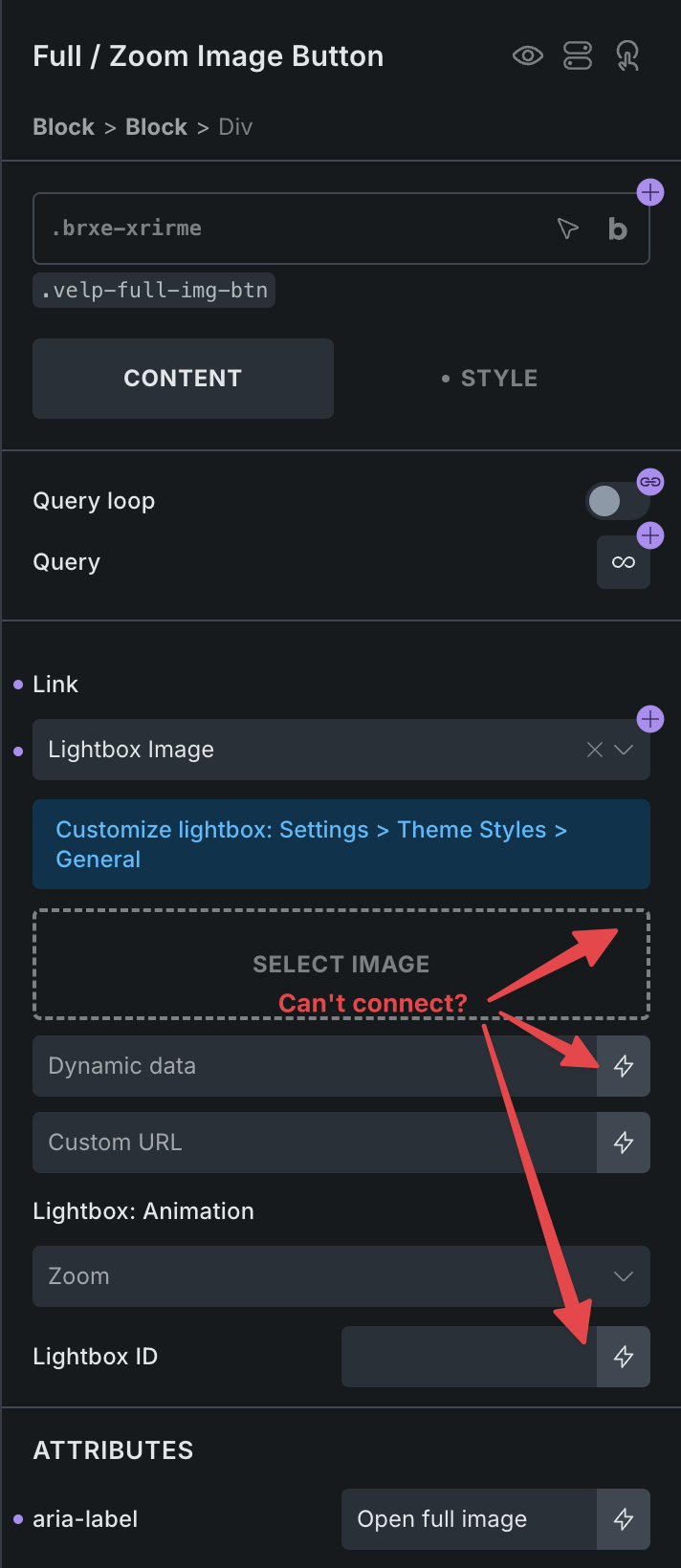
The clearest example is the Link control. When Link type is set to Lightbox Image (or Lightbox Video), the fields that appear underneath — Select image, Dynamic data, Custom URL, and Lightbox ID — offer only the dynamic data lightning icon. There is no way to expose any of them as a component property, so the person using the component instance has no way to fill them in.
The same applies to the other link types (Internal post/page, Taxonomy term, Media, Custom URL) once you are inside a component.
Steps to reproduce
- Create a component containing a
div(or button, icon, block — any element with a Link control). - Set Link → Lightbox Image.
- Try to create/connect a property on the Select image field, the Dynamic data field, the Custom URL field, or the Lightbox ID field.
- No property connector is available on any of them.
Real-world use case
I built a reusable image card / media component with a small “view full image” button in the corner. Clicking it should open that card’s image in the Bricks lightbox.
The button itself is easy to build, but there is no way to let the person placing the component say which image the lightbox should open. The image is different on every instance — it is exactly the kind of value a property exists for. Because the lightbox image field cannot be exposed as a property, the button is unusable inside a component, and the component has to ship without it.
Thanks for considering it — components are excellent, and closing this gap would make them usable for a whole class of media/lightbox patterns.