WIP: Component variations lose styling as a descendant selector

Browser: Chrome
OS: macOS
URL: https://stg-sfddcprod-sfddcdev.kinsta.cloud/

HT Access
User: sfddcdev
Pass: p5sWNcKugcSp5a

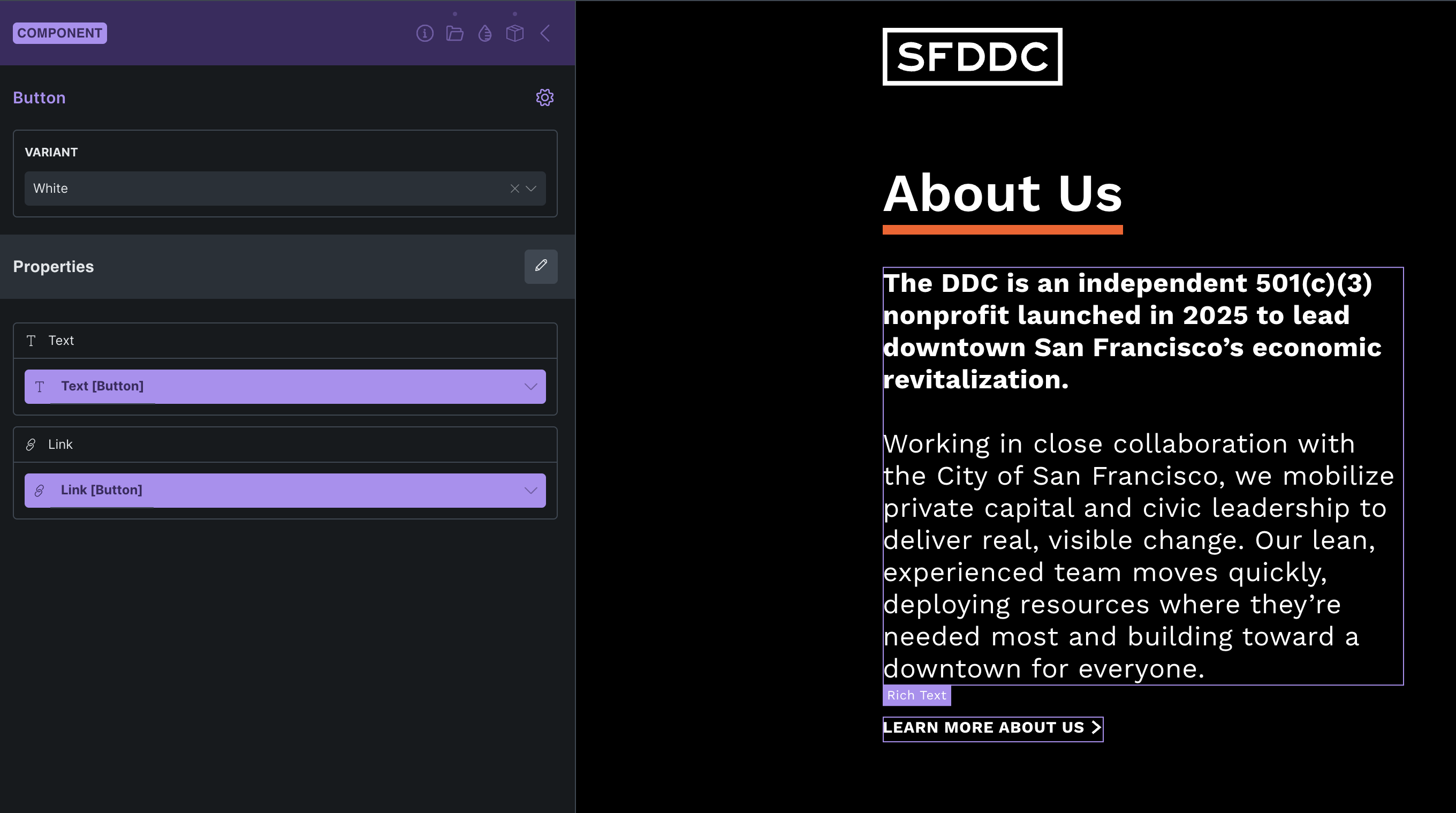
I have a Button component with two variants: base and white. The white variant simply sets color to white. You can check the button in the black backgrounded section beneath the text ad by inspecting the inline CSS selector.

When I use the white variant on a template where no base variant button exists on the same page, the style does not apply.

Root cause identified via DevTools:

Bricks generates the variant CSS as:

[data-brx-variant="aorbaj"] .brxe-dhvyxd { color: var(--color-white); }

This descendant selector requires an ancestor element with data-brx-variant="aorbaj" to exist in the DOM. When only the variant is used (without the base variant on the same page), that ancestor is never rendered, so the selector never matches and the style is not applied.

Expected behavior: The variant CSS should target the element directly, e.g. .brxe-dhvyxd[data-brx-variant="aorbaj"], so it works regardless of whether the base variant is present on the page.

Steps to reproduce:

  1. Create a Button component with a base and a white variant

  2. Use only the white variant on a template (no base variant on the same page)

  3. The white color is not applied

Hi @cdeweerdt,

I’m unable to replicate the issue locally. Can you share the component here and record a video with step by step steps how can I repolicate it.

I’ve tested with external and with inline styles, but it worked in both cases.

Best,
Matej

One thing I have noticed it seems to happen after editing the component at a certain point it loses something.

Here is the screen recording (expires in 2 days): Watch Screen Recording 2026-04-02 at 14.42.32 | Streamable

Here is the component json:

{
“components”: [
{
“id”: “dhvyxd”,
“category”: “Buttons”,
“desc”: “”,
“elements”: [
{
“id”: “dhvyxd”,
“name”: “button”,
“parent”: 0,
“children”: ,
“settings”: {
“icon”: {
“library”: “svg”,
“svg”: {
“id”: 31,
“filename”: “button-arrow.svg”,
“url”: “``https://stg-sfddcprod-sfddcdev.kinsta.cloud/wp-content/uploads/2026/03/button-arrow.svg”
},
“height:mobile_portrait”: “13px”,
“width:mobile_portrait”: “13px”
},
“_cssGlobalClasses”: [
“ujgbka”
],
“iconGap:mobile_portrait”: “5px”,
“_typography:mobile_portrait:variant-aorbaj”: {
“color”: {
“id”: “avtojb”,
“raw”: “var(–color-white)”,
“light”: “#FFFFFF”
}
}
},
“label”: “Button”
}
],
“properties”: [
{
“label”: “Text”,
“type”: “text”,
“default”: “I am a button”,
“id”: “rshowu”,
“connections”: {
“dhvyxd”: [
“text”
]
}
},
{
“label”: “Link”,
“type”: “link”,
“id”: “kubqcx”,
“connections”: {
“dhvyxd”: [
“link”
]
}
}
],
“_created”: 1774376052,
“_user_id”: 3,
“_version”: “2.3”,
“labelVariantBase”: “Black”,
“variants”: [
{
“id”: “variant-aorbaj”,
“name”: “White”
}
]
}
],
“globalClasses”: [
{
“id”: “ujgbka”,
“name”: “typo-body-copy”,
“settings”: {
“_typography:mobile_portrait”: {
“font-size”: “var(–font-size-body-copy)”,
“line-height”: “var(–line-height-body-copy)”
},
“_typography:tablet_portrait”: {
“font-size”: “var(–font-size-body-copy-desktop)”,
“line-height”: “var(–line-height-body-copy-desktop)”
},
“icon”:
}
}
]
}

Hey @cdeweerdt,

can you add wrap the JSON code with ```, otherwise it’s not formatted properly.

Also, from the video I see that you are editing the component directly. Can you just double check if you set “White” variant on the instance - on the page, not just inside component?

Let me know please.
Matej

Yes I can confirm the white is selected in options, here is the image, also it’s inside another component.

Sorry about that, here is the component again:

  "components": [
    {
      "id": "dhvyxd",
      "category": "Buttons",
      "desc": "",
      "elements": [
        {
          "id": "dhvyxd",
          "name": "button",
          "parent": 0,
          "children": [],
          "settings": {
            "icon": {
              "library": "svg",
              "svg": {
                "id": 31,
                "filename": "button-arrow.svg",
                "url": "https://stg-sfddcprod-sfddcdev.kinsta.cloud/wp-content/uploads/2026/03/button-arrow.svg"
              },
              "height:mobile_portrait": "13px",
              "width:mobile_portrait": "13px"
            },
            "_cssGlobalClasses": [
              "ujgbka"
            ],
            "iconGap:mobile_portrait": "5px",
            "_typography:mobile_portrait:variant-aorbaj": {
              "color": {
                "id": "avtojb",
                "raw": "var(--color-white)",
                "light": "#FFFFFF"
              }
            }
          },
          "label": "Button"
        }
      ],
      "properties": [
        {
          "label": "Text",
          "type": "text",
          "default": "I am a button",
          "id": "rshowu",
          "connections": {
            "dhvyxd": [
              "text"
            ]
          }
        },
        {
          "label": "Link",
          "type": "link",
          "id": "kubqcx",
          "connections": {
            "dhvyxd": [
              "link"
            ]
          }
        }
      ],
      "_created": 1774376052,
      "_user_id": 3,
      "_version": "2.3",
      "labelVariantBase": "Black",
      "variants": [
        {
          "id": "variant-aorbaj",
          "name": "White"
        }
      ]
    }
  ],
  "globalClasses": [
    {
      "id": "ujgbka",
      "name": "typo-body-copy",
      "settings": {
        "_typography:mobile_portrait": {
          "font-size": "var(--font-size-body-copy)",
          "line-height": "var(--line-height-body-copy)"
        },
        "_typography:tablet_portrait": {
          "font-size": "var(--font-size-body-copy-desktop)",
          "line-height": "var(--line-height-body-copy-desktop)"
        },
        "icon": []
      }
    }
  ]
}

Hey @cdeweerdt,

thank you so much for this. However, I can’t replicate it as colors don’t even change for me with your component. Might be something else (possibly different overall configuration or classes).

If possible, can you share your temporary login credentials to your website and a link to this topic to help@bricksbuilder.io using the email address you used during the purchase, so we can take a look?

Thank you,
Matej

@Matej Hey,

Email sent.

@Matej Any updates on this?

Hey @cdeweerdt,

I’ve received the email, but due to the holiday yesterday, I was unable to look at it yet. I’ll check it today and will let you know.

Thank you,
Matej

Hey @cdeweerdt,

I was able to replicate it and I’ve added it to our internal bug tracker.

Thank you,
Matej

Great, would you still need access to the WP then, since we are still developing the site?
For now, I have created a separate component as the solution.

Thanks for the help!

No, not needed anymore, you can revoke the access. Thanks :folded_hands:

Or add another component outside, and hide it with CSS. Then once it’s fixed, you just remove that one. It should probably be simpler to handle eventually.

We will update this topic once the issue is resolved.

Thank you,
Matej