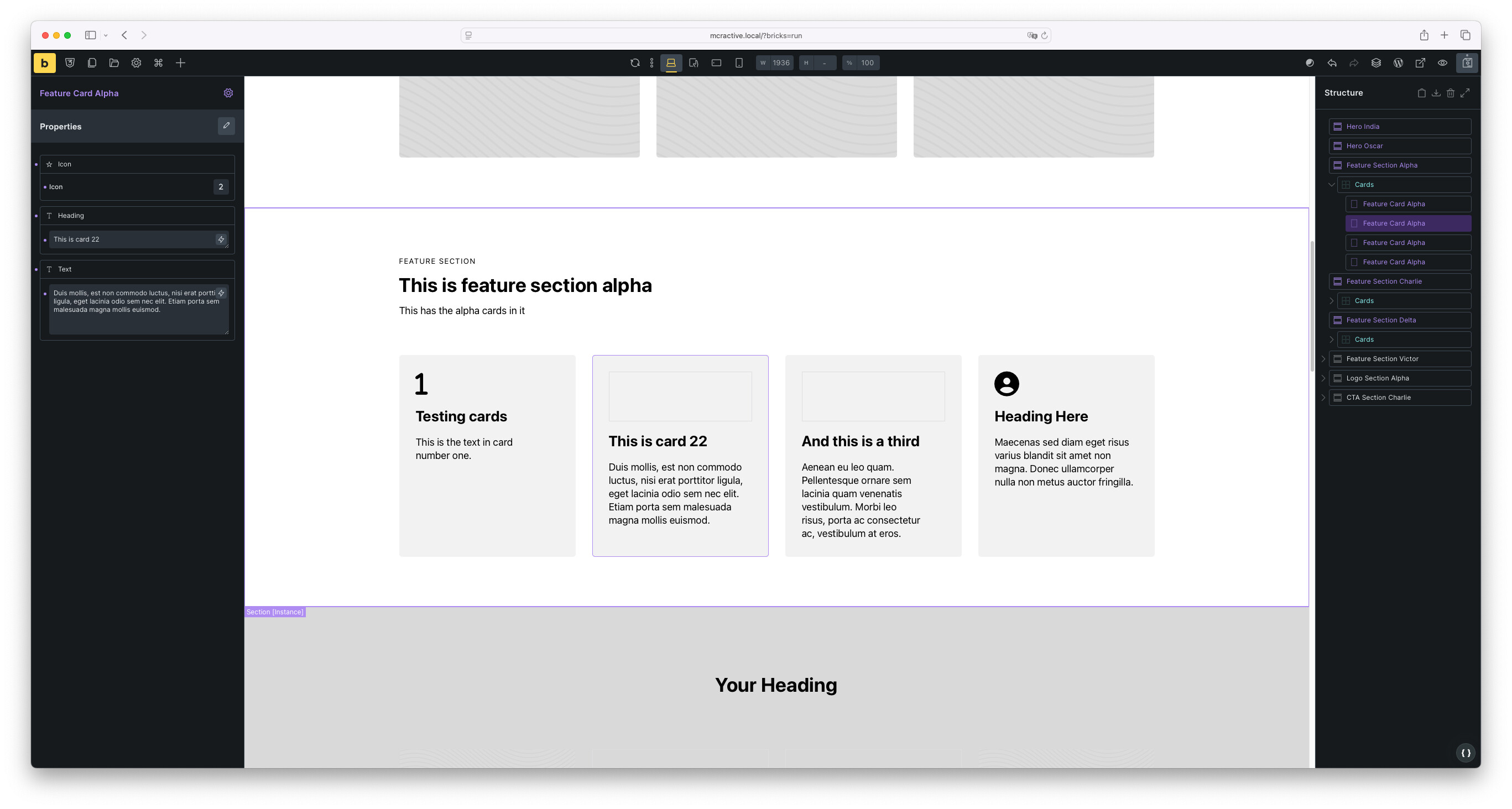
I’m experimenting with Component Slots. My goal was to create an icon card grid component that allows clients to select between different options.
Issues encountered:
Incomplete rendering in Builder - The component doesn’t render correctly in the Builder. As shown in the video, most of the card SVG icons are missing.
Styling discrepancies on frontend - The styling looks completely different on the frontend compared to the Builder. It appears that some styling has been lost during rendering.
Poor client editing experience - When I click on a card, it focuses on the slot instead of the component itself. This makes the experience overly complicated for clients, as they need to navigate to the structure panel to select the correct element. The component I’m clicking on should be focused directly instead.
Can you export your components/the entire layout and make them available to me?
I’m almost certain that we already have reports/tasks for at least two of the problems. However, to confirm this, I need your components
Hey, I created a staging environment where you have access to everything. I sent you a private DM. For some reason, the Icon Cards look fine now on the frontend, but on the backend they’re still not rendering correctly. Thanks!
Could you possibly record a separate video showing only this problem? I’m not sure if you showed this in your previous video—if so, please give me the timestamp
Thanks! Yeah, I recorded a video for you. Basically, the editing experience isn’t great, especially for client editing, because you’re forced to use the structure panel. I think it should automatically detect when you click on a component that’s inside a slot. In the video, I also show how Webflow handles it, and I found a solution with Claude where it can detect when you click on something inside a slot.
I’ve got a similar rendering issue. I have a two column component, text on one side and a slot in the other. There are several properties like padding and background colour choice linked to the text block. My slot has an image in it and if I change any of the text block’s properties, the image disappears in the backend. After saving the exchange and refreshing the page (refreshing the builder does nothing), the image reappears. This only happens in the backend.
Came here to add to the discussion. today is my first time using the new slots feature for a new build. Client wants to be able to start adding content in 2 days! I have created components for 3 card designs and have also created some for “feature grids” which can accept these cards using the new slot element. On adding some cards which have images they randomly don’t have the images displayed in the backend but they are displayed when viewing the page. See attached screen grab. I think if I add the card components slower that they aren’t broken as often if that helps?
Adding components in slots slowly is fine but adding them quickly like a client may do means some (half in this video) do not have images and adding in images does not work and so you have to delete them and then and then add them back in again….. slowly.
I have had a thought on this - I may be wrong but hear me out! Could it have something to do with how lazy load works? If you have images in the components set to lazy load and you don’t wait for the default image to load in then it causes this issue? Just a thought.
I’ve just tested this by setting the load to eager and the issue remains when adding 4 in quick succession.
Edit - I’ve just been in to re-create the homepage on the dev site with just the components, and not classes as that’s a hurdle for the client to get over - thinking it was just an issue with how fast you add the components in the slots.
It’s not that at all - adding them slowly does not help at all. Here’s a video of me editing a page after waiting for the image to appear when adding each component card slowly:
As you can see, the first card’s image when added is broken when adding the second one, the third card picks up the image from the second card and never shows it’s own (the people in the swimming baths).