Browser: Chrome 110
OS: Windows
Hi team,
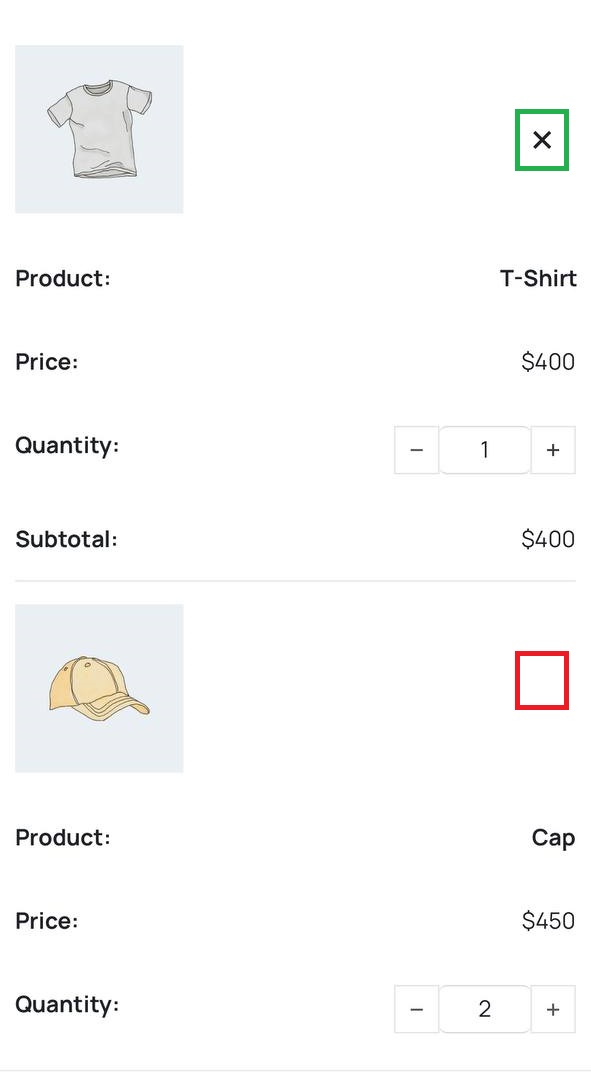
If we use a custom position for the “Remove” button, in iPhone browsers the Remove button will only be displayed for the first item in the cart.
Browser: Chrome 110
OS: Windows
Hi team,
If we use a custom position for the “Remove” button, in iPhone browsers the Remove button will only be displayed for the first item in the cart.
Hi @HOSEIN,
I was able to replicate bug #2 and bug #3, and I’ve created 2 separate tasks, because the issues are not really the same. 
But…
I can’t replicate this one. I’ve tested on my iPhone using Safari and Firefox, but I see the clear icon just fine. Do you have a link to the websites though, where I could check it on iPhone + on which browser you were testing?
Thanks,
Matej
Hi Matej,
As always, thank you for taking the time to review this report.
Interesting that it’s showing up well for you. It reminded me of this report. I still can’t find a reason why it’s not working on my phone. Because it was working fine for you.
Do you have a link to the websites though, where I could check it on iPhone + on which browser you were testing?
Yes, definitely. Please see my test website.
Thank you
Hi @HOSEIN,
I can replicate it on your website  What happens is that the “second” remove icon goes all the way up, which means both remove icons are piled up on the first object. I’m not yet sure what the difference is between Safari and other browsers (I was able to replicate the issue on macOS Safari as well).
Could you export the cart template and paste it here for me to test?
Thank you,
Matej
Great, thank you Matej.
Could you export the cart template and paste it here for me to test?
Hi @HOSEIN,
thank you. I was able to replicate it now. Seems like Safari is not respecting position:absolute in this case.
I’ve created a local task for that and connected it to this forum report. But keep in mind that now we have 3 different tasks connected to this forum topic, which means that once we solve at least one, we may set it as solved, although the other two issues are not yet solved.
Thanks,
Matej
Thank you Matej,
Yes, you’re right. I made a mistake not creating separate reports. If it’s not too late, I can do that right now.
Hi @HOSEIN,
You don’t need to do it and spend time on creating separate reports again. But if you do, then I’ll properly connect it to internal tasks  , just please tag me in the reports and also include a link to this one.
Thanks,
Matej
Thanks,
I’ve also updated a link for this task
Best regards,
Matej