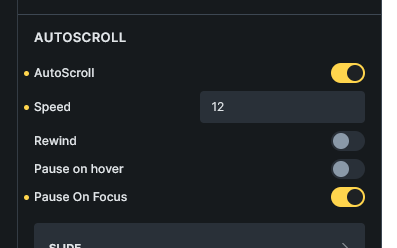
Hi,
Please add support for Splide autoscroll extension. Auto Scroll - Splide (splidejs.com)
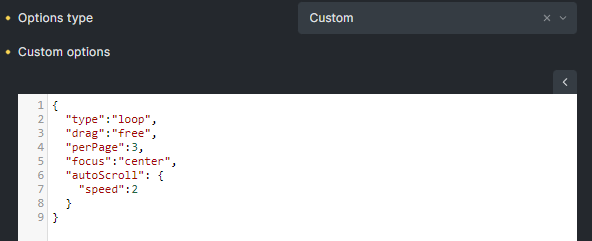
I loaded the extension js file and put the options in custom options (splide json) but not working.
Hi,
Please add support for Splide autoscroll extension. Auto Scroll - Splide (splidejs.com)
I loaded the extension js file and put the options in custom options (splide json) but not working.
Just came across this cause I’m in need of autoscroll as well. The reason it doesn’t work even if you include the script and add the config options, is that the extensions need to be mounted
new Splide( '.splide' ).mount( window.splide.Extensions );
I figured I’d just create my own structure instead of using the slider element and initialize the slider via js. Problem then is that bricks doesn’t load the splide js files since there is no slider element on the page,which makes sense.
So for now I just load all the splide files from a cdn myself and it works. Good enough for now but it would be great if at some point, we could optionally enable the .mount( window.splide.Extensions ) part on a slider, so we can just include whichever extensions we need.
Just in case anybody else comes across this, here is the setup:
Structure following Getting Started - Splide
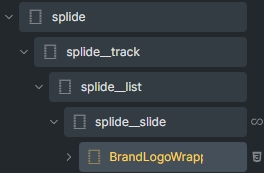
Code in Body (footer) Scripts in page settings:
<script src="https://cdn.jsdelivr.net/npm/@splidejs/splide@4.1.4/dist/js/splide.min.js"></script>
<link href="https://cdn.jsdelivr.net/npm/@splidejs/splide@4.1.4/dist/css/splide.min.css" rel="stylesheet">
<script src="https://cdn.jsdelivr.net/npm/@splidejs/splide-extension-auto-scroll@0.5.3/dist/js/splide-extension-auto-scroll.min.js"></script>

<script>
  document.addEventListener( 'DOMContentLoaded', function() {
   const splide = new Splide( '.splide', {
  type   : 'loop',
  drag   : 'free',
  focus  : 'center',
  perPage: 3,
  autoScroll: {
    speed: -1,
  },
} );
    splide.mount(window.splide.Extensions);
  } );
</script>
Hi !
I’m sorry to bother you but i just saw your explanation about how to install SplideJS autoscroll extension and i’m trying to do the same but with the URL Nash Navigation.
My goal is to be able to redirect to a specific slide in page A from a link in page B.
I try to reproduce your exemple with the following code 
<script src="https://cdn.jsdelivr.net/npm/@splidejs/splide@4.1.4/dist/js/splide.min.js"></script>
<link href="https://cdn.jsdelivr.net/npm/@splidejs/splide@4.1.4/dist/css/splide.min.css" rel="stylesheet">
<script src="https://cdn.jsdelivr.net/npm/@splidejs/splide-extension-url-hash@0.3.0/dist/js/splide-extension-url-hash.min.js"></script>

<script>
  document.addEventListener( 'DOMContentLoaded', function() {
    const splide = new Splide( '.splide');
    splide.mount(window.splide.Extensions);
  } );
</script>
Then i set a data-splide-hash attribute as explained in SplideJS and put the code in the page body footer scripts.
It’s seems like i did something wrong because nothing changes… Did i follow your exemple well to install the extension ?
Greetings,
Maybe with bricks 2.0 there would be a chance to add an autoscroll extension?
It’s been a while, and it’s a feature that is very useful.
This is needed for scrolling customer or vendor logos. I would like to see this implemented.
It’s 2 years but this function still get no reply. I really hope Bricks team pay attention to this.
For anyone who wants to implement it without destroying and mounting the splide instances (for some reason I was getting a bug?):
What the gist does is just updates one line of code that mounts splide with the extension property from the splide object?
// They could add this and that would at least make it easier to implement
// Though they are already working on it
//                     vvvvvvvvvvvvvvvvvvvvvvv
splideInstance.mount( window.splide?.Extensions );
This works very well and the if you have an image on a slide connected with the lightbox, the lightbox works right. With other ways I tried, the lightbox would only work if the slide was in the left 1/3 of the screen.
Could you show an example of enqueue of the script? I think you are talking about how to use it in functions.php that way, right?
Thank you!
Correct.
add_action('wp_enqueue_scripts', function() {
    wp_enqueue_script(
        'splide-script',
        get_stylesheet_directory_uri() . '/assets/splide-with-extensions.js', // the code from the gist
        ['bricks-scripts'],
        null,
        true
    );
});
Of you course you would need to add some conditions to avoid loading it everywhere, though I think bricks is already loading all in one large minified script so one little thing more won’t hurt? Also you could add it inline but I think it’s too much.
I actually added the options from the splide docs to the controls which do all the necessary things but I saw splide autoscroll was a WIP and thought that it wouldn’t be necessary. Maybe if in the next version is not released, I could write a blog post (to enforce myself to finish my website)
Yeah, a work in progress for over 3 years now… 
if you guys need no hacky solution you may destroy and remount slider.
try this script under slider
<script src="https://cdn.jsdelivr.net/npm/@splidejs/splide-extension-auto-scroll@0.5.3/dist/js/splide-extension-auto-scroll.min.js" defer></script>
<script defer>
document.addEventListener('DOMContentLoaded', (event) => {
  // Give some times for Bricks to init the sliders
  setTimeout(() => {
    // Please replace rrbqsp to your Slider element ID !!NOT CSS ID!!
    const mySlider = window.bricksData?.splideInstances['rrbqsp'] || false

    if (mySlider) {

      mySlider.destroy(true);
      mySlider.mount(window.splide.Extensions);

    }
  }, 250)
})
</script>
It autoscrolls with default values so if you need adjustments you may do options between. Like so:
      mySlider.destroy(true);
      mySlider.options = { //your autoscroll options }
      mySlider.mount(window.splide.Extensions);