Suppose I have a list of CSS colour variables from something like CoreFramework. Is there a way to import/add those to the colour palette automatically? I’m aware that there’s a paid CoreFramework plugin that syncs this, but I’m curious if this can be achieved without it?
In the classes and variables section in the bricks builder, you can import/export variables and classes:
this is an example json you could import to get a blue and a red color with the variable names --test-color and --test-color-tint
if you can export a list of variables from coreFrameworks, you could manually (or by llm) convert the format from one to the other and import
{

  "variables": [

    {

      "id": "nkauqu",

      "name": "test-color",

      "value": "#ff0000"

    },

    {

      "id": "rhaqtv",

      "name": "test-color-tint",

      "value": "#0000ff"

    }

  ],

  "categories": []

}
1 Like
Any pointers on how to form a valid id or how they are used? How does Bricks know that these variables are colours for a particular theme palette?
Actually, I think we are at cross purposes. It’s easy enough to paste a bunch of CSS variables in to the Bricks variable manager. My question is how to get them to appear in the colour picker palette without having to manually add them individually?
ah, i thought you meant variables…
you can do something similar with colorpalettes,
when selecting a color in the sidebar in the editor you can press the + at the bottom of the popover
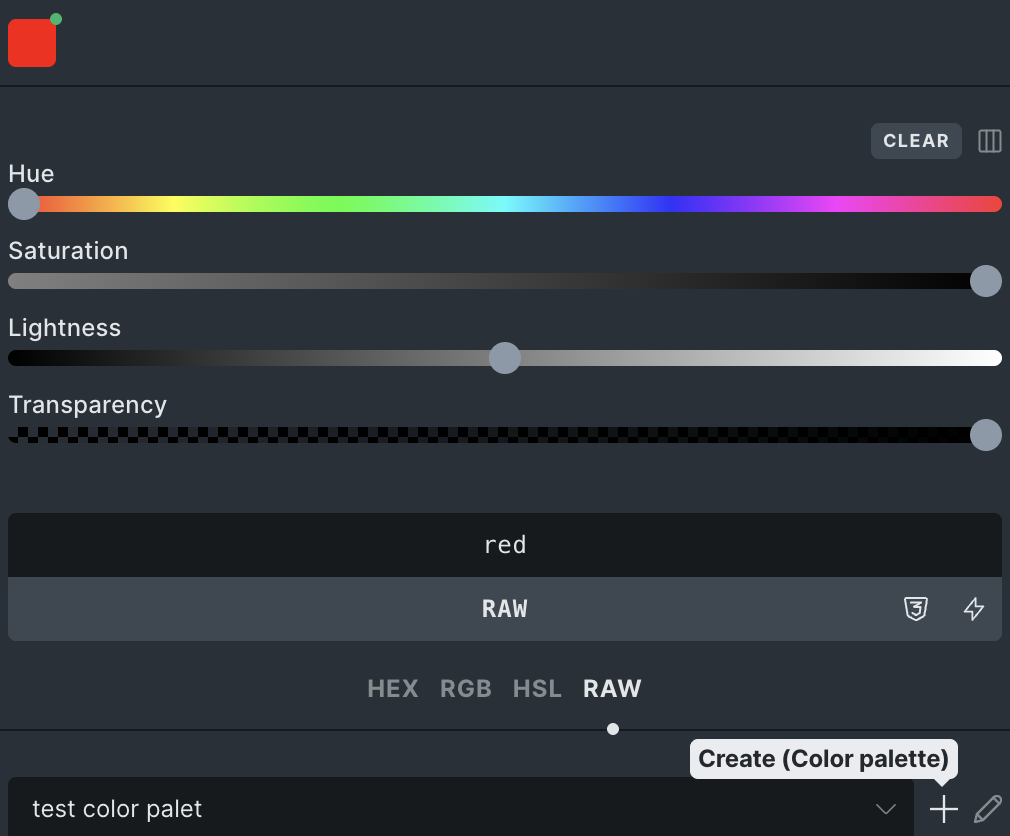
then import some JSON like this:
{
  "id": "dgnpcv",
  "name": "test color palet",
  "colors": [
    {
      "raw": "red",
      "id": "fqwmnn",
      "name": "Color #1"
    }
  ]
}
the ID’s are arbitrairy and not needed, all you need is the raw/hex/rgb/hsl and the name per color, to be safe you can use a 6ch random alpha code for the ID
note that RAW can contain variables like we defined did before
it should then be “raw”: “var(–test-color)”
other than that you could look at how ACSS does their automatic imports via code
upon further review, it looks like that the color palettes are stored in: get_option(‘bricks_color_palette’,)
it seems that that uses the same structure as the json posted above
I took some time to create a php snippet,
i am not sure howCoreFramework structures their data so you’d need to create a translation between the two:
Php function
<?php
/**
 * Import Bricks settings from a JSON file.
 *
 * @param string $json_path Path to the JSON file.
 * @return array|WP_Error Result of the import.
 */
function import_bricks_settings_from_json( $json_path ) {
	if ( ! file_exists( $json_path ) ) {
		return new WP_Error( 'file_not_found', 'JSON file not found.' );
	}

	$json_content = file_get_contents( $json_path );
	$data = json_decode( $json_content, true );

	if ( json_last_error() !== JSON_ERROR_NONE ) {
		return new WP_Error( 'json_error', 'Invalid JSON format.' );
	}

	$results = [];

	// Import Color Palette
	if ( isset( $data['colorPalette'] ) ) {
		$option_name = defined( 'BRICKS_DB_COLOR_PALETTE' ) ? BRICKS_DB_COLOR_PALETTE : 'bricks_color_palette';
		$updated = update_option( $option_name, $data['colorPalette'] );
		$results['colorPalette'] = $updated ? 'Updated' : 'No change or failed';
	}

	// Import Global Variables
	if ( isset( $data['globalVariables'] ) ) {
		$option_name = defined( 'BRICKS_DB_GLOBAL_VARIABLES' ) ? BRICKS_DB_GLOBAL_VARIABLES : 'bricks_global_variables';
		$updated = update_option( $option_name, $data['globalVariables'] );
		$results['globalVariables'] = $updated ? 'Updated' : 'No change or failed';
	}

    // Import Global Variables Categories
    if ( isset( $data['globalVariablesCategories'] ) ) {
        $option_name = defined( 'BRICKS_DB_GLOBAL_VARIABLES_CATEGORIES' ) ? BRICKS_DB_GLOBAL_VARIABLES_CATEGORIES : 'bricks_global_variables_categories';
        $updated = update_option( $option_name, $data['globalVariablesCategories'] );
        $results['globalVariablesCategories'] = $updated ? 'Updated' : 'No change or failed';
    }

	return $results;
}

// Usage example:
// $result = import_bricks_settings_from_json( 'path/to/settings.json' );
// print_r( $result );
Example Json
{
  "colorPalette": [
    {
      "id": "palette_1",
      "name": "My Custom Palette",
      "colors": [
        {
          "id": "color_primary",
          "name": "Primary",
          "hex": "#0d6efd"
        },
        {
          "id": "color_secondary",
          "name": "Secondary",
          "hex": "#6c757d"
        },
        {
          "id": "color_success",
          "name": "Success",
          "hex": "#198754"
        }
      ]
    }
  ],
  "globalVariables": [
    {
      "id": "var_spacing_sm",
      "name": "spacing-sm",
      "value": "0.5rem",
      "category": "cat_spacing"
    },
    {
      "id": "var_spacing_md",
      "name": "spacing-md",
      "value": "1rem",
      "category": "cat_spacing"
    },
    {
      "id": "var_spacing_lg",
      "name": "spacing-lg",
      "value": "2rem",
      "category": "cat_spacing"
    }
  ],
  "globalVariablesCategories": [
    {
      "id": "cat_spacing",
      "name": "Spacing"
    }
  ]
}
Thank you for taking the time to answer and provide code for this @Odinn_k !
1 Like
Hi Jamie,
We already have a task for this on our to-do list.
Ideally, it should be possible to paste variables and values to generate a color palette automatically, or select existing variables in the variable manager to create a color palette with a single click.
We’ll update this thread once it’s implemented 
4 Likes
@timmse Excellent.
Are there any plans to extend colour generation in general? Specifically, generating shades/tints from base colours much like how tools like CoreFramework allow you to.
Let’s put it this way: look forward to the next version 
6 Likes
You tease! 
1 Like