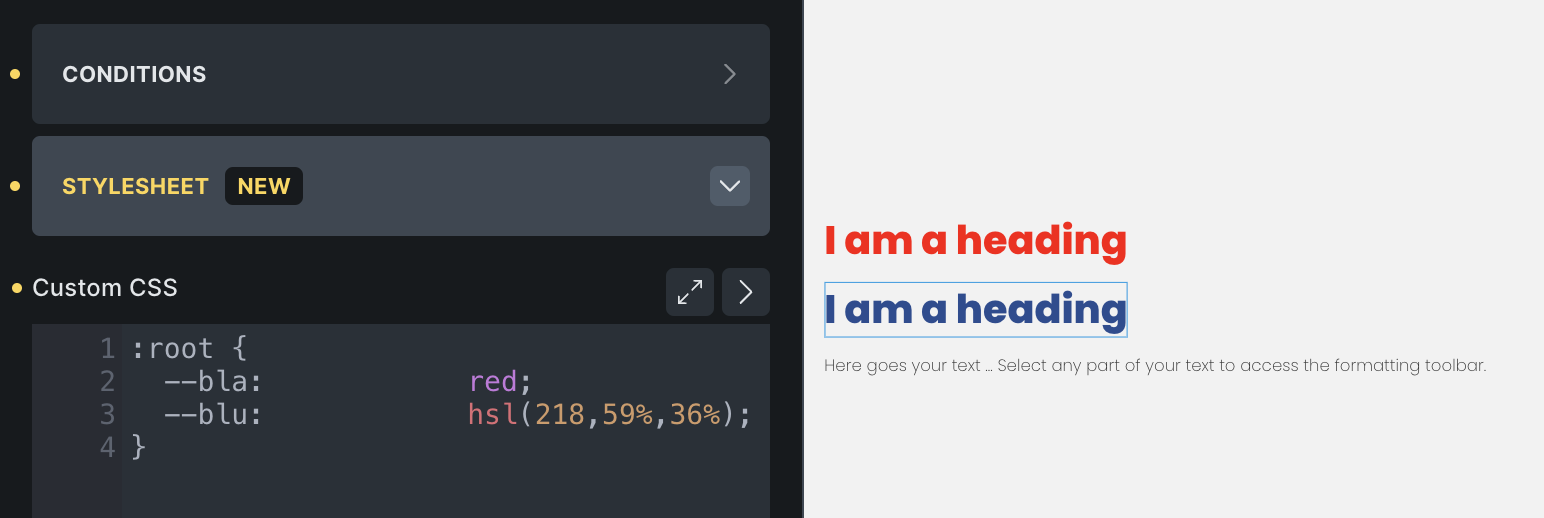
Browser: Windows Chrome, Version 138.0.7204.15 OS: Ubuntu
When tabs are used for text alignment of css variables in Theme Styles → Stylesheet, the variables are not detected or matchable in the builder’s UI.
Example:
If I create a variable like
:root {
 --my-color:<tab><tab>   hsl(whatever); /* tabs for alignment - breaks */
 --my-other-color:<space>hsl(whatever); /* space for alignment - ok*/
}
Using var(–my-color) in the color selector doesn’t get resolved, and doesn’t show the correct color in the builder (turns black). The elements, however, do display properly on the live site.
This seems to be because bricks is storing the \t literal in some internal data structure representing the custom stylesheet, but is then failing to parse it properly when it has the tab characters.
Hi Alex,
I think you need to update the variables by removing tab characters and using spaces instead:
css :root { --my-color: hsl(...); /* aligned using spaces */}
This way, Bricks Builder can correctly detect and match the variable inside its UI without affecting the frontend rendering.
I’ve tested it after this change, and it works as expected both in the builder and on the live site.
Fin as a workaround, but this is still a bug because it’s certainly unexpected and undocumented behavior. It’s pretty normal to tab things into place, and the editor allows tabs.
@timmse That’s interesting - the commenter above was able to reproduce it, so it might be slightly more specific than just a tab (although getting rid of the tabs fixed it)
I’ll spin up a totally blank instance and see if can create a simple, reproducible example.
This seems to be some kind of intermittent issue, because I cannot consistently reproduce it.
I thought I had it, and then tried to record a video… but then it worked as expected. I’ll update this again if I find a consistent set of steps reproduce this bug.