Windows 11, Latest Chrome
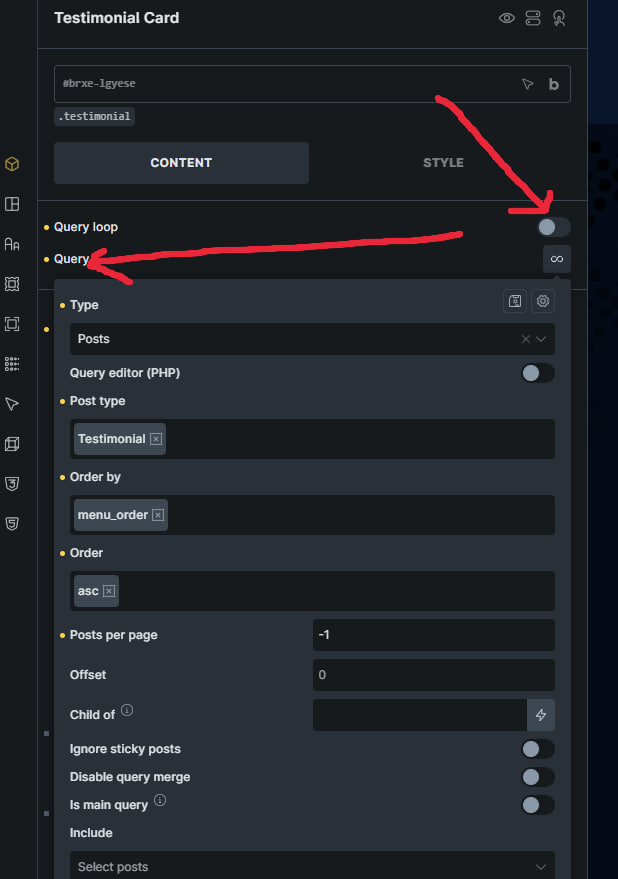
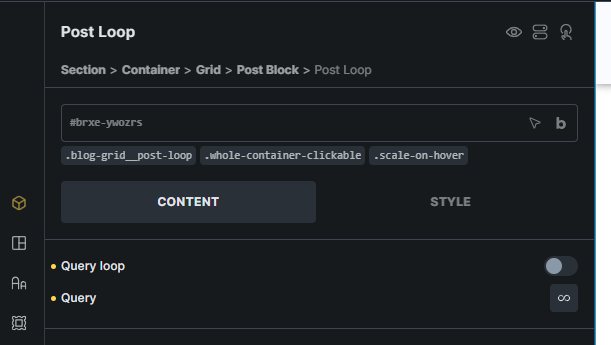
After updating Bricks, my ENABLED query loops are being displayed as DISABLED. This has happened across various Bricks versions and across various websites.
Hey @primexaos,
can you let me know from which version to which version you upgraded? I am switching from and to multiple versions, but never saw this issue, so maybe it’s something specific. Is this happening on all query loops, or just on a specific one? What about on a new ones?
Can you also copy-paste the element JSON of the element in question?
Thanks,
Matej
Hey @primexaos,
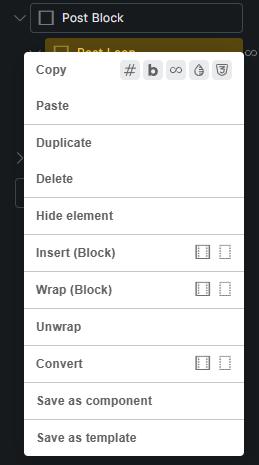
just click on “copy” and you should have JSON in the clipboard, then you can paste it here, but make sure that you paste it inside a code block (three backticks) or at least preformatted text.
But yeah, unless we can somehow replicate the issue, no way we can fix it. 
Matej
{"content":[{"id":"ywozrs","name":"block","parent":"qfytnh","children":["dmlbku","hvisxp"],"settings":{"_cssGlobalClasses":["ossjqq","racadh","lszzve"],"hasLoop":"1","query":{"objectType":"post","post_type":["post"],"is_archive_main_query":"1","orderby":["date"],"order":["desc"]}},"label":"Post Loop"},{"id":"dmlbku","name":"block","parent":"ywozrs","children":["fhbgpa"],"settings":{"_cssGlobalClasses":["kyrpvs"]},"label":"Media Wrapper"},{"id":"fhbgpa","name":"image","parent":"dmlbku","children":[],"settings":{"_cssGlobalClasses":["lujgvj"],"image":{"useDynamicData":"{featured_image}","size":"medium_large"},"loading":"eager"}},{"id":"hvisxp","name":"block","parent":"ywozrs","children":["rpqjsn","gmhpup","qlzhyu"],"settings":{"_cssGlobalClasses":["heqged"]},"label":"Meta Wrapper"},{"id":"rpqjsn","name":"text-basic","parent":"hvisxp","children":[],"settings":{"_cssGlobalClasses":["yhkrau"],"text":"{post_date}"}},{"id":"gmhpup","name":"heading","parent":"hvisxp","children":[],"settings":{"_cssGlobalClasses":["oivlow"],"text":"{post_title}","tag":"h2","link":{"type":"meta","useDynamicData":"{post_url}"}}},{"id":"qlzhyu","name":"text-basic","parent":"hvisxp","children":[],"settings":{"_cssGlobalClasses":["chycrq"],"text":"{post_excerpt:30}"}}],"source":"bricksCopiedElements","sourceUrl":"https://marcelgielezy.pl","version":"2.3.4","globalClasses":[{"id":"ossjqq","name":"blog-grid__post-loop","settings":{"_cssCustom":".blog-grid__post-loop {\n flex-direction: row;\n align-items: stretch;\n flex-wrap: nowrap;\n border-radius: var(--border-radius);\n overflow: clip;\n box-shadow: var(--box-shadow);\n max-inline-size: 75ch;\n text-align: justify;\n}\n\n.blog-grid__post-loop:nth-child(even) {\n flex-direction: row-reverse;\n \n & .blog-grid__post-loop__meta-wrapper {\n align-items: flex-end;\n }\n \n}","_cssCustom:mobile_landscape":".blog-grid__post-loop, .blog-grid__post-loop:nth-child(even) {\n flex-direction: column;\n max-inline-size: 50ch;\n \n & .blog-grid__post-loop__meta-wrapper {\n align-items: flex-start;\n }\n \n}\n"},"modified":1764024648,"user_id":1},{"id":"racadh","name":"whole-container-clickable","settings":{"_cssCustom":".whole-container-clickable {\n position: relative;\n isolation: isolate;\n \n a::before {\n position: absolute;\n content: \"\";\n inset: 0;\n z-index: 1;\n }\n \n}"}},{"id":"lszzve","name":"scale-on-hover","settings":{"_cssCustom":".scale-on-hover {\n transition: var(--transition);\n \n &:hover, &:focus-within {\n scale: 1.05;\n }\n \n}"}},{"id":"kyrpvs","name":"blog-grid__post-loop__media-wrapper","settings":{"_cssCustom":".blog-grid__post-loop__media-wrapper {\n overflow: clip;\n flex: 1 1 50%;\n}","_cssCustom:mobile_landscape":".blog-grid__post-loop__media-wrapper {\n flex: 1 1 100%;\n}"},"modified":1763979593,"user_id":1},{"id":"lujgvj","name":"blog-grid__post-loop__media","settings":{"_cssCustom":".blog-grid__post-loop__media {\n object-fit: cover;\n block-size: 100%;\n}"},"modified":1763936451,"user_id":1},{"id":"heqged","name":"blog-grid__post-loop__meta-wrapper","settings":{"_cssCustom":".blog-grid__post-loop__meta-wrapper {\n padding: var(--padding);\n gap: calc(var(--gutter) / 2);\n}"}},{"id":"yhkrau","name":"blog-grid__post-loop__post-cat","settings":{"_cssCustom":".blog-grid__post-loop__post-cat {\n font-size: var(--step--1);\n}"}},{"id":"oivlow","name":"blog-grid__post-loop__post-heading","settings":{"_cssCustom":".blog-grid__post-loop__post-heading {\n font-size: var(--step-1);\n}"}},{"id":"chycrq","name":"blog-grid__post-loop__post-excerpt","settings":{"_cssCustom":".blog-grid__post-loop__post-excerpt {\n font-size: var(--step--1);\n}"},"modified":1763936451,"user_id":1}]}
Hey @primexaos,
thank you for the JSON. I can see the issue with your JSON and it appears that the hasLoop is set to 1 instead of true in your case. However, I was not able to replicate this locally, with my elements and I did not find a code that could cause it.
So, in your case, best to just enable/disable/enable it and that’s it, should work like before.
I’ll keep en eye on this in the future, but if you notice a pattern, please let me know.
Matej
Im not sure if thats the pattern, but try right clicking and copying the loop onto another page
Nope, still works if I try that. In the new page, the loop is still active.
Matej
It only happens sfter the update through. Works fine in rhe beginning, then a few months later I come back to edit and realize the loop toggle is off while the loop itself works fine
My bet is that something will change the DB value. No idea why that could be, but it might be a migration, server update…
Sadly, I can’t replicate it even when upgrading / downgrading, so can’t debug it further 
Matej
Just letting you know that the same bug occurred on another Bricks website - the query loops set themselves to disabled again
Hey @primexaos,
thanks for letting me know.
Unfortunately this still does not give us enough new information to debug it from our side.
If this site still shows the issue, can you please send:
Ideally, if it’s reproducable, that would be great. But I suppose it’s not
Matej
I cant see any specific patterns, I have a few plugins and update all of them at once weekly. I could technically give you the login details, but you are likely to find the same issue as before, and its fixable by re-clicking the query loop toggle anyway.
Hmm, could you update next time plugin by plugin and check the query loop after each update?
I don’t have any other ideas for detecting what could be causing this.
Best regards,
Matej
Yes ill try that, and if i encounter the bug again ill try to describe it step by step. If its not bricks,nill let you know thwt another plugin caused it