Browser: Chrome 148
OS: Windows
This is the third time we’ve seen the same page break on a website with PHP fatal error due to the corrupted custom options of a nestable slider.
The PHP error is:
PHP Fatal error:  Uncaught TypeError: stripslashes(): Argument #1 ($string) must be of type string, stdClass given in /www/xxxxx/public/wp-content/themes/bricks/includes/elements/slider-nested.php:1190
Stack trace:
#0 /www/xxxx/public/wp-content/themes/bricks/includes/elements/slider-nested.php(1190): stripslashes(Object(stdClass))
#1 /www/xxxxx/public/wp-content/themes/bricks/includes/elements/base.php(2941): Bricks\Element_Slider_Nested->render()
#2 /www/xxxxxx/public/wp-content/themes/bricks/includes/frontend.php(748): Bricks\Element->init()
#3 /www/xxxxx/public/wp-content/themes/bricks/includes/elements/container.php(946): Bricks\Frontend::render_element(Array)
#4 /www/xxxxx/public/wp-content/themes/bricks/includes/elements/base.php(2941): Bricks\Element_Container->render()
#5 /www/xxxxx/public/wp-content/themes/bricks/includes/frontend.php(748): Bricks\Element->init()
#6 /www/xxxxxx/public/wp-content/themes/bricks/includes/elements/container.php(946): Bricks\Frontend::render_element(Array)
#7 /www/xxxxx/public/wp-content/themes/bricks/includes/elements/base.php(2941): Bricks\Element_Container->render()
#8 /www/xxxxx/public/wp-content/themes/bricks/includes/frontend.php(748): Bricks\Element->init()
#9 /www/xxxxx/public/wp-content/themes/bricks/includes/frontend.php(902): Bricks\Frontend::render_element(Array)
#10 /www/xxxxx/public/wp-content/themes/bricks/includes/builder.php(1395): Bricks\Frontend::render_data(Array, ‘content’)
#11 /www/xxxxxx/public/wp-content/themes/bricks/includes/builder.php(321): Bricks\Builder::builder_data(1183)
#12 /www/xxxxxx/public/wp-includes/class-wp-hook.php(341): Bricks\Builder->enqueue_scripts(‘’)
#13 /www/xxxxx/public/wp-includes/class-wp-hook.php(365): WP_Hook->apply_filters(NULL, Array)
#14 /www/xxxxx/public/wp-includes/plugin.php(522): WP_Hook->do_action(Array)
#15 /www/xxxxx/public/wp-includes/script-loader.php(2329): do_action(‘wp_enqueue_scri…’)
#16 /www/xxxxxx/public/wp-includes/class-wp-hook.php(341): wp_enqueue_scripts(‘’)
#17 /www/xxxxxx/public/wp-includes/class-wp-hook.php(365): WP_Hook->apply_filters(NULL, Array)
#18 /www/xxxxxx/public/wp-includes/plugin.php(522): WP_Hook->do_action(Array)
#19 /www/xxxxx/public/wp-includes/general-template.php(3208): do_action(‘wp_head’)
#20 /www/xxxxx/public/wp-content/themes/bricks/header.php(7): wp_head()
#21 /www/xxxx/public/wp-includes/template.php(814): require_once(‘/www/xxxxx…’)
#22 /www/xxxxx/public/wp-includes/template.php(749): load_template(‘/www/xxxxxx…’, true, Array)
#23 /www/xxxxx/public/wp-includes/general-template.php(48): locate_template(Array, true, true, Array)
#24 /www/xxxxxx/public/wp-content/themes/bricks/template-parts/builder.php(2): get_header()
#25 /www/xxxxx/public/wp-includes/template-loader.php(132): include(‘/www/xxxxx…’)
#26 /www/xxxxxxx/public/wp-blog-header.php(19): require_once(‘/www/xxxx…’)
#27 /www/xxxxxx/public/index.php(17): require(‘/www/xxxxx…’)
#28 {main}
thrown in /www/xxxxxx/public/wp-content/themes/bricks/includes/elements/slider-nested.php on line 1190
I cannot view the frontend of the page or the Bricks edit UX, both will throw the PHP fatal error and crash.
However, from WP backend I can duplicate the page and then the Bricks editor will open.
When I edit the duplicated page and look at the Slider (nestable) settings, I see this:
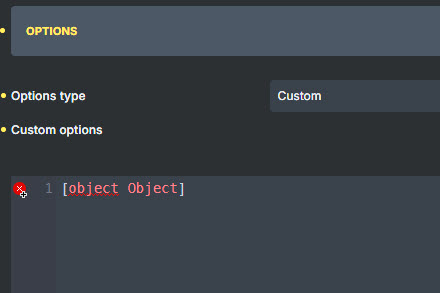
The custom options were always valid, it used to be this:
{"type":"loop","autoWidth":true,"height":"35vh","direction":"ltr","keyboard":"global","rewind":false,"gap":0,"start":0,"easing":"linear","speed":9000,"interval":0,"autoplay":false,"pauseOnHover":false,"pauseOnFocus":false,"arrows":false,"pagination":false,"mediaQuery":"max","drag":"free","autoScroll":{"speed":1,"pauseOnHover":false}}
I know there are other posts that blame the Enable Media Replace plugin for this, but in our case, even though we have this plugin, it has not been used for the images on this particular page. The images have been the same since the original build.
In fact, there is another page with a slider (different images) that hasn’t corrupted once, but this page keeps breaking.
I don’t know why the JSON string keeps getting changed into an object type, or at least Bricks thinks it is? There is a data type conversion issue or a rendering problem or something.
In any case, this is not robust and the slider code needs to have some data/error checking to prevent this. The client is already hesitant to edit this page cause nobody knows when it’s going to randomly blow up with fatal crash again.
For more information, I went into the databasse directly and looked at the Bricks content in the _bricks_page_content_2 option.
The broken slider looks like this:
s:12:"lbydf-slider";s:8:"interval";s:1:"0";s:7:"options";O:8:"stdClass":19:{s:4:"type";s:4:"loop";s:9:"autoWidth";b:1;s:6:"height"......
Notice the “sstdClass” reference.
When I duplicate the page and fix the custom options, it looks like this:
s:12:"lbydf-slider";s:8:"interval";s:1:"0";s:7:"options";s:335:"{"type":"loop","autoWidth":true,"height"...
Now it’s just a 335 char string.
Why in the world does it randomly switch to a stdClass? And why doesn’t the slider have some data type checking to avoid a fatal crash?
I don’t really know what to do to fix it or find the root cause of the corruption.
Hopefully this information helps someone!
In the meantime I’m going to have to find some other tool to make this slider.
