I had a small design in plain html with block and I copy/pasted it into Bricks. It created the element tree just fine with class names attached and some styles set in the style panel. Everything was fine.
One thing that it did was create a variable which it then put in the font selection box, like this:
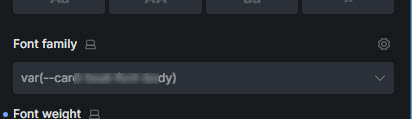
I can’t erase this variable. It’s not in the dropdown list and I can’t type in the box manually. So if I select a font, it will use that font, but if I erase the font selection, it defaults back to this variable again.
I can’t find where this is happening. It’s not the default font in the global styles, that is set properly. There’s no custom CSS or code on the page.
I don’t know how Bricks parsed the html/css into this variable in the first place. The variable doesn’t exist in the variable manager. Nevertheless it’s stuck in here. How do I clear it out? How is there even a variable reference here? I can’t type a custom variable here if I wanted!
There are no custom fonts added to this site. The default font is Arial, set in global styles.
What’s going on?