Yes, the function is whitelisted and works correctly as an Echo Function.
When used in a Text element, it returns the expected attachment ID (e.g. 497139). The attachment exists in the Media Library and can be opened directly via the admin URL.
The issue only occurs when using the same Echo Function as the Dynamic Data source of an Image element.
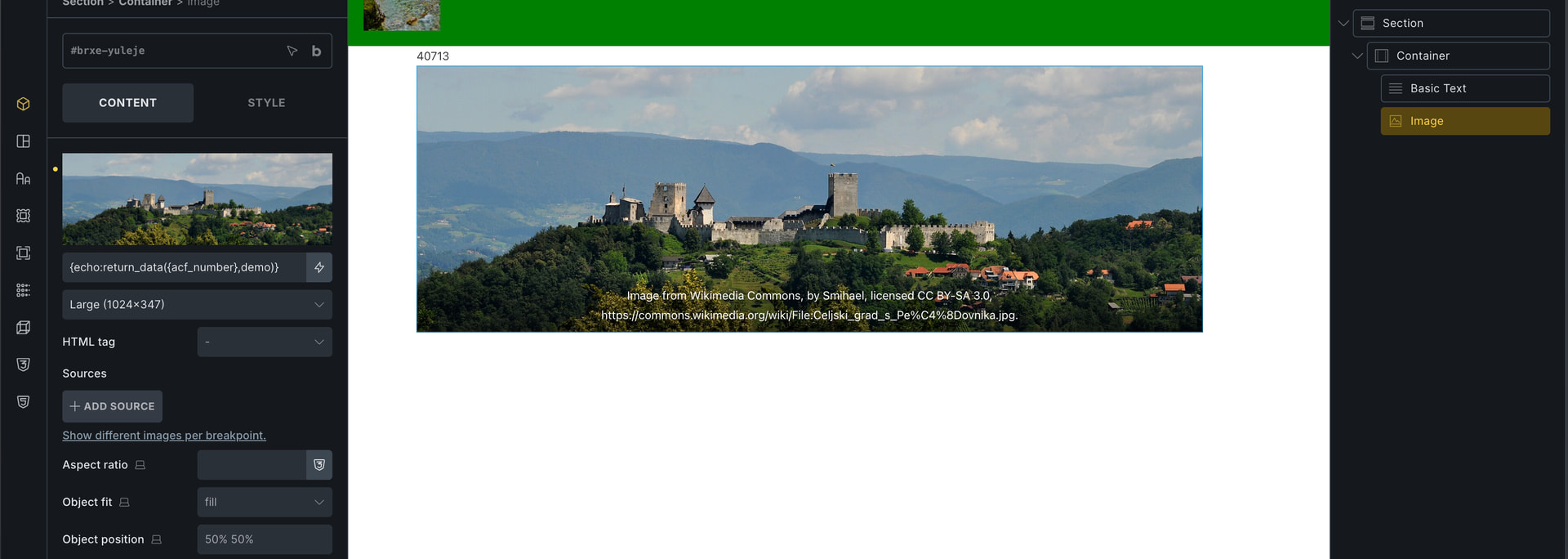
I cannot replicate the behavior. If you look at the screenshot below, I tried to reproduce the same function. It takes the ACF field, which returns the image number, and you can see the basic text returning the number and the image element returning the image itself.
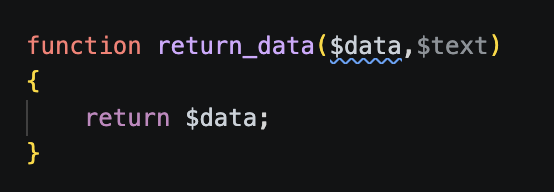
Here is how my function looks. It is quite simple; I just return the data and that is it. Perhaps you could try using the simple function as well, although I am unsure what situation you might be facing.
Really, I suggest that you just try to create a simple function with no parameters and just return the ID. And if that works, add one parameter and add the fixed ID inside the bricks. If that works, then maybe change that idea with the custom field and so on. And then see when it breaks, at what stage it breaks in your case, then it might help me replicate the issue locally as well, because now I can’t
The profile_picture user meta contains the Media Library attachment ID.
When I output the value in a text element, it returns the correct attachment ID.
However, when I use the same dynamic data in an Image element, the image is not rendered.
Am I missing a specific format that Bricks expects from custom echo functions for Image elements? Should the function return the raw attachment ID, an array, or something else?
Can you let us know which Bricks version is installed? It’s 1.9.7.1 or the latest 2.3.6?
Please try wrapping each argument with single quotes {echo:get_user_field_by_id('{je_cct_interview_evaluation_ie_id_teacher_applied}','profile_picture')}
Please try error_log to check the output value so you can find the root cause.
Example:
I am using Version: 2.3.6 and try wrapping it didnt work, when I use the same code with the text field, it will give me the ID for the image and work well. Just think when I use it in the image, it doesn’t show me anything and it will hide the image because it’s like empty. I tried this code and it doesn’t work; all of this doesn’t work.
My question would be, why are you creating a custom echo function for an image? Why not use a dynamic tag? What is it that you are trying to achieve?
Also, screenshots or video or your setup is super helpful and respects people time, as we are just trying to guess at this point. As where is this coming from {je_cct_interview_evaluation_ie_id_teacher_applied}? Is this a custom field or?
I would first try error_log out and check what the $user_id outputs are (Like my step 3 stated)
I suspect the {je_cct_interview_evaluation_ie_id_teacher_applied} is unable to resolve when parsing the dynamic tag on the image element.
Bricks dynamic tag is a little complicated to explain. When rendering an element, Bricks will first parse the dynamic tag on the element level once, and also before rendering the HTML.
As this dynamic tag {je_cct_xxxxx} is not maintained by Bricks source code, I can’t really test this locally. JetEngine CCT is not supported in native Bricks, it should be created by JetEngine plugin.
So I think Jenn has hit the nail on the head with JetEngine and Bricks, but I am not sure as I don’t use JetEngine, so not sure how the dynamic tags work in that regard.
Either way, it seems complicated to me using custom functions and then echoing them out, but that might be the limitation of JetEngine and dynamic tags and my small brain. =]
Either way, I did a video showing how I use MetaBox and dynamic tags which makes life much easier. Have a look and maybe it will help find a solution.