Browser: Chrome 110 OS: macOS / Windows / Linux / etc. URL: Link to a page that illustrates this issue Video: Short screen recording that illustrates this issue (free tool: jam.dev)
Hi bricks team,
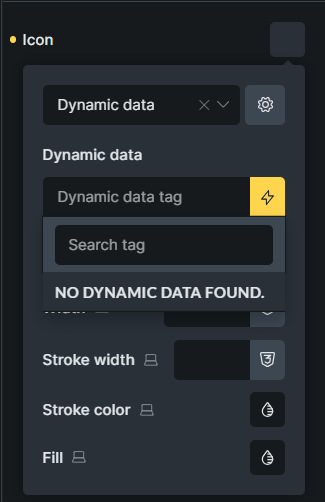
I have selected SVG icons for WooCommerce categories to render and style them in bricks with the icon element. But the icon data dynamic is not displaying anything. Am I doing something wrong?
I see. Here only ACF and MetaBox Icon fields are supported. I guess you don’t have any, so it doesn’t show it.
If you can confirm that you don’t have any, then I’ll mark this as a no-bug, and you will have to use some other element (if it’s SVG, you can try using SVG, otherwise you can use image element).
Thanks for the solution. The SVG element works great. But if I manually add dynamic data in the icon element, it returns the icon as img. Is this expected behavior?
thanks for confirming. But I’m a little confused on your reports, because now you wrote that if you manually add dynamic tag to the icon field, it will return img:
But on the first post, you said it does not display anything.
If the dynamic tag is no from ACF or MB icon fields, I guess it should not display anything, but on the other hand, you manually entered the dynamic tag inside, which should not be the case anyway.
What dynamic tag were you using?
When I first wrote the report, I didn’t know that it was possible to insert dynamic data manually. I didn’t even know that in the SVG dynamic data element, all dynamic data is displayed (unlike the icon element).
After you gave me your guidance, I tested it and found that dynamic data works fine in the svg element. Then I took the dynamic data and added it to the icon element. In the icon element, the dynamic data is rendered well, but the icons are added with the Img tag. That’s why I asked you if this behavior is normal or not.