Browser : Chrome 110OS : Windows
Hi everyone,
I’m working with a Bricks form and using the bricks/form/validate filter to add custom validation.
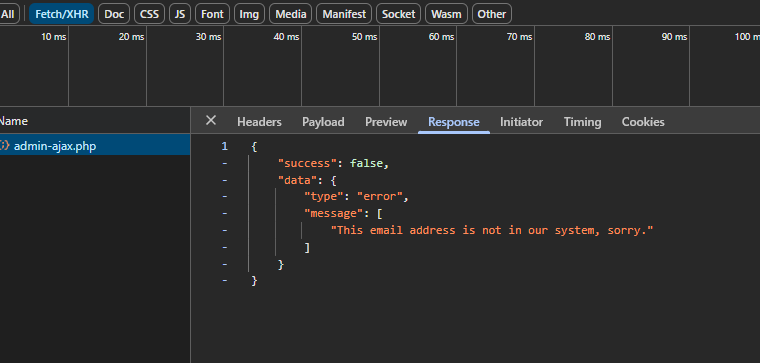
My custom function correctly returns errors, like this ( i can see it in chrome dev tools):
add_filter( 'bricks/form/validate', function( $errors, $fields, $form ) {
   if (email_exists($email)) {
        $errors[] = esc_html__('Vous avez déjà un compte.', 'bricks');
    }
    return $errors;
}, 10, 3 );
The problem is: the errors don’t appear in the frontend form.
The form submits, the validation runs, but no error message shows under the field.
I’m expecting the error message to be displayed under the input like Bricks normally does.
Has anyone experienced this? Do I need to trigger something else for Bricks to display these custom errors?
Thanks a lot for your help!
Matej
July 11, 2025, 5:14am
2
Hi @julielabrune83 and welcome to the forum
I’ve tested locally, can you try with the filter below?
add_filter(
    'bricks/form/validate', function ( $errors, $form ) {

        $errors[] = esc_html__('This email address is not in our system, sorry.', 'bricks');

        return $errors;
    }, 10, 2
);
or if you need it, you have full example here: Form Element – Bricks Academy
The reason why it’s not working for you, it’s because your filter expects 3 parameters, but it got only 2.
Let me know please,
Hi @Matej ,
thank you for your feedback.
thanks for your help
Matej
July 11, 2025, 9:14am
4
Hi @julielabrune83 ,
do you have a link, where I can test this?
Thanks,
hi @Matej ,
Matej
July 14, 2025, 1:44pm
6
Feel free to send temporary login credentials to your website and a link to this topic to help@bricksbuilder.io using the email address you used during the purchase, then we can take a look
Best regards,
 .
.