Browser: Chrome 110
OS: macOS / Windows / Linux / etc.
URL: Link to a page that illustrates this issue
Video: Short screen recording that illustrates this issue (free tool: jam.dev)
The filters repeatedly lose functionality in the first or second language for no reason. If you change something in the filter and save it, it works again in the saved language but not in the second language, and vice versa. Sometimes it helps to update the posts in bulk. But usually only in one language. We use ACF Pro, WPML and Bricks. Unfortunately, I haven’t found a solution. I’m asking for help. Thank you, Stefan.
Hi @Webbrick ,
It would be best if you could provide admin access for us to investigate. Please send admin credentials to help@bricksbuilder.io and include this thread URL in the email as a reference.
Maybe the filter element DB was corrupted.
Regards,
Jenn
Hi Jenn,
we have an idea or suspicion as to when the problem occurs. We have created a single template from German to English, or rather duplicated it with WPML. The German template has a filter, which is also transferred to the English template. As soon as the English template has been created, the filter no longer works in German. If you press the Repair Filter button, it seems to work again. Is there any way we can avoid this, or are we doing something wrong? I hope the error does not occur randomly in other places. What experience do you have with this problem?
Thanks Stefan
Hi @Webbrick ,
I apologize for losing the email from October.
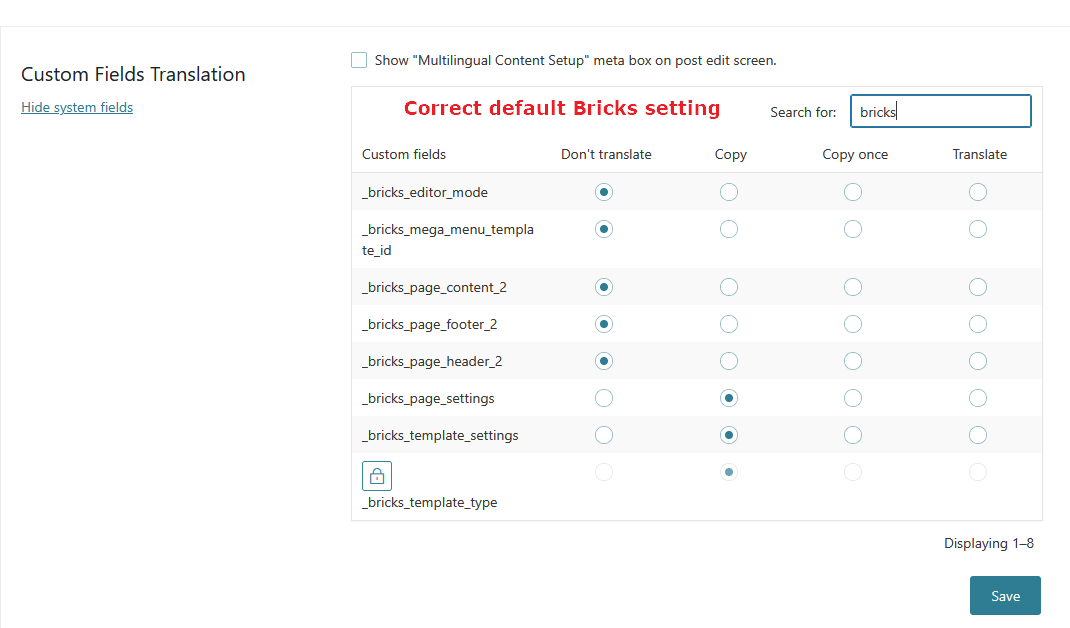
I just received a similar ticket from another user, and we found that the Custom field translation setting in WPML is not quite right.
Can you also check yours?
Reference