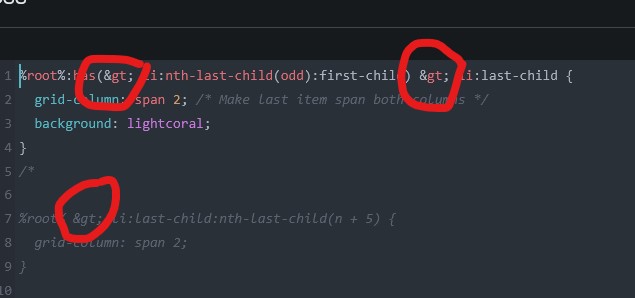
Thanks for the report and first, sorry for not answering sooner.
I can reproduce this on try.bricksbuilder.io with special characters such as > and & in custom CSS after saving and reloading.
This appears to be related to how WordPress handles the unfiltered_html capability. On WordPress multisite, regular site admins do not have this capability by default; only super admins do.
When a user does not have unfiltered_html, WordPress sanitizes/escapes certain saved content for security reasons. That can turn characters like > into > and & into &, which then breaks CSS selectors like %root% > li.
Try Bricks runs as a multisite, so this is likely why you’re seeing it there. We’re checking the playground configuration to confirm whether we can improve this behavior for custom CSS in that environment.
Have you also been able to reproduce this on your own Bricks install, outside of try.bricksbuilder.io? If yes, please let us know your WordPress role and whether the site is single site or multisite.