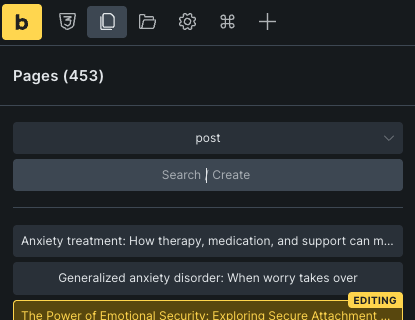
I created a new post (within a CPT called “landing page”). I saved the post as a draft and edited in Bricks. Worked great. Left the post and came back to edit a short time later. When I click to edit with Bricks, it 302 redirects to the core posts post type (e.g. blog post list table) with the following message:
Bricks is not enabled for post type “post”. Go to “Bricks > Settings” to enable this post type.
After trying out a few different things, I found that only when I published the post would it allow me to edit in Bricks again.
Follow up, it doesn’t appear to be saving even after publishing. It appears to be treating it literally as a post (it’s displaying a post title tag in my browser window, even though it’s a completely separate CPT).
I got to thinking about the pages tab in Bricks editing mode and when I clicked on it, it showed posts by default (even though I’m not editing a post, I’m editing a single post in a CPT) and had one of the posts selected by default, which explains why it’s doing the redirect.