Browser: Chrome 150.0.7871.187
OS: macOS
URL: N/A
Video: N/A
In a previous topic I had created regarding the Form element, I had created a form that had 9 fields. For each of these fields, I used a custom value for the width property in the field settings.
I copied this Form element and pasted it to use on another page. This instance of the form has only 6 fields.
The problem I’m having now is that the submit button is almost being treated as a 7th field since it uses the same form-group class as the fields, and the custom width values from the original Form element instance seem to be retained and associated with the same indices of the original form instance. This is proven by the styling to div.from-group.submit-button-wrapper as seen here:
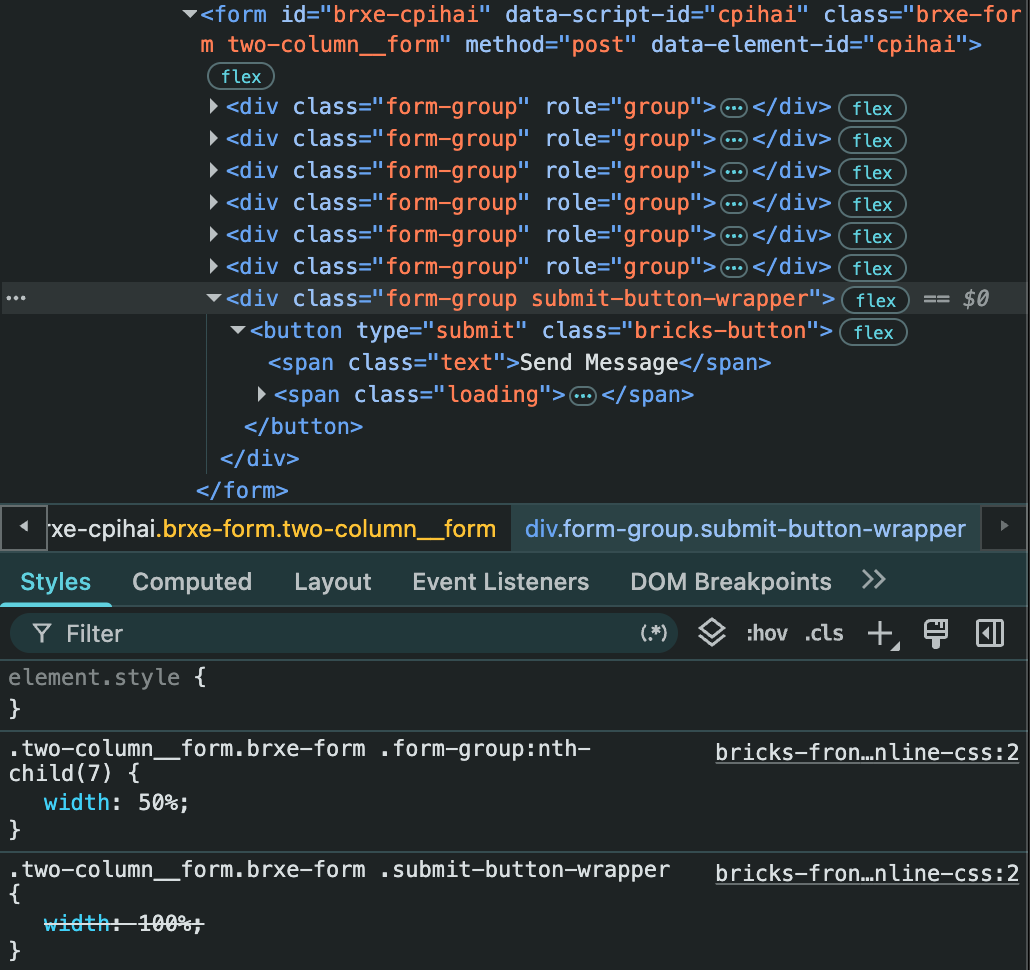
So basically, whatever the custom width value was for the field at index 7 in the original form instance is being applied to my submit button now since the submit button is at index 7 for form element children with the class form-group. In this case, that custom width value is 50%.
The width value I am trying to achieve for the submit button is 100%, but it is being overridden by the retained custom width value for the field at index 7 in the original form instance.
I have already tried regenerating CSS files and this did not fix the issue.
I think that this is a bug as I wouldn’t expect the custom width values associated with fields and their respective indices to be retained when those fields are deleted after being copied.