Hello
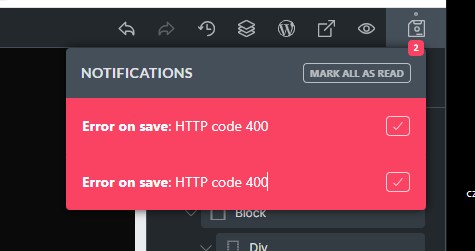
Please help! Bug - Error on save: HTTP code 400
I can’t save the page
WordPress 6.6.2
Bricks 1.11.1.1
php 8.3.14
Hello
Please help! Bug - Error on save: HTTP code 400
I can’t save the page
WordPress 6.6.2
Bricks 1.11.1.1
php 8.3.14
Usually happens when your session has logged out in the background. Point a new tab at your admin area, log in, then try saving again in the old tab (you might well get a nonce error or similar though)
Alternatively, copy all, refresh, log in if you need to, then delete all and paste all before saving
I was just having this same issue and solved it.
Was doing all kind of approaches in Bricks, cleaning cache and reload until I realize that the issue was somewhere else. The server was full and exceeded the Quota due to heavy backups. After deleting them and creating space at the server, this error disappeared, and I was able to save in Bricks.
Hope this works for you.
Let me know it that’s the case.
Had the same issue.
In my case not the server quota exceeded but the inodes did.
That means: a web server usually has a maximum number of files (“inodes”), in my case the issue was that this maximum had exeeded.
My client had several copies with wordpress installations on his server, each containing an inactive piwik/matomo installation.
piwik/matomo is known for consuming a huge number of files in its installation so that was wayyy too much and the inode maximum was reached – so nothing else could be written.
I’ve cleant up the webspace, deleted the unused folder. That solved the issue. 
So if anybody runs into this issue: check for free disk space, and if this space looks good, look for the consumed amount of inodes.