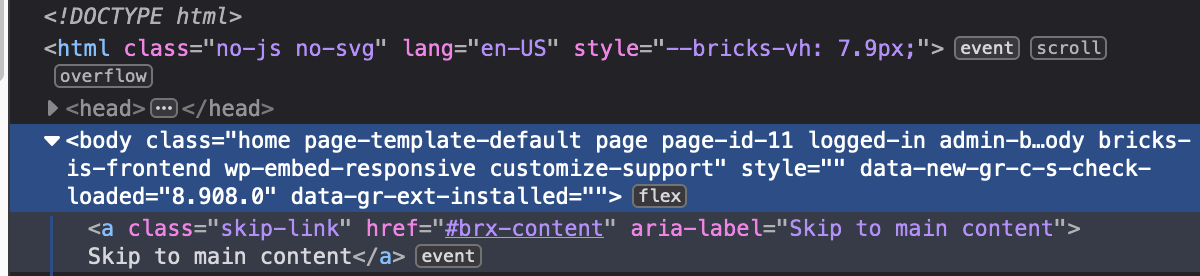
But when I create a Header in the “Bricks Templates”, a style=“opacity: 0;” is added to the Body tag and it’s pasted with the Class without any space, which creates an HTML error.
See screenshot.
Hello Charaf,
In fact, I only noticed it recently on 2 production sites.
So, to investigate, I set up a local test site to replicate the bug.
I’ve found out where it’s coming from, and it has nothing to do with plugins but comes from the WEBFONT LOADING METHOD setting.
To replicate the bug :
1 - I create a new WordPress database.
2 - I check that there are no plugins.
3 - I add the Bricks theme and the Child, activate the Child and activate the license.
4 - I create a “Home” page.
5 - I edit it with Bricks and add a template from the community to make it quick, in my example I’ve taken “Digital” and I don’t import the template styles just the colors.
6 - I check the page published on the front no problem and I look at the source code no problem on the body tag.
7 - I create a Header via Bricks → Templates.
8 - I edit it with Bricks and also import the header from the “Digital” theme. Likewise, I don’t import styles, just colors.
9 - I check the published page with the header in front no problem and I look at the source code no problem on the body tag.
10 - I go to settings and activate “css loading method = external files” so far so good.
11 - however, as soon as I activate “WEBFONT LOADING METHOD = WEBFONT LOADER (JS)” => that’s when style=“opacity: 0;” is added to the Body tag.
Hi Charaf,
I’ve just sent you an email to help@bricksbuilder.io with the test server login details and the link to this forum thread.
Thank you for your investigation.
Cyril
Hi Charaf,
I tested on the 4 sites in production that I have on Bricks Builder and I deactivated on all sites the “WEBFONT LOADING METHOD = WEBFONT LOADER (JS)” and put instead the “Stylesheets (default)” and I confirm that it removes well on the 4 sites the style=“opacity: 0;” of the Body.
Thank you for sharing access. I don’t see the opacity property being applied to the body on the site you’ve shared. All the settings are the same as you’ve shared them. And I tried checking for it on Firefox, Chrome, and Safari.
Hello Charaf,
Thank you for your investigation of the test site.
It’s really strange that you don’t see the style=“opacity: 0;” … when I read your answer I thought it was coming from my development stack as I’m on Linux … but I checked on a Windows 11 computer on Firefox, Chrome and Edge and on my side it’s quite visible when I activate the “WEBFONT LOADING METHOD = WEBFONT LOADER (JS)” when a Header is created with Templates.
It’s a shame that no one else from the Bricks community give feedback on this discussion. It would have been nice to have another opinion.


 I can’t replicate this locally so can you maybe disable all plugins and see if that style is removed? Thanks!