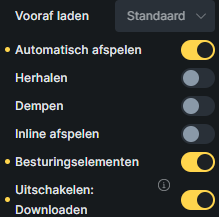
I have a landing page that has a video with audio as the background. I’m having an issue with the video not autoplaying on a mobile. It works fine on the PC. I have these controls selected:
I’ve also tried it with the controls option selected but it never autoplays.
Even on the PC, I have to interact with the page before the video plays, even a slight scroll is needed to kickstart it, but I can live with that, but on a mobile, it just doesn’t play ball.
The Video is an mp4. It is a full screen video, that is behind the text/pics on the page. I tried those settings too, and I still had the same issue, mainly on Android phones, IOS seem to autoplay.
I had a issue with a video before (not bricks but coded) and then mp4 did not work very good in mobile screens and did not play. Webm format worked just fine with that issue. Maybe you can try the Webm format for your video. The settings on my screenshot are also with the Webm format.