i want to ask…
about step 2… where do i need to add the text “php_value max_execution_time 180” in the .htaccess file?
also… where do i find the php.ini file?
i only succeeded with the first step for now…
tnx
i want to ask…
about step 2… where do i need to add the text “php_value max_execution_time 180” in the .htaccess file?
also… where do i find the php.ini file?
i only succeeded with the first step for now…
tnx
Php settings are often found at your hosting provider on server settings.
Log in to the hosting provider, search for advance configuration and php settings.
did it…

do you know where i should put the line in the .htaccess too? it is not easy to understand
tnx
i mean… should it be at the first arrow location from the top or the second arrow location?
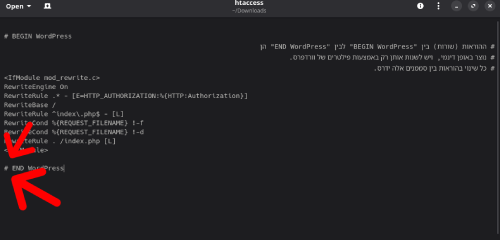
It must always go before the end
But it is not a rewrite rule, and other examples seem to target their specific php version
https://stackoverflow.com/questions/7739870/increase-max-execution-time-for-php
But since it ain’t in there, but it is there, it must be defined elsewhere.
See if you can find a php.ini at the root of your hosting directory.
There are plugin’s to do it like this one though not updated for 4 years but might be working just fine.
If you want to use the htaccess i think it goes below the rewrite above the end but im not sure as i would always go find it inside the php settings. Also the above examples seem to have tags to target their php version.
Also, a script running for 300 seconds is really long and should not happen.
Google Pagespeed Insights also appears to be able to change the max execution time
Not sure if this is Hostinger specific:
php_value max_execution_time 60