SOLVED: WooCommerce Release 8.1.0 - Cart Template Mismatch

Recent release of WooCommerce 8.1.0 has a new cart template that does not match the bricks template. I figure an update would be released, but maybe a possibility since this is a on going thing when WC is updated, to make a patch file vs. waiting for a full release?

Thoughts?

3 Likes

How is this a bug? :smiley: just copy the template file from woocommerce folder to the bricks theme and you’re good to go.

1 Like

Hey Lyle,

thanks for your report.

We’ve already updated the outdated template internally. So this will be fixed with the next update.

Best,

André

2 Likes

There are differences between the woocommerce template and the bricks template, so its not a 1-1 copy. Yes, I could go through a diff them, but rather than missing something, the updates from the Bricks team would be preferred. I was just suggesting that they just provide the couple files we can manually replace vs. waiting for the update.

1 Like

@aslotta, So as I mentioned in the OP, whats the chances of getting these small updates in a patch file or something so there isn’t a delay between a normal bricks release and when WC is updated?
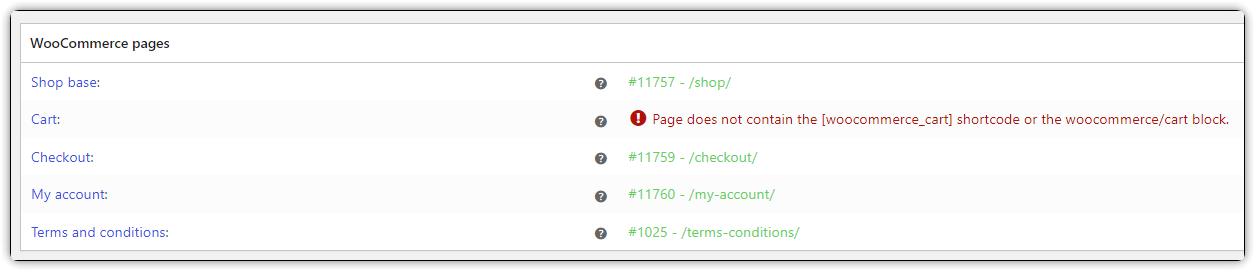
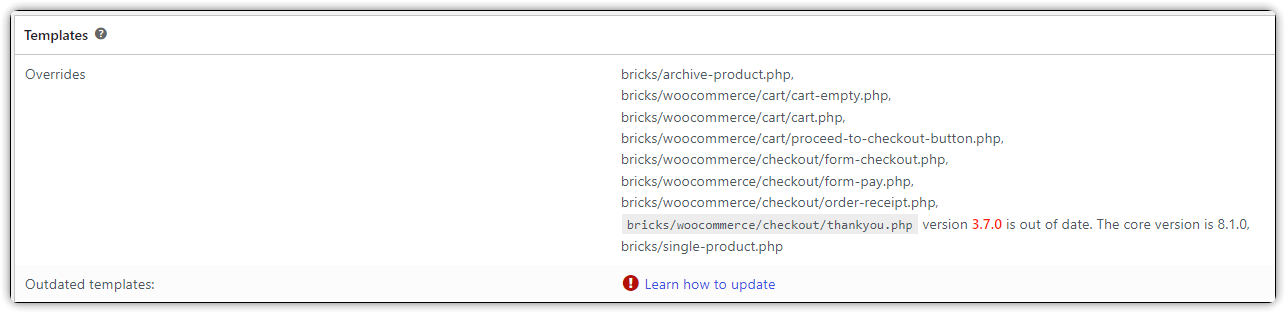
1 Like

I am seeing the Thankyou page being out of date.

bricks/woocommerce/checkout/thankyou.php` version 3.7.0 is out of date. The core version is 8.1.0

Same here. Using Bricks 1.9 with Bricks Child Theme and WooCommerce 8.1.0 reporting thankyou.php version 3.7.0 is out of date.

I have the same issue " bricks/woocommerce/checkout/thankyou.php version 3.7.0 is out of date. The core version is 8.1.0,"

Hi guys,
We’ve fixed this issue in Bricks 1.9.1/1.9.1.1, now available as a one-click update in your WordPress Dashboard.

Please let us know if you are still experiencing issues.

Best regards,
timmse

2 Likes

Still some issue in version 1.9.1.1

Hello Chaja,
Welcome to the forum!

The form-pay template has been updated in Bricks 1.9.2 beta :wink:

As with any beta release, please do not use it on any production/live website. It is only meant for testing in a local/staging environment.

In general, you can ignore the message, because only a new filter was added, which did not exist before. Accordingly, the change has no effect.
