SOLVED: WooCommerce pages change footer font styles

In the footer, I have basic text HTML-tagged as address that displays in italic over the whole website, but as soon as I go to the WC shop or product pages, it gets displayed in normal font.

Adding font-style: italic; fixes the issue, but it should not change “by itself”. From what I recall there were also footer issues in the previous versions (weird block-end margin visible on WC pages), maybe it’s somehow related (and maybe not).


UPDATE: IT’S NOT JUST A SINGLE SITE, THE ISSUE PERSISTS ON OTHER WEBSITES AS WELL.


Hi Daniel,
Thanks so much for your report!

I reproduced the issue and added it to our bug tracker.
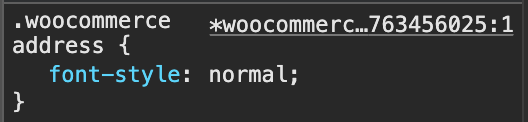
Of course, this happens on every website, as the styles responsible for this exist everywhere:

Best regards,
timmse

1 Like

We fixed this issue in Bricks 2.2 RC, now available as a manual download in your account (see changelog).

Please let us know if you are still experiencing issues.

As with any pre-stable release, please do not use it on a production website. It is intended for testing in a local or staging environment only.

1 Like

Superb! Any news about input fields? Can we use them already to type the content in? For the past few months, when you were typing stuff into any input fields on Windows, it would execute actions such as deleting page elements instead.


Still in progress: WIP: Elements are being deleted as I type CSS (Windows)

1 Like