Hi,
I have seen this on multiple client websites where the turnstile validation is failing randomly but now i also see it on the Bricks Login form:
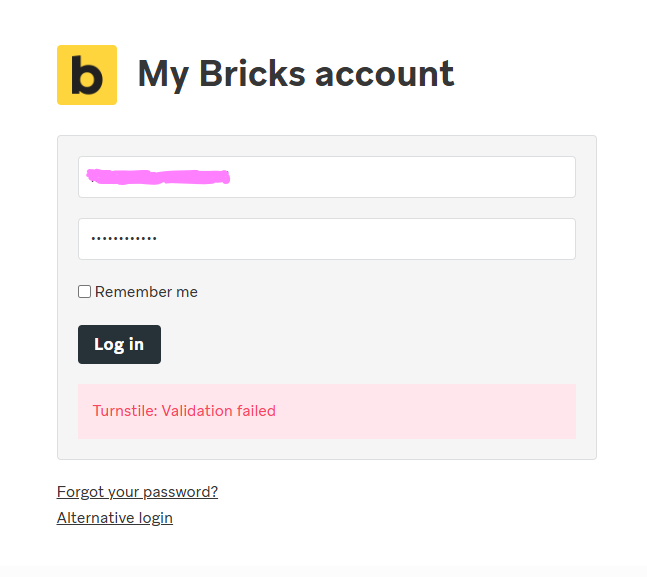
On 2nd load it’s passing.
Jasper
Hi,
I have seen this on multiple client websites where the turnstile validation is failing randomly but now i also see it on the Bricks Login form:
On 2nd load it’s passing.
Jasper
This occurs when the user is not interacting with the website, indicating that the user may be a robot. However, if you manually scroll or type to form, the CAPTCHA will pass without any issues.
I would greatly appreciate the ability to modify the error message for CAPTCHA validation, though.
Hi Martin,
That’s what i also know theoretically. But it happens “instant” after the form is loaded. The same with Bricks Login or Regular forms used in the website. Before the user is able to start filing the fields the error message is already there.
Jasper
Hi @joep,
can you replicate this issue on my.bricksbuilder.io every time or only occasionally?
Matej
Hi Matej,
It’s occasionally on my.bricksbuilder.io (2 times now) but i have seen multiple occasions on different client websites. I am using Bricks for Forms and WP Login page.
If it happens more i will report back; maybe a topic starter if more people see it happening that we can investigate further.
Jasper
Hi @joep,
actually, on my.bricksbuilder.io it happened in the past as well, so that we added “alternative login” link below.
I’m not sure what the reason was for those invalid errors when we investigated. But please report if it happens more - and even somewhere that we could somehow replicate—becuase now, it’s working fine for me.
Thank you,
Matej
I get that sometimes as well.
The same issues is happening on one of my Bricks sites as well that uses Bricks Form for the login page.
Is it something to do with Bricks Builder?
Hi @EuropaKing,
I don’t think so  . But sure enough, I can’t be sure, as I can’t replicate the issue on my end.
However, I don’t think it’s connected to Bricks, as we just insert Turnstile to the page, and the error itself is from Turnste then.
If you ever notice a pattern that causes this to show more often, let me know.
Matej
I just thought of the fact that i sometimes use auto fill in the login pages with a password manager. That could be the reason the form does not validate because there is no user interaction.
But that doesn’t explain the turnstile misfire on normal bricks forms I sometimes face as well
Jasper
@Matej I get this error every single time on the first try. Always have to click “Log in” twice.
Can confirm this issue. No specific pattern identified. It happens regardless of whether I wait, scroll down, or otherwise.
Yep, you are right. I’ve noticed the same lately. Multiple validation errors even with user activity.
pattern is : the hidden turnstile sometimes verifying slow (or maybe even failing to verify first attempt) and when you click login button fast login fails 
I am used to it at this point I am giving couple second before clicking login
I think turnstile should be visible that will give people visual feedback to understand if verification done or not
On my.bricksbuilder.io when the username and password autopopulates, I can click the Log in button so fast, turnstile fails. I have to wait about 4 seconds before clicking the button, or it will fail every time.
There is a turnstile.ready callback that can be used to enable a disabled Log in button when it is ready. I don’t think that is being done in Bricks.
It appears Simple CAPTCHA Alternative with Cloudflare Turnstile plugin is using it to enable a disabled Log in button.
Hi all,
thank you so much for the additioinformationions.
 Yep, this might be the case here, nice catch.
Yes, this seems like a potential solution. I’ll ask the other developers about it, so we can decide.
Thank you guys so much.
Matej
I can confirm that after waiting for a few seconds, I am able to log in on the first try. A better solution is definitely needed.
Hi guys,
I just wanted to let you know that we created the task internally and will address this issue
Thank you for all the help with identifying the issue.
Matej
We fixed this issue in Bricks 2.1, now available as a one-click update in your WordPress Dashboard.
Please take your time to read the changelog entry before updating: Bricks 2.1 Changelog – Bricks + Bricks 2.1-beta Changelog – Bricks, and let us know if you continue to experience issues.
How was this resolved? I’ve noticed some lag before typing to forms which may frustrate users.