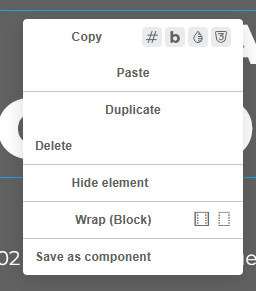
Browser: Firefox Latest
OS: Windows
Text-align in theme style affects builder’s context menu. Theme Styles → Typography → Body → text-align: center:
Browser: Firefox Latest
OS: Windows
Text-align in theme style affects builder’s context menu. Theme Styles → Typography → Body → text-align: center:
Hi,
Thanks so much for your report!
Unfortunately, I cannot reproduce the issue (on Windows or macOS, in Chrome or Firefox).
Have you already tried a different browser?
Best regards,
timmse
Yes, here is the recording from Chrome https://jam.dev/c/bd863f73-b367-49ad-85b0-d286f76fbc8c
Aaaah sorry, I checked the right click menu in the structure panel, not the one on the canvas  That’s always a problem with cropped screenshots, you have to look at them like an eagle… I created an internal task
We fixed this issue in Bricks 2.1.4, now available as a one-click update in your WordPress Dashboard.
Changelog: Bricks 2.1.4 Changelog – Bricks
Please let us know if you are still experiencing issues.
Best regards,
timmse