Hi everyone,
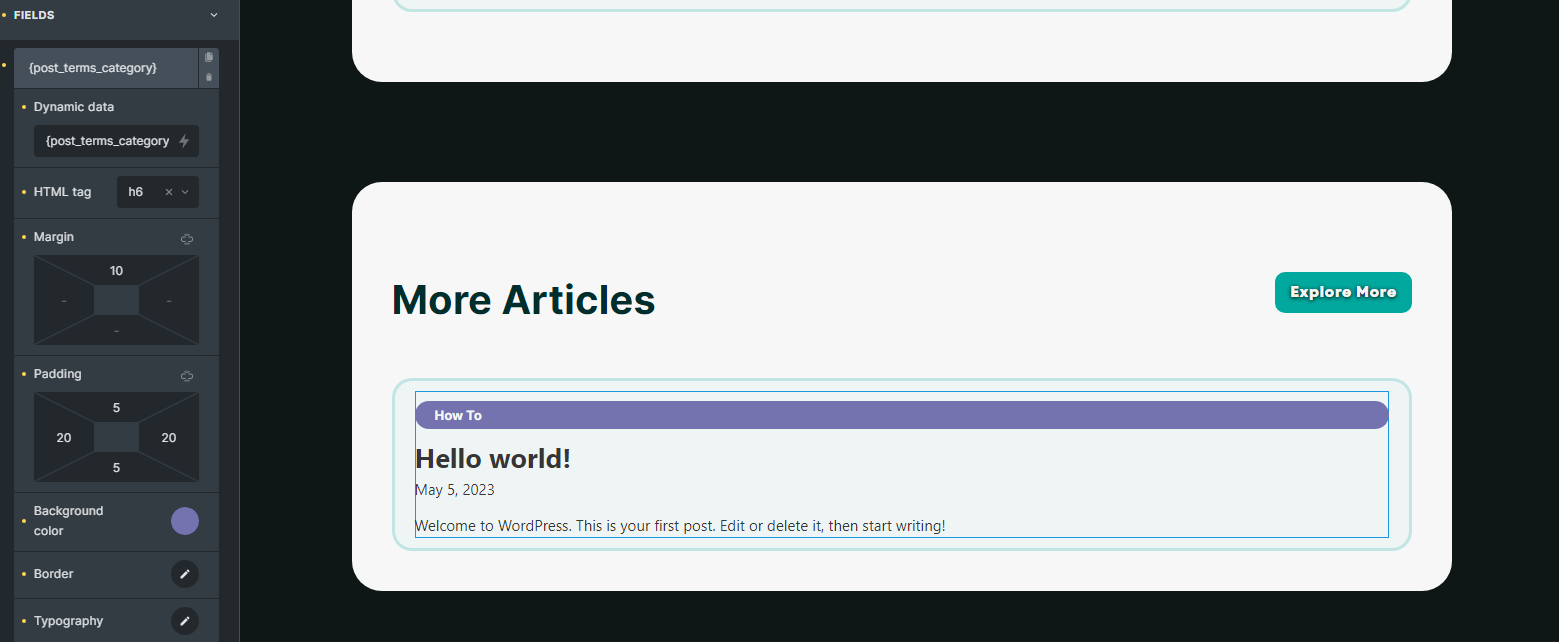
I am working on the “Related Posts” element in BricksBuilder and would like to add some styling to the “Category” field. I am displaying various fields, including the Category field, and I want to make it visually appealing by creating a rounded field around the text with a specific background color for each category.
However, I am facing an issue with the width of the field. Currently, the field has a width of 100%, which doesn’t look good. I would like to have the width of the field as long as the text is and then add some padding to make it look good.
Can someone guide me on how to accomplish this? I have also attached a few screenshots for reference.
Currently it looks like this:
How it should look like:
Thank you in advance.
by default width of the field as long as the text . Maybe you added some changes.
1 Like
Thank you for your reply.“as long as the text” does not seem to be true. Have you tried it for youself to validate this, because based on my experience and testing, the width of a field is not automatically set to match the length of the text by default.
If you have made any specific changes or modifications to the field or its styling to get it to have the width of the text, it would be helpful to know more details about those changes to further investigate the issue.
Even if I change the text to be static instead of dynamically generated from a category, the width of the field remains at 100%. This indicates that the width is likely determined by the styling or CSS applied to the field, rather than the length of the text itself.
Stop. I’m wrong. The wrong element.
1 Like
add css
root h6 { display: inline-block;}
2 Likes
I appreciate your help, thank you!