Browser: Chrome 153
OS: Windows 11
Hi,
I would like to report a UI/drag-and-drop bug in Bricks 2.4 (Stable) within the Style Manager.
Style Manager > Classes tab.
The Issue:
-
Dragging a CSS class from the Classes column and dropping it onto a target category in the Categories list (e.g., dragging from
UncategorizedtoFoo) fails to update or reassign the class’s category. -
The category count remains unchanged (e.g.,
Fooremains at0). -
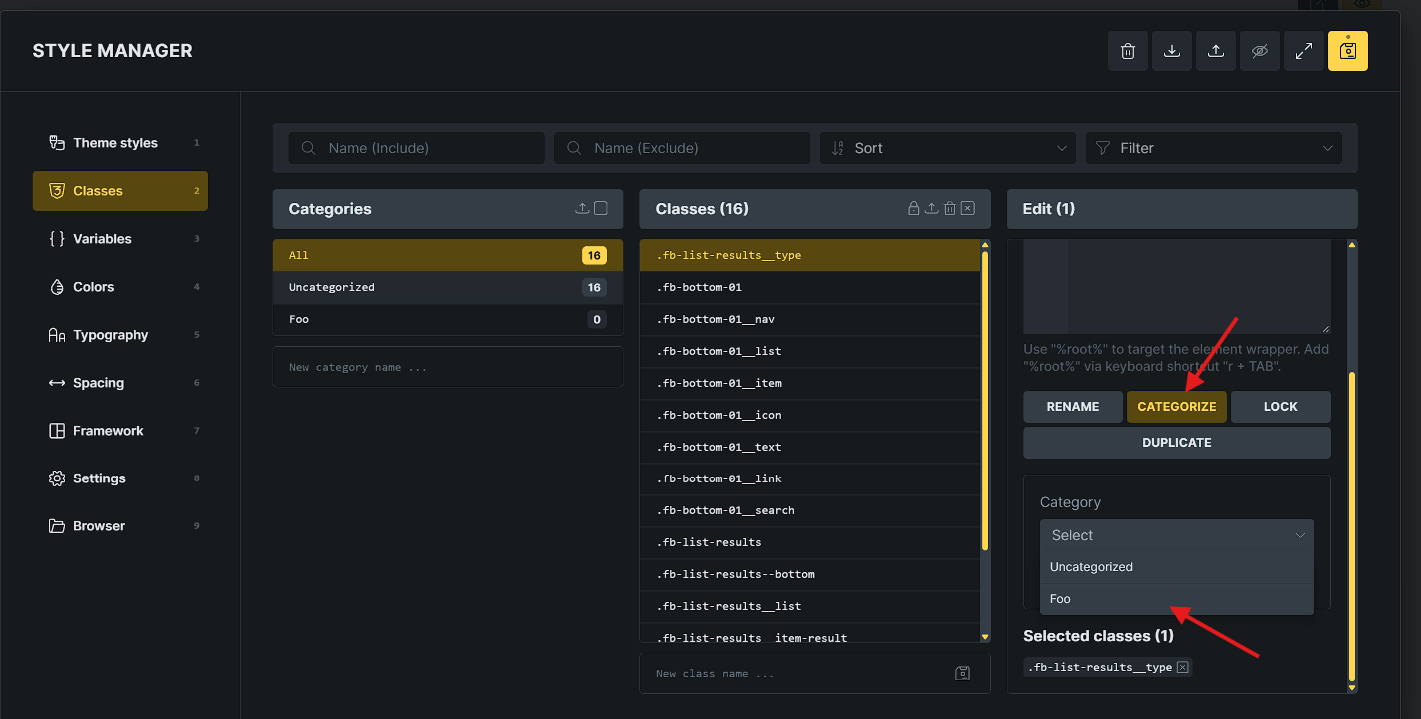
Workaround / Working method: Selecting the class, clicking CATEGORIZE in the right-hand Edit panel, and picking the category from the dropdown updates the category without issues.
Steps to Reproduce:
-
Open the Builder and open Style Manager > Classes.
-
Create a new category (e.g.,
Foo) in the Categories column. -
In the Classes column, drag any class (e.g.,
.fb-list-results__type) and drop it ontoFoo. -
Bug: The class is not reassigned, and the count for
Fooremains0. -
Select the class, go to the right-hand Edit (1) panel, click CATEGORIZE, and select
Foofrom the dropdown: the category assigns successfully.
Thanks
