SOLVED: Sticky header and ACSS: white space

Hello, after updating to 2.0 alpha, I need to add this to the child theme, to make sticky header working:

#brx-header.sticky {
top: 0 !important;
position: fixed !important;
}

There is a white gap between header without it:

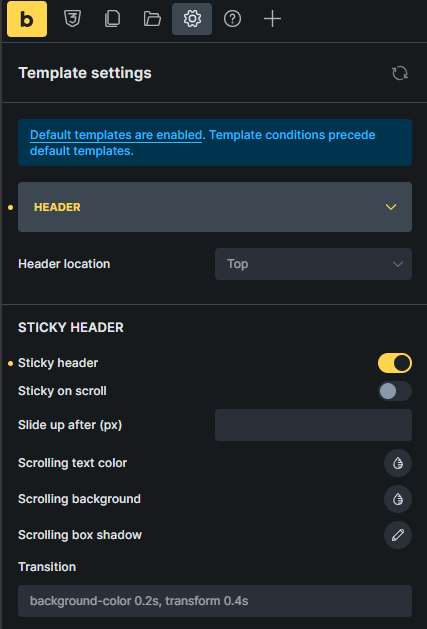
My settings:

My URL: Pacient - PlĂ­ce Pod Kontrolou

PixPin_2025-04-28_16-28-24
check automatic css

1 Like

video
https://jam.dev/c/5071b12a-4d21-45b2-8873-62e32885929f

2 Likes

Hi @alessykora,

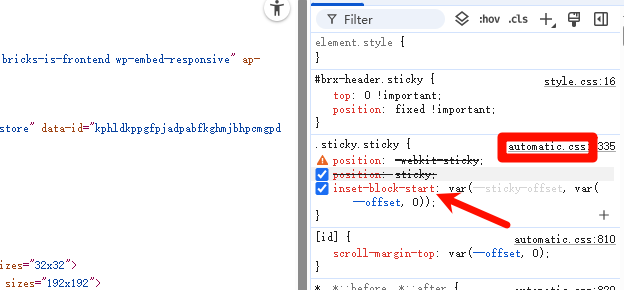
As @timchen shared above, the issue on your page seems to be caused by the ACSS styling. Specifically, this property:

inset-block-start: var(--sticky-offset, var(--offset, 0))

Best to share this with their team.

1 Like

Ahh, okay, sorry for that : )

1 Like

You can use this temporary fix if you use Bricks 2.0 with ACSS 3.3.5. Hope this helps others.

/* Temporary fix for sticky headers between Bricks 2.0 and ACSS 3.3.5 */
#brx-header.sticky {
    position: fixed !important;
    top: 0;
}
body.bricks-is-frontend.admin-bar #brx-header.sticky {
    top: 32px;
    top: var(--wp-admin--admin-bar--height);
}
7 Likes

@charaf why is Bricks still using Physical Properties instead of Logical Properties?
top should be => inset-block-start! Then it would overwrite the ACSS Styling because its chained with the #brx-header ID - but only when the Stlying is not inside the Layer.

Why is this sticky Styling inside the Bricks Layer? This isn’t about default styling that needs to be overridden in any way, since that’s set in the Bricks UI, right? That shouldn’t be in the layer.

Yeah it would make more sense for the sticky styling to be outside the Bricks layer since it is something that should not be changed.

I also wonder why the Bricks sticky class doesn’t use the brx- prefix as most other Bricks specific classes use.

2 Likes

I think a data attribute like data-header=sticky would make the most sense here. A class with a prefix is also a good idea.

Or with more context, like .sticky-header.

Sticky is too general. Even without ACSS or Core or whatever, a user might come up with the idea of naming a class .sticky, and then you’d have the same problems. With or without the CSS framework, it’s problematic.

2 Likes

really hope for a fix. .sticky is very general and now i have to apple the temporary fix on nearly every site i update.

2 Likes

Hi @tobiashaas,

I’m responding to your reply on the other thread here since it’s related to the .sticky issue.

“Sticky” header is a default Bricks style that is only applied when the user enables “Sticky” header. Since it’s not a user-generated style, it gets added to the cascade layer.

Yup, agreed, we’ll rename this class in our next release. I have set this task as “WIP” accordingly.

I still don’t think the styling belongs in the layer, but renaming the class at least solves the problem. Thank you @charaf

We’ve fixed this issue in Bricks 2.0.2 now available as a one-click update in your WordPress Dashboard.

Please take your time to read the changelog entry before updating: Bricks 2.0.2 Changelog – Bricks, and let us know if you continue to experience issues.