Browser: Chrome 110 OS: macOS / Windows / Linux / etc.
[Please describe this bug in as much detail as possible so we can replicate & debug this bug]
Made a post query of a CPT and wanted to display just the number of related items by acf bi-directional post relation.
Figured out, it can be done by the “Query Results summary” item after putting it inside a DIV, with a query on that DIV to the ACF post relation.
When it started to output “the number” times* “the number” of query results. (logical)
But after disabling the related query on the DIV, the output became as needed. Just the single number of the related posts.
Without the non-active query on relations, it does not work. So even though this might be a bug, PLEASE don’t fix it without giving us a dynamic filter option to just count to total number of items.
There’s no cache active and regenerated the ting several times.
I’m sorry if this was by design, it just seems weird.
you should be able to output the number of posts in a query loop via {query_results_count:bricksId} or just {query_results_count} if it’s inside the query loop item itself.
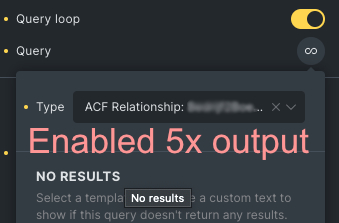
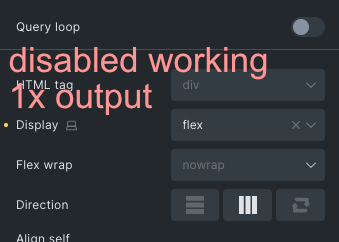
bricksID does work! On the query that does not exist. As it has been disabled. (see photo’s)
When i enable the query loop, it outputs the number x the number.
When i disable the query but leave it in there, it works.
not working, rendering it 5x
working. No active query but does query the relation total items
With the {query_results_count:ID} i can move it over the entire page. Without the ID, i need it inside the DIV with the query disabled.
When i remove the DIV with the disabled query it does not work.
So somehow the query is not disabled. Or at least the relation is not.
thanks for more info. I see, and I can replicate it now - and I am not sure if this was intended (I don’t think so), so I’ll have to speak with the rest of the team, so we can check if we keep this behavior or if we change it.
If you change it then please give a way to do count related posts to that post object in the query without needing additional code.
Iv seen code to do exactly this, but it was like 10 lines or so.
A query filter option would be great, like :related_post_count
I’m also wondering if more disabled elements are still active, arising the need to clear all settings below, before changing a setting with different settings under it.
I do always notice when i change a setting with different settings under it the old settings are still in there when i change the setting back to the original setting.
Example:
If a make a interaction, on “filter not empty” ,
Then change it to “click”, the main setting change some.
Then, when i change it back to “filter not empty”, it has remembered all previous settings.
ps, can we have “on fliter change” interaction? that would allow us to do stuff when users changes the filter selection.
I’ve spoken with my colleagues, and we agreed that this is a bug, so it will be fixed. After this is fixed, you will have to add a query loop (maybe just one div element), bug then hide it with display:none, and it should still work. The point is, the query loop will need to be executed.
We will update this topic, once we have a solution.