On Query Sort, Filter & Live Search – Bricks Academy under Custom Option Labels, you should explain that when using ACF, the value to use in “Find” is the field value—not the label. For example, an ACF True/False field will display “True” and “False” as labels, and so it is natural to assume you need to enter “True” and “False” in the Find field, while actually “1” and “0” are needed.
Hi @glp ,
Thanks for the feedback and agree that it’s confusing.
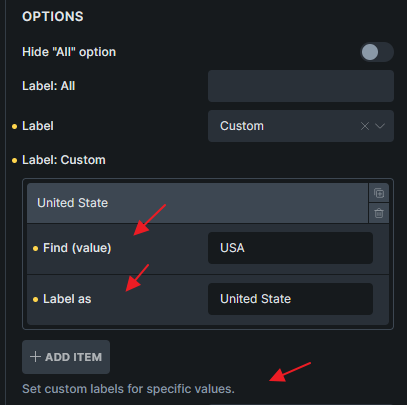
What do you think if we change it like this?
1 Like
That’s great! Very good idea to put it into the UI.
We added this imrovement in Bricks 2.1.3, now available as a one-click update in your WordPress Dashboard.
Please take your time to read the changelog entry before updating, and let us know if you continue to experience issues.