Browser: Chrome 110
OS: macOS / Windows / Linux / etc.

Hi Bricks Team,
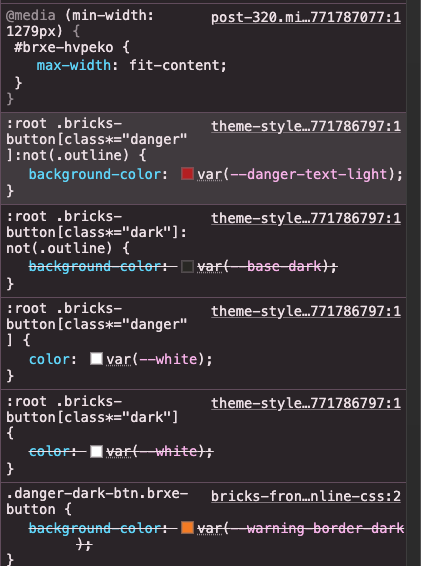
I’ve noticed a CSS specificity issue in Bricks 2.2 regarding how Button Theme Styles (Danger, Dark, Light, Info, etc.) are applied to elements on the frontend.
The Issue: When I create a custom class for a button that happens to contain one of the theme style keywords (for example, danger or dark), Bricks dynamically outputs an overly aggressive CSS attribute selector using the *= (substring match) wildcard.
For instance, the frontend outputs: :root .bricks-button[class*="danger"]:not(.outline) { ... }
Why this is a problem: Because *= matches any substring within the class attribute, this CSS rule will accidentally target and hijack the styling of any button whose class merely contains that string. For example, if I create custom utility classes like:
-
.no-danger-btn -
.dark-mode-toggle -
.highlight-darker
Bricks will falsely flag these as “Danger” or “Dark” buttons and forcefully apply the native Theme Styles, overriding my custom CSS. (A similar issue was actually reported a while back regarding [class*="light"] overriding hover states in the builder).