Browser: Chrome 110
OS: Windows
The latest version (2.4) of Bricks cannot retrieve the WooCommerce feature image on the checkout page with this query loop
Here is the custom PHP query:
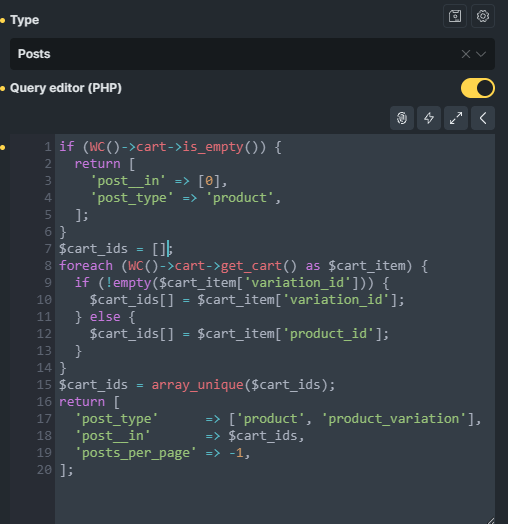
2.3 works just fine with {featured_image} in the loop
I tested your query in Bricks 2.4 with an Image element using {featured_image}, and the images displayed for both simple products and variations.
Please provide more details or try to deactivate plugins or custom code to identify the root cause.
I see the problem, if the media is offloaded to cloud storage, like S3 or R2, it will not be displayed properly in the loop using {featured_image}. The media offload plugin creates a new table for media mapping.
But the Media Offload plugin works fine with the previous version
Thanks for sharing the information. This sounds like not related to Query Loop.
Can you please set up a staging site with the previous Bricks version and share admin access with us via help@bricksbuilder.io (Use your purchased licensed email as the sender)
We will check if that is a change related to the {featured_image} rendering logic in Bricks 2.4 and see what we can do from there.
Regards,
Jenn
Please ignore my previous reply. I am able to replicate the offload image scenario locally and confirm it’s a bug.
We are working on it.
Regards,
Jenn
Thanks for the quick response and fix!
We’ve addressed this in Bricks 2.4.1, now available as a one-click update in your WordPress Dashboard.
Please read the changelog entry before updating, and let us know if you experience any issues.