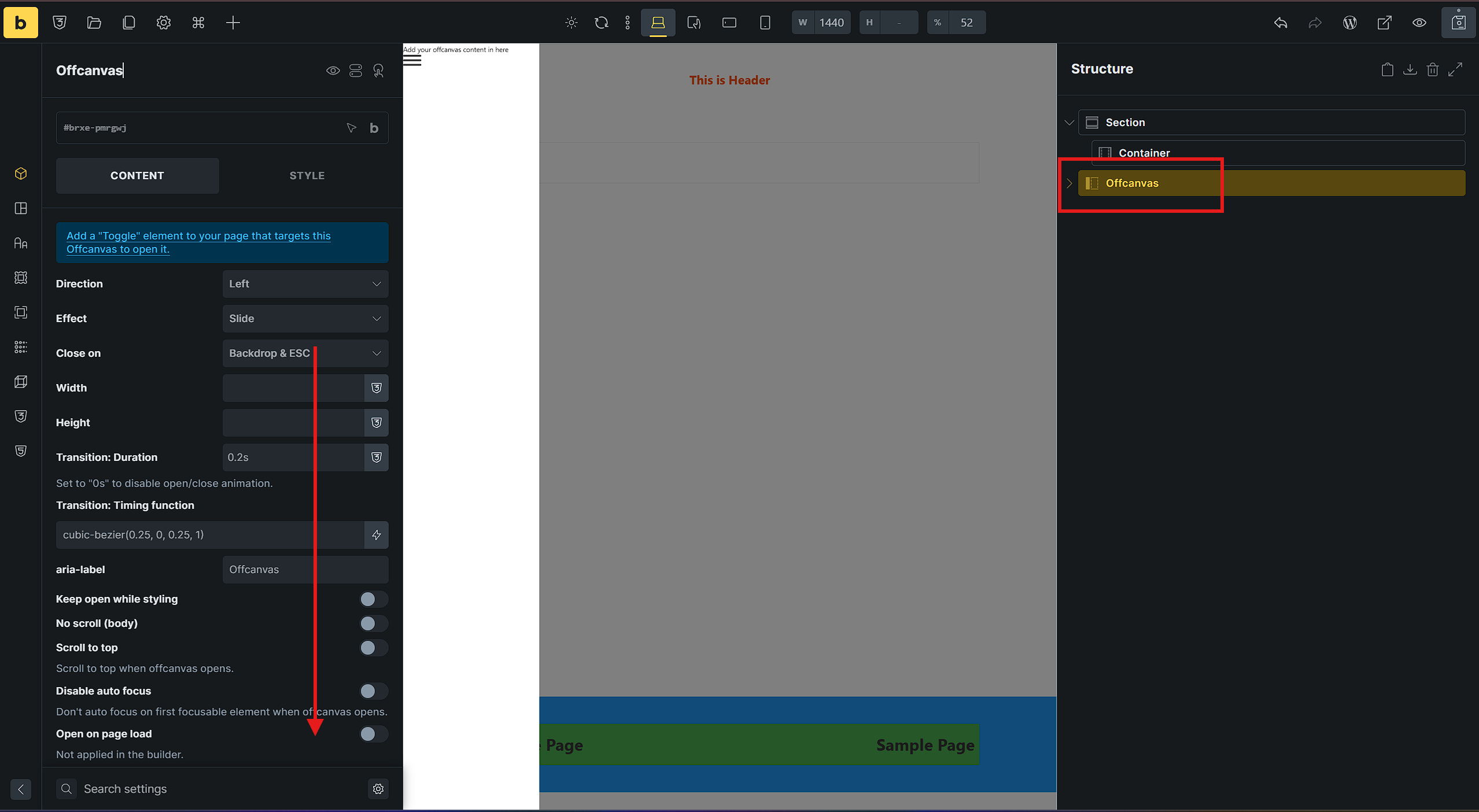
When selecting an Offcanvas element with the browser window maximized or in fullscreen mode, the left settings/controls panel becomes completely locked and cannot scroll down vertically (as shown in screenshot).
If the browser window is un-maximized, resized, or adjusted manually, the layout recalculates and vertical scrolling in the left panel works normally again.
However, two of us tried to replicate the issue independently from another, but none of us can replicate it.
Are you experiencing this issue in 2.4 beta-3 only, or also in other versions?
Are you experiencing this problem on try.bricksbuilder.io, too?
Have you tried in a fresh installation with only Bricks and no additional plugins?
Have you tried a different browser/incognito tab (without browser extensions)?
After a lot of back-and-forth, we figured out that it has nothing to do with a maximized or full-screen browser window; it’s about your current display resolution and the length of the settings panels. If there’s even the slightest overlap, you can’t scroll anymore.
We’ll let you know as soon as the problem is fixed.
That’s interesting. I think we should have a suggestion about sending more resolution to the environment screen where the error occurred in future error reporting.
We’ve addressed this in Bricks 2.4-rc (release candidate), now available for manual download from your Bricks account.
Please read the changelog entry before testing, and let us know if you experience any issues. Release candidates are not recommended for production sites.