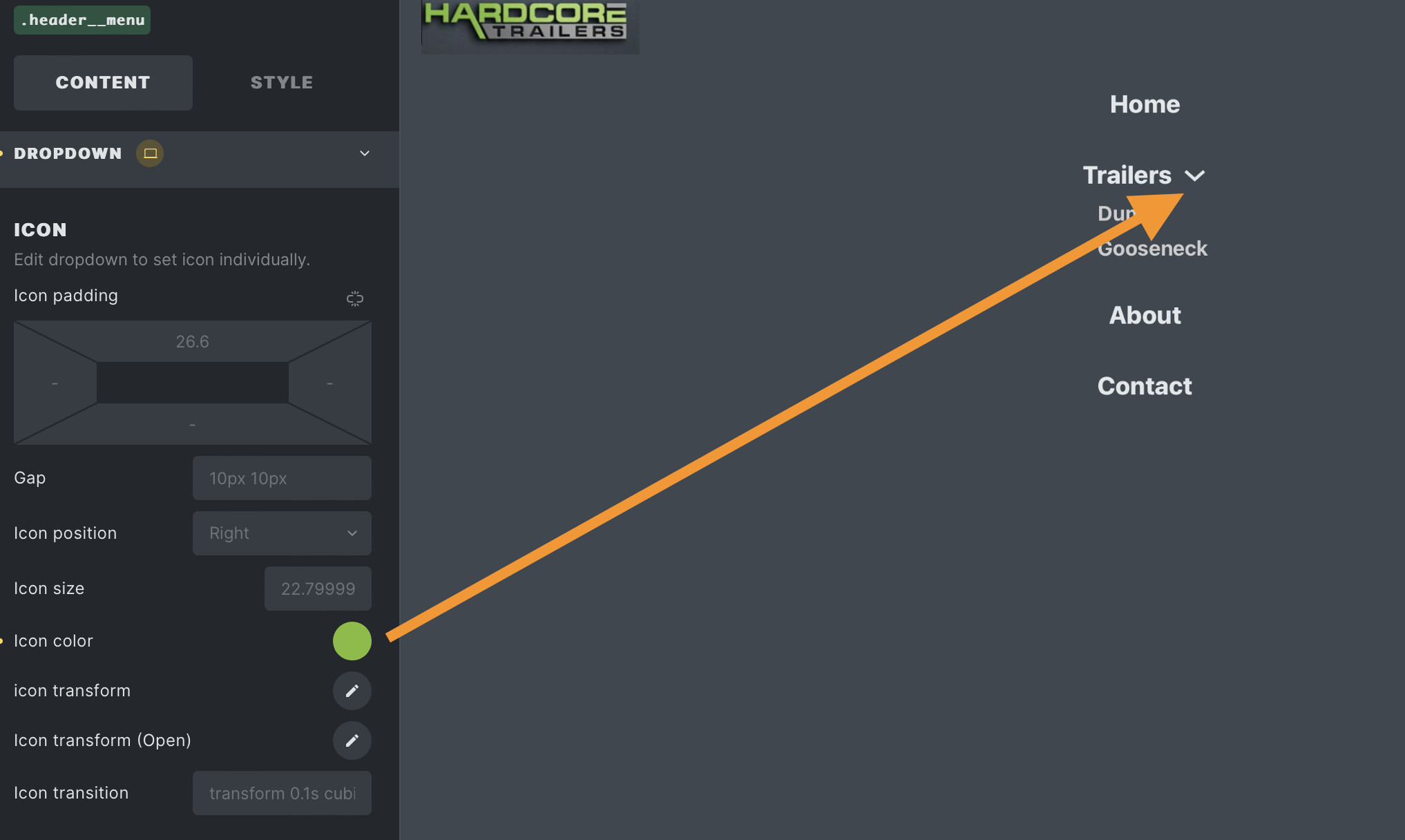
I noticed recently in trying to set an icon colour for a dropdown on the Nav Nestable element, the colour does not take. I have to style it instead at the actual Dropdown element instead. There is a note under the Icon text to “Edit dropdown to set icon individually”, but I presume that just means if I want to overwrite the master Nav Nestable element settings for the dropdown to then edit the dropdown individually.
If I edit the Dropdown element instead, it works fine, the defect only seems to affect when it’s styled at the Nav Nestable element. Screenshot included.
Steps to reproduce:
Use the Nav Nestable element, add a Dropdown element to it if needed too
Edit the Nav Nestable element in the Dropdown section and set the Icon Colour to any other colour. Notice the dropdown icon does not reflect the changes.
Now edit the Dropdown element instead and set the Icon Colour, and notice this will reflect the desired colour.
Unfortunately, I cannot reproduce the issue (Bricks 1.9.2 beta). The icon color is displayed in the builder in both cases, but the individual icon color of the dropdown cannot be overridden if a color is set within the nav nestable settings » dropdown » icon color - but that’s a different topic.
Can you please test it again with the 1.9.2 beta? Is the color displayed after saving and a builder reload?
I believe I narrowed this down further though… the issue appears when it’s set on a class on the Nav Nestable element. If it’s set at the ID level of the element, it works as expected in that case. So the defect seems specific to when the icon colour property is set on a class on the Nav Nestable element.
Here are my updated reproduction steps knowing the extra information now:
Use the Nav Nestable element, add a Dropdown element to it if needed too.
Add a class to the Nav Nestable element called “header__menu” for example.
With the class selected, edit the Nav Nestable element in the Dropdown section and set the Icon Colour to any other colour. Notice the dropdown icon does not reflect the changes.
I’m not quite sure what to tell you… I can reproduce it. Definitely something weird then if it’s not reproducible for you, perhaps just something I’m overlooking then although it feels like a defect.
I’ll send you an email with credentials to access the site so you can review it. Email to be sent in a few minutes. Thanks, @timmse.
Edit - Email sent. Btw, I had tried removing Bricks-related plugins in case of compatibility issues, but no change in the behaviour seen when disabled.
Hi Dustin,
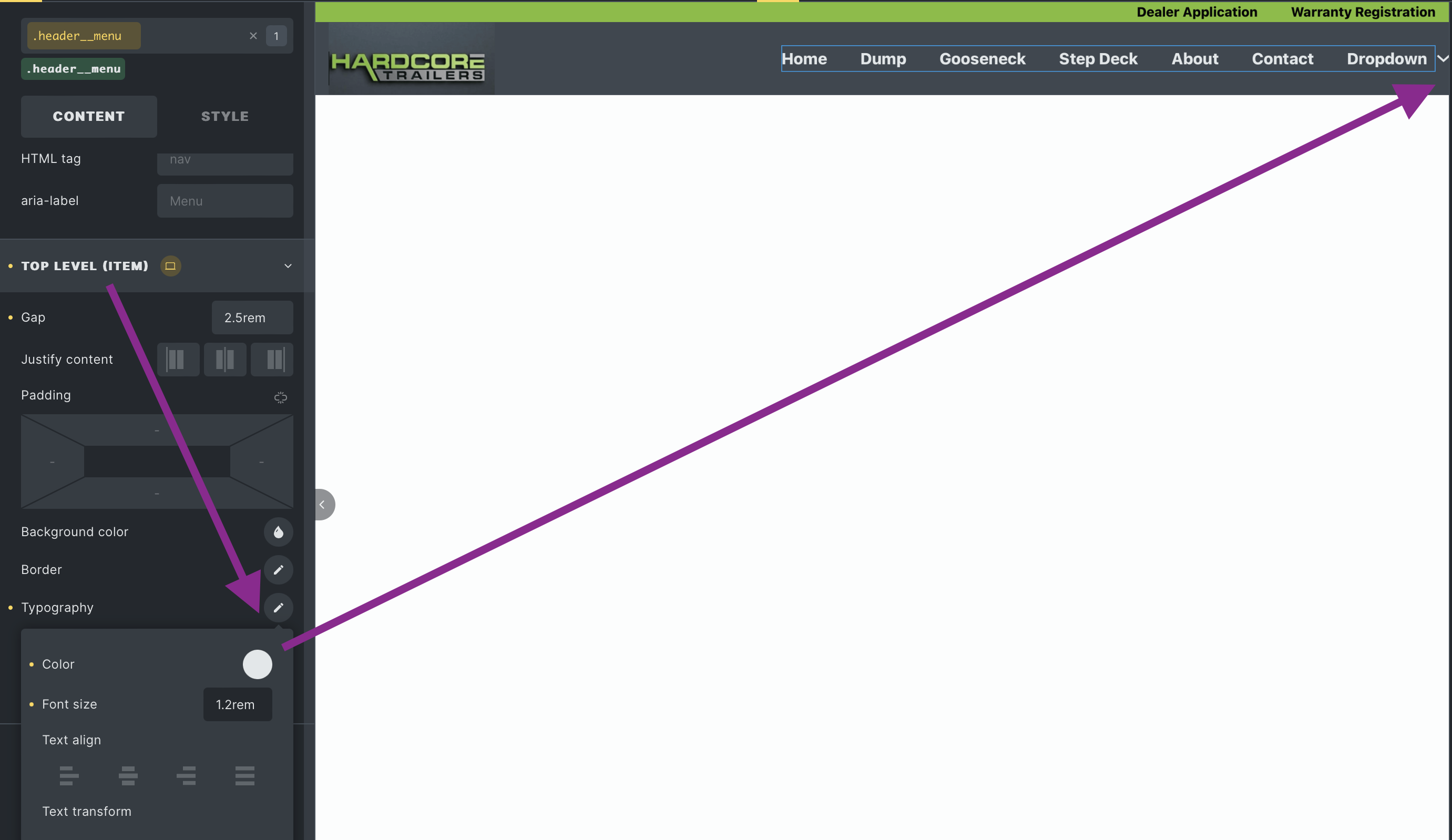
You have also assigned a color to the class for the top level items - that makes the difference. This color is applied to every item within the submenu toggle, so the dropdown item text and the icon also get the same color.
This selector is more specific than the one used when you use a class, so the top-level color overrides the color set on the class for the icon. If you use an ID instead, which always has a higher specificity, this won’t happen.
We need to see if we can increase the specificity of the icon selector without causing other problems (which can happen super fast with the complexity of the nestable nav).
Took me a while to understand what you meant but it looks like you’re saying if I set a colour for typography on the Top Level items that it also sets the icon colour for the Dropdown? Much like the screenshot below, right?
I definitely think users would expect that a colour set on the typography control would only apply to the actual text in the top level items rather than the icons. Likewise the Dropdown icon should be specific to the icon in the Dropdown element and override anything else (except for a colour set specifically on the actual Dropdown element itself rather than the Nav Nestable element).
I’m of the mindset that typography controls should not affect the dropdown icon at all , but I can see a case where that may be preferred for ease-of-use, however in that case then it should only be treated as the “default” colour rather than something that can override the Dropdown icon colour set on the Nav Nestable element.
Please do, that would be very helpful to correct this bad behaviour and improve the experience for users. I hope this can be considered soon. Thanks for your time reviewing this, @timmse, I really appreciate it.

 Definitely something weird then if it’s not reproducible for you, perhaps just something I’m overlooking then although it feels like a defect.
 Btw, I had tried removing Bricks-related plugins in case of compatibility issues, but no change in the behaviour seen when disabled.