Browser: Chrome 128.0.6613.113
OS: Windows
Hi bricks team,
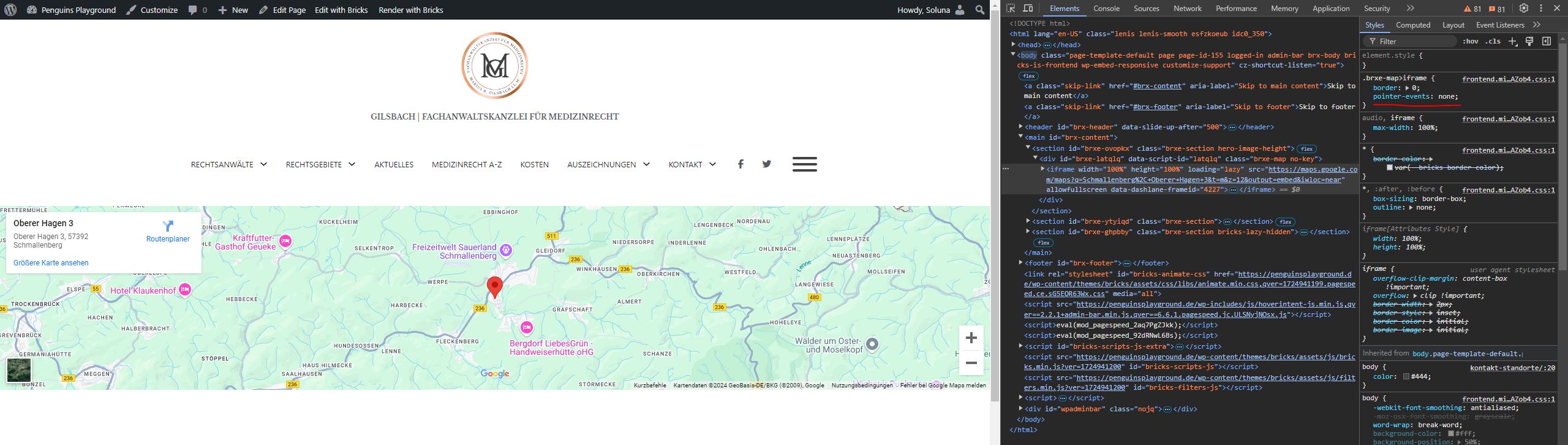
After updating to the new version, the map buttons is not clickable. Like zoom in and out buttons.
Browser: Chrome 128.0.6613.113
OS: Windows
Hi bricks team,
After updating to the new version, the map buttons is not clickable. Like zoom in and out buttons.
I can confirm this behavior.
I noticed that there is a ‘pointer-events: none’ on the iframe, which seems to prevent any clicking events. As soon as you remove it, it works again. But in my opinion, it shouldn’t be there in the first place.
I can confirm this bug and have added it to our bug tracker.
It was only meant to work like that in the builder, so make the Map iframe clickable and open the control panel.
As a temporary workaround, please add the following custom CSS to Bricks > Settings > Custom code:
.brxe-map:not(.bricks-draggable-item) > iframe {
  pointer-events: auto;
}
Hi guys,
We’ve fixed this issue in Bricks 1.11 BETA, now available as a manual download (Bricks – Account)
Please let us know if you are still experiencing issues.
You can see the full changelog here: Bricks 1.11 Changelog – Bricks
As with any beta release, please do not use it on a production/live website. It is only meant for testing in a local or staging environment.
Best regards,
Matej