Browser: Chrome 150
OS: Windows 10 21H2
URL: https://bricks-test.zlatopole.ru
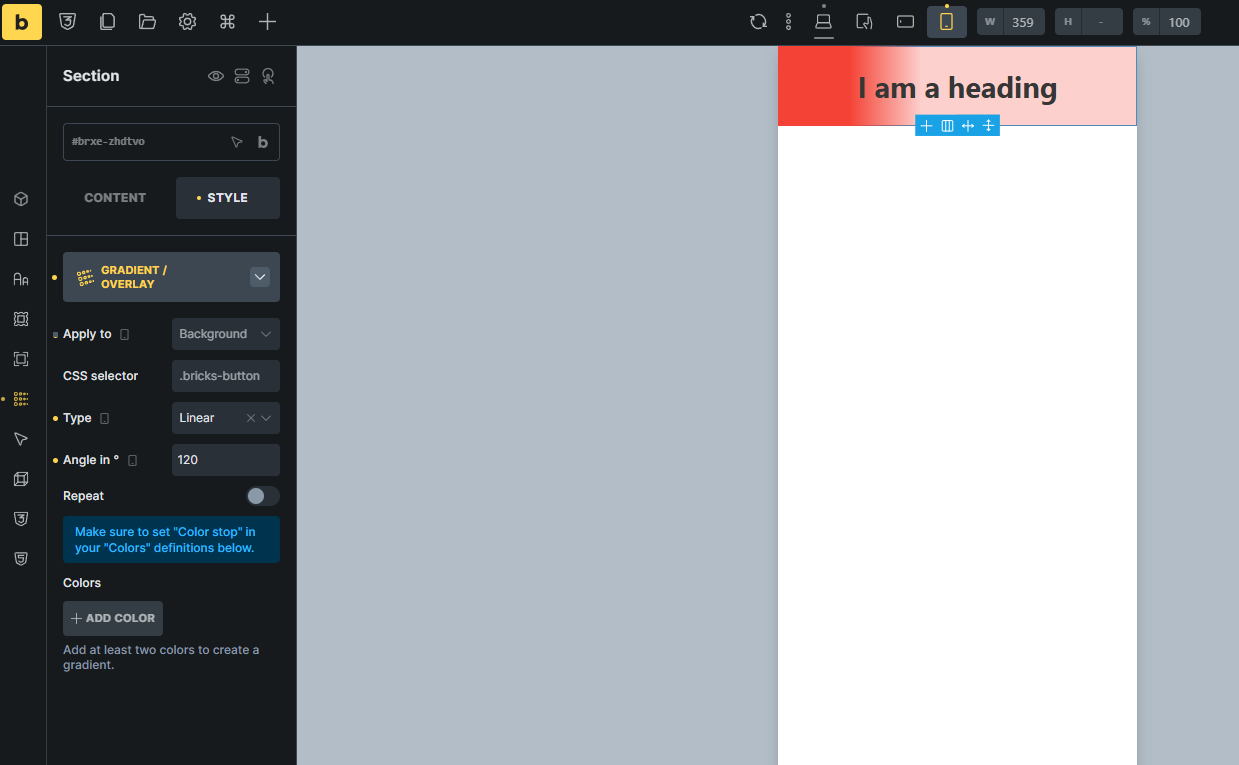
For example, I change the gradient angle, but it doesn’t change. The angle remains the same as for the desktop version.
Browser: Chrome 150
OS: Windows 10 21H2
URL: https://bricks-test.zlatopole.ru
For example, I change the gradient angle, but it doesn’t change. The angle remains the same as for the desktop version.
Hi @Mover,
Thanks for the report. The mobile breakpoint currently has an angle set, but no colors. A responsive gradient needs its own complete gradient definition, so please add at least two colors at the mobile breakpoint, then set the desired angle.
The desktop gradient remains active until that mobile gradient is complete.
Because of this, I’ve marked this topic as a no-bug.
Best regards,
Matej
It’s inconvenient. If I have a lot of colors, like 5, why should I duplicate them all? I only need to change the angle.
Hi @Mover,
Thanks for the report. I gave this some thought: while defining the complete gradient at each breakpoint makes sense technically, it becomes cumbersome, especially when multiple colors are involved.
I’ve added an improvement to our internal tracker so changing the gradient angle at another breakpoint can reuse the inherited colors instead of requiring you to add them again.
I’ve changed the topic prefix to WIP. We’ll update this thread once the improvement is implemented.
Thanks,
Matej
We’ve addressed this in Bricks 2.5-beta (beta release), now available for manual download from your Bricks account.
A responsive Gradient/Overlay setting can now change a single value, such as the angle, while the colors inherit from the larger breakpoint.
Please read the changelog entry before testing, and let us know if you experience any issues. Beta builds are not intended for production sites.