SOLVED: Gradient / Overlay indicator dots

Browser: Chrome 110
OS: macOS / Windows / Linux / etc.
URL: Link to a page that illustrates this issue
Video: Short screen recording that illustrates this issue (free tool: jam.dev)

Hello,

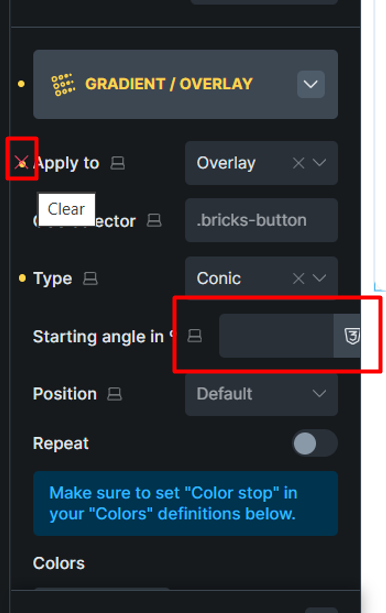
In the Gradient/Overlay settings, if you select the Conic option, a yellow clearing point is added for the “Apply to” option. Now set the Apply to option to overlay. Now two yellow dots will appear for the Apply to option. Also, the width of the Starting angle in º control looks unusual.
1 Like

Hi Jolia,
Thanks so much for your report!

I reproduced the issue and added it to our bug tracker.
We’ll update this thread once it’s fixed.

Best regards,
timmse

2 Likes

We’ve addressed this in Bricks 2.4-beta (beta release), now available for manual download from your Bricks account.

Please read the changelog entry before testing, and let us know if you experience any issues. Note: beta builds are not recommended for production sites.